cancel
Showing results for 
Search instead for 
Did you mean: 

Learn from the best! Meet the four finalists headed to the FINALS of the Power BI Dataviz World Championships! Register now

Reply
Anonymous
Not applicable

First/Last not Converting to ImageURL

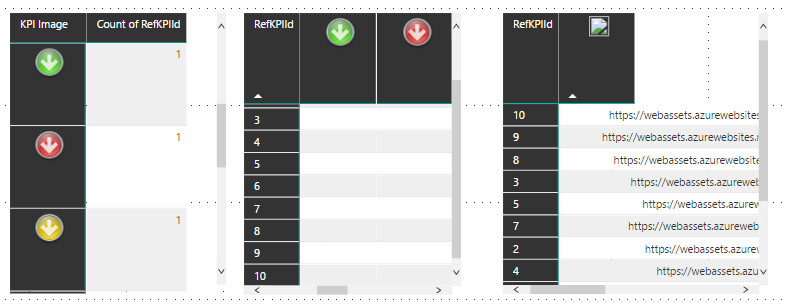
We can get images to show in the matrix as rows or columns but when you use it as a value it selects it by First or Last.  First/Last are just seeing the column as a text instead of an ImageURL.  Note:  The image will show in the regular grid.


Are there any work arounds for this?


FirstLastBug.pngFirstLastBug2.png


1 ACCEPTED SOLUTION
v-caliao-msft
Microsoft Employee
Microsoft Employee

@Anonymous,


Based on my test, it's not supported to display image in Matrix visual value part. As matrix value will be aggregated and return just "values" rather than image.


If you have any concern on this feature, you can submit your idea on the link below. If this feature was mentioned by mulitple users, product team will consider to add this feature to next release.
https://ideas.powerbi.com/forums/265200-power-bi-ideas


Regards,

Charlie Liao

View solution in original post

1 REPLY 1
v-caliao-msft
Microsoft Employee
Microsoft Employee

@Anonymous,


Based on my test, it's not supported to display image in Matrix visual value part. As matrix value will be aggregated and return just "values" rather than image.


If you have any concern on this feature, you can submit your idea on the link below. If this feature was mentioned by mulitple users, product team will consider to add this feature to next release.
https://ideas.powerbi.com/forums/265200-power-bi-ideas


Regards,

Charlie Liao

Helpful resources

Announcements
Join our Fabric User Panel

Join our Fabric User Panel

Share feedback directly with Fabric product managers, participate in targeted research studies and influence the Fabric roadmap.

March Power BI Update Carousel

Power BI Community Update - March 2026

Check out the March 2026 Power BI update to learn about new features.