

Join us at FabCon Atlanta from March 16 - 20, 2026, for the ultimate Fabric, Power BI, AI and SQL community-led event. Save $200 with code FABCOMM.
Register now!The Power BI Data Visualization World Championships is back! Get ahead of the game and start preparing now! Learn more
I need to find the first day of the month from the month an employee started, but use the current year.
I'm trying to do this with a Measure in PBI desktop.
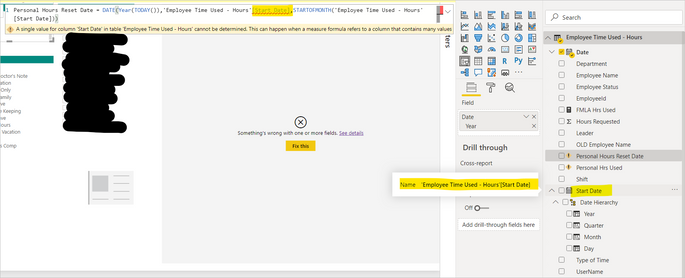
I tried the below measure formula, but it doesn't recognize the "Month" portion of the formula:
The [Start Date] field is a Date field:
Solved! Go to Solution.
HI @AMR80
Try the below formula:
HI @AMR80
Try the below formula:
That did it @Anonymous !! Thank you very much
Hell0 @AMR80 ,
try with below measure,
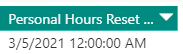
That got me much closer thank you! The only issue now is the DAY. It returned 3/5/2021 instead of 3/1/2021. The actual Start Date in the Start Date field is 3/19/2018. Here is what your formula returned in PBI:
You need to pass a number between 1 and 12 for the month parameter. You're trying to pass a date there.
Also, a measure is evaluated in context so if using a field from the data it has to have an aggregation round it (MIN, MAX etc) . So please be aware whent constructing the measure.
Thank you @HotChilli but I still cannot get it to work. Can you suggest a measure formula that would take this date (for example): 3/9/2018 and return: 3/1/2021 (the first of the month from the original date and the current year).
The Power BI Data Visualization World Championships is back! Get ahead of the game and start preparing now!
| User | Count |
|---|---|
| 41 | |
| 38 | |
| 36 | |
| 30 | |
| 28 |
| User | Count |
|---|---|
| 128 | |
| 88 | |
| 79 | |
| 67 | |
| 62 |