Forum Discussion
Finding the 'Current' Status based on most
000001 Enrolled 2020-04-01
000001 LOA 2020-05-14
000001 Dismissed 2020-07-20
This is the expected output I would want to see:
Date Enrolled LOA Dismissed
2020-04 1 0 0
2020-05 0 1 0
2020-06 0 1 0
2020-07 0 0 1
What would be the most efficient way to write this to get the 'current' status based on the most recent update date within a specific period/date.
As always, thanks for your input!
Ryan F.
4 Replies
- Greg_Deckler
Community Champion
ryan_b_fiting - Sounds like a modification of Lookup Min/Max - https://community.powerbi.com/t5/Quick-Measures-Gallery/Lookup-Min-Max/m-p/985814#M434
Probably also have to use a disconnected table as this article demonstrates: https://community.powerbi.com/t5/Community-Blog/Solving-Attendance-with-the-Disconnected-Table-Trick/ba-p/279563
- amitchandak
Super User
ryan_b_fiting , have month year, either in your table or date table and use a measure like
lastnonblankvalue(Date[Month-Year],count(Table[Status]))
Month year = format([Date],"YYYY-MM")
- v-easonf-msft
Community Support
Hi , ryan_b_fiting
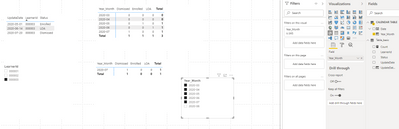
I made a sample file, it can meet your requirements.
The result will show as below:
For more details ,please refer to the sample file
Best Regards,
Community Support Team _ Eason
If this post helps, then please consider Accept it as the solution to help the other members find it more quickly. - v-easonf-msft
Community Support
Hi , ryan_b_fiting
Could you please tell me whether your problem has been solved?
If yes, you could accept the helpful answer as solution. You also could share your own solution here. For now, there is no content of description in the thread. If you still need help, please share more details to us.Best Regards,
Community Support Team _ Eason