cancel
Showing results for 
Search instead for 
Did you mean: 

The Power BI Data Visualization World Championships is back! Get ahead of the game and start preparing now! Learn more

Reply
varunv11
Frequent Visitor

Finding Max Value

Hello, 


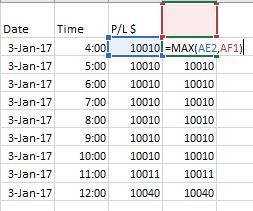
I am trying to create a DAX which will find the Max value between 2 different columns. Excel for and screenshot given below, 

Capture.JPG


Please advice. 


Warm Regards 

Varun Raj

1 ACCEPTED SOLUTION

Hi @varunv11


The calculated column you want to add is really just the maximum value so far in the P/L $ column.


You could use a DAX calculated column like this:

Max so far = 
VAR CurrentDateTime = Data[Date] + Data[Time]
RETURN
    CALCULATE (
        MAX ( Data[P/L $] ),
        ALL ( Data ),
        FILTER (
            ALL ( Data[Date], Data[Time] ),
            Data[Date] + Data[Time]
                <= CurrentDateTime
        )
    )

Regards,

Owen


Owen Auger
Did I answer your question? Mark my post as a solution!
Blog
LinkedIn

View solution in original post

7 REPLIES 7
varunv11
Frequent Visitor

Hello, 


I am trying to create a formula which will find the Max value between one above and one parallel values on two columns. Excel for and screenshot given below, 


 Capture.JPG


 I feel this is more like cumulative total or a running total but here i need to find the max of PL with above column.  


Please advice. 


Warm Regards 

Varun Raj

quentin_vigne
Solution Sage
Solution Sage

Hi @varunv11


You simply have to write : 


MaxValue = MAX(['YourTable'[P/L $];'YourTable'[Column2])


- Quentin

Thanks @quentin_vigne


I did that but the requirement is to find max of PL value with the above value on the other column. 


This is more like running total but here we are looking for max value between 2 values. 


Please advise. 


Warm Regards 

Varun Raj


Hello,


I think your requirement isn't absolutely clear.


If you search Max depending on specfic value you need

MaxOfValue=CALCULATE(MAX([SearchColumn]),FILTER(Table,[FactColumn]=SearchValue))


If you just want to find the maximum value @quentin_vigne is absolutely correct.


Please give us a more precise example with your expected result.


Best regards.

Hello @Floriankx


The requirement is to find the Max value from 2 columns, like we do cumulative total or the running total (current cell added with the above cell to give running balance). 


In the below screenshot, i need to find max of column C2 with column D1. The result for the requirement is highlighted in yellow. 


Capture.JPG


Please advise. 


Warm Regards 

Varun Raj

Hi @varunv11


The calculated column you want to add is really just the maximum value so far in the P/L $ column.


You could use a DAX calculated column like this:

Max so far = 
VAR CurrentDateTime = Data[Date] + Data[Time]
RETURN
    CALCULATE (
        MAX ( Data[P/L $] ),
        ALL ( Data ),
        FILTER (
            ALL ( Data[Date], Data[Time] ),
            Data[Date] + Data[Time]
                <= CurrentDateTime
        )
    )

Regards,

Owen


Owen Auger
Did I answer your question? Mark my post as a solution!
Blog
LinkedIn

Hello,


in this case calculated colum should be fine, but D1 can't be calculated dynamically as far as I know.


So you could either use a helper table to provide this Value or you have to type it.


Column=MAX([P/L $],[CompareValue])

Helpful resources

Announcements
Power BI DataViz World Championships

Power BI Dataviz World Championships

The Power BI Data Visualization World Championships is back! Get ahead of the game and start preparing now!

December 2025 Power BI Update Carousel

Power BI Monthly Update - December 2025

Check out the December 2025 Power BI Holiday Recap!

FabCon Atlanta 2026 carousel

FabCon Atlanta 2026

Join us at FabCon Atlanta, March 16-20, for the ultimate Fabric, Power BI, AI and SQL community-led event. Save $200 with code FABCOMM.