cancel
Showing results for 
Search instead for 
Did you mean: 

Get Fabric Certified for FREE during Fabric Data Days. Don't miss your chance! Request now

Reply
Anonymous
Not applicable

Finding MIN date for multiple related records

Hi,


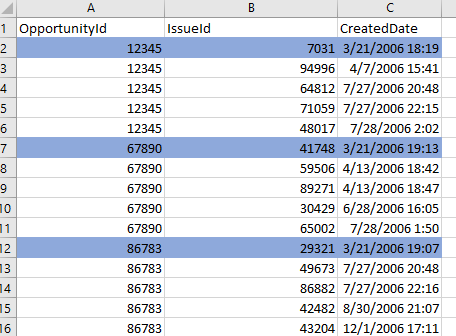
I'm working with one table where I'd like to write a measure that identifies the earliest date for any given set of records.  In the screenshot below, I've highlighted the earliest date for each set of records.


Thanks,


J


Screenshot_1.png

1 ACCEPTED SOLUTION
v-sihou-msft
Microsoft Employee
Microsoft Employee

@Anonymous


For your requirement, you can use ALLEXCEPT() to get the MIN date group on each id. 


Measure = CALCUATE(MIN(Table[CreateDate]),ALLEXCEPT(Table,Table[OpportunityId]))


Regards,

View solution in original post

3 REPLIES 3
v-sihou-msft
Microsoft Employee
Microsoft Employee

@Anonymous


For your requirement, you can use ALLEXCEPT() to get the MIN date group on each id. 


Measure = CALCUATE(MIN(Table[CreateDate]),ALLEXCEPT(Table,Table[OpportunityId]))


Regards,

TomMartens
Super User
Super User

Hey,


I'm not sure if a calculated column would also suit your case, if this could be, than you might have a look at this pbix file


On the report page "First Date In Group" there is a table viz, that uses the table "FactWithDates" from my model, this table has two calculated columns

"First Date by Customer bool col" and "First Date by Customer col".

The first calculated column returns 1 if the date in the current row is the first date of the customer, where as the 2nd calculation returns the first date of the customer.


I tend to implement this kind of requirements as calculated columns due to the possibility to use these columns as slicer and as axis on slicer.


If you have to implement your requirement as measure, can you please add, why a measure is necessary and a calculated column is not enough.


Regards


Did I answer your question? Mark my post as a solution, this will help others!

Proud to be a Super User!
I accept Kudos 😉
Hamburg, Germany
Anonymous
Not applicable

@TomMartensThank you for the file...  It certainly put me on the right track.  Ultimately, I've solved using a calculated column approach, but it does not sit well with me because it dedicates too many resources memorywise.


I suspect I need to learn about variables to get it done within a measure.


The calculated column leveraged the ALLEXCEPT( ) function.


Thanks for your help!


Helpful resources

Announcements
November Power BI Update Carousel

Power BI Monthly Update - November 2025

Check out the November 2025 Power BI update to learn about new features.

Fabric Data Days Carousel

Fabric Data Days

Advance your Data & AI career with 50 days of live learning, contests, hands-on challenges, study groups & certifications and more!

FabCon Atlanta 2026 carousel

FabCon Atlanta 2026

Join us at FabCon Atlanta, March 16-20, for the ultimate Fabric, Power BI, AI and SQL community-led event. Save $200 with code FABCOMM.

Top Solution Authors
Top Kudoed Authors