Join us at FabCon Atlanta from March 16 - 20, 2026, for the ultimate Fabric, Power BI, AI and SQL community-led event. Save $200 with code FABCOMM.
Register now!The Power BI Data Visualization World Championships is back! Get ahead of the game and start preparing now! Learn more
Hello,
I apologize if this question is previously asked. Here is my doubt.
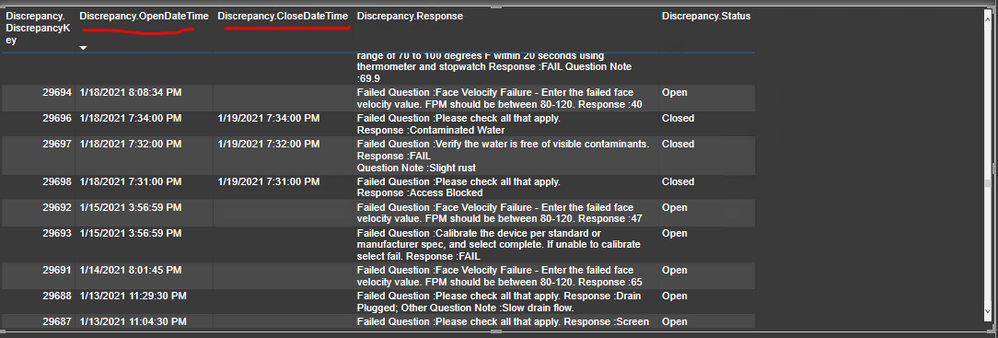
I have a discrepancy open date and discrepancy closed date. If the discrepancy is not resolved, the closed date is blank but if it is, there is a value for it. In the table below, I want to add a column that tells since how many days and months (2 separate columns for month and days will also work) is the discrepancy still open.
The image below shows the most recent data, but we have instances where discrepancies are open for months and I'd like to color code them (eg, if case is open for less than 1 month, then green, it is between 1-3 months then yellow, if open beyond 3 months, then red)
Really appreciate any help
Solved! Go to Solution.
Hi @Anonymous ,
Here are the steps you can follow:
If a discrepancy is still open, it doesn't show up:
1. You can change your function to the following style:
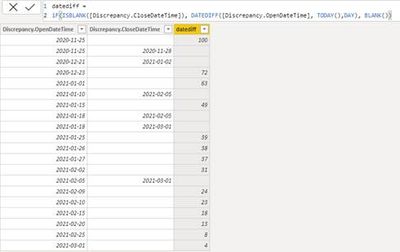
Column 2 =
iF(ISBLANK([Discrepancy.CloseDateTime]), DATEDIFF([Discrepancy.OpenDateTime], TODAY(),DAY), BLANK())
Result:
Color the required datediff:
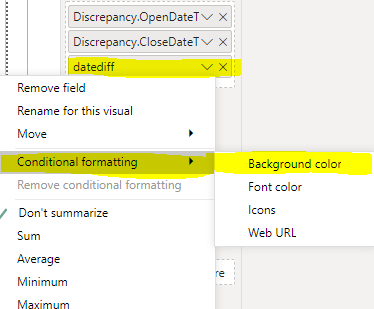
1. Select column Datediff-select Conditional formatting-Background color
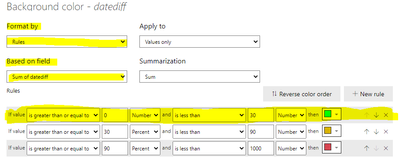
2. In the Background color interface, Format by selects Rules, Based on field selects datediff, and then color labels according to the rules
3. Result:
You can downloaded PBIX file from here.
Best Regards,
Liu Yang
If this post helps, then please consider Accept it as the solution to help the other members find it more quickly.
Hi @Anonymous ,
Here are the steps you can follow:
If a discrepancy is still open, it doesn't show up:
1. You can change your function to the following style:
Column 2 =
iF(ISBLANK([Discrepancy.CloseDateTime]), DATEDIFF([Discrepancy.OpenDateTime], TODAY(),DAY), BLANK())
Result:
Color the required datediff:
1. Select column Datediff-select Conditional formatting-Background color
2. In the Background color interface, Format by selects Rules, Based on field selects datediff, and then color labels according to the rules
3. Result:
You can downloaded PBIX file from here.
Best Regards,
Liu Yang
If this post helps, then please consider Accept it as the solution to help the other members find it more quickly.
I created a new column called Datediff and this is the formula -
The Power BI Data Visualization World Championships is back! Get ahead of the game and start preparing now!
| User | Count |
|---|---|
| 40 | |
| 38 | |
| 36 | |
| 29 | |
| 28 |
| User | Count |
|---|---|
| 127 | |
| 88 | |
| 78 | |
| 66 | |
| 65 |