cancel
Showing results for 
Search instead for 
Did you mean: 

The Power BI Data Visualization World Championships is back! Get ahead of the game and start preparing now! Learn more

Reply
Ley
Helper I
Helper I

Find recursive pattern

Hi,

I am trying to find a recursive pattern between a group of tickets. This pattern implies that a ticket is assigned from one group (G1) to another group (G2) but in the next itteration it is assigned to the starting group (G1). The pattern would be G1-->G2, G2-->G1.

When this happens I should obtain the label “ANOMALY” in the new calculated column “Anomalies”.

Each row is a transaction. Rows (transactions) are grouped by ticket ID (ID).

I have tried using EARLIER function but it does not work


ID Initial GroupFinal GroupANOMALIES
A1G1G1OK
A1G1G1OK
A1G1G2ANOMALY
A1G2G1OK
A1G1G3OK
A2G1G1OK
A2G1G1OK
A2G1G2OK
A2G2G3ANOMALY
A2G3G2OK
A2G2G1OK
A2G1G2ANOMALY
A2G2G1OK
A2G1G1OK
A2G1G1OK
A3G1G2ANOMALY
A3G2G1OK
A3G1G1OK
A3G1G1OK
A3G1G1OK


Thanks in advance

3 REPLIES 3
sturlaws
Resident Rockstar
Resident Rockstar

hi, @Ley,


I assume that you either have date column in your table, or that the order of the rows in your source in the order of occurence and can be indexed.


I have taken the data you have provided and added an index to the table in Power query. I then created this calculated column:

AnomaliesDAX =
VAR _nextIndex = 'Table'[Index] + 1
VAR _nextInitialGroup =
    CALCULATE (
        SELECTEDVALUE ( 'Table'[Initial Group] );
        FILTER ( ALL ( 'Table' ); 'Table'[Index] = _nextIndex )
    )
VAR _nextFinalGroup =
    CALCULATE (
        SELECTEDVALUE ( 'Table'[Final Group] );
        FILTER ( ALL ( 'Table' ); 'Table'[Index] = _nextIndex )
    )
RETURN
    IF (
        'Table'[Initial Group] < _nextInitialGroup
            && 'Table'[Initial Group] = _nextFinalGroup;
        "Anomaly";
        "OK"
    )


.pbix


Cheers,
Sturla

If this post helps, then please consider Accepting it as the solution. Kudos are nice too.

Hi,

I have tried the formula, but it does not work properly. There are some mistakes:


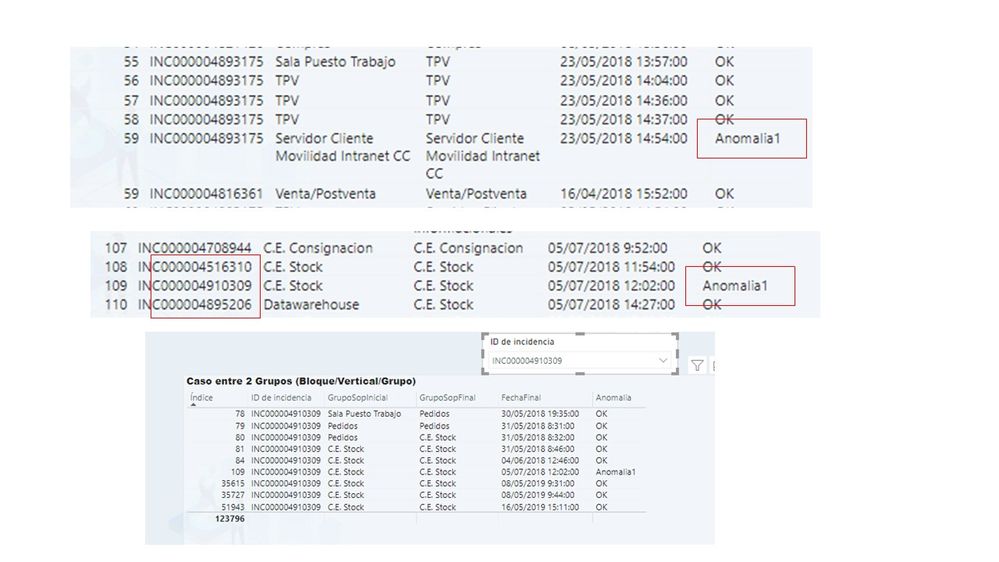
- In order to consider like an anomaly, we have to group tickets and compare rows that belong to the same ticket. I have found cases that there is recursivity (from G1 to G2 and from G2 to G1) but in DIFFERENT tickets. So this should not be an anomaly

- There can not be an anomaly when a ticket has an unique transition. I have detected anomalies in this cases

- When I filter by ticktes anomalies does not apear properly

An example:

error.jpg

Any idea about waht could be grong?


Thanks 

sturlaws
Resident Rockstar
Resident Rockstar

Yes, there were a couple of weaknesses in my code, so you can replace it with this:


AnomaliesDAX =
VAR _currentID =
    CALCULATE ( SELECTEDVALUE ( 'Table'[ID ] ) )
VAR _currentIndex =
    CALCULATE ( SELECTEDVALUE ( 'Table'[Index] ) )
VAR _nextIndex =
    CALCULATE (
        MIN ( 'Table'[Index] );
        FILTER (
            ALL ( 'Table' );
            'Table'[ID ] = _currentID
                && 'Table'[Index] > _currentIndex
        )
    )
VAR _nextInitialGroup =
    CALCULATE (
        SELECTEDVALUE ( 'Table'[Initial Group] );
        FILTER (
            ALL ( 'Table' );
            'Table'[Index] = _nextIndex
                && 'Table'[ID ] = _currentID
        )
    )
VAR _nextFinalGroup =
    CALCULATE (
        SELECTEDVALUE ( 'Table'[Final Group] );
        FILTER (
            ALL ( 'Table' );
            'Table'[Index] = _nextIndex
                && 'Table'[ID ] = _currentID
        )
    )
RETURN
    IF (
        'Table'[Initial Group] = _nextfinalGroup
            && 'Table'[Final Group] = _nextInitialGroup
            && _nextInitialGroup <> _nextFinalGroup;
        "Anomaly";
        "OK"
    )


There is one difficulty in the data from your original post, though:

A2G3G2OK
A2G2G1OK
A2G1G2Anomaly
A2G2G1OK


With these data it is possible to make use of greater than/less than to decide if a row is an anomaly or not. But with data you just posted that is not an option, and no direct way if separating row 2-row 3 and row 3-row 4. The code I posted above will mark them both as anomalies. It might be a possibility to add columns that identify the order of the groups, and make use of that in order to identify an anomaly. 

Another option could be to identify all combinations of anomalious combinations and search for that.

Helpful resources

Announcements
Power BI DataViz World Championships

Power BI Dataviz World Championships

The Power BI Data Visualization World Championships is back! Get ahead of the game and start preparing now!

December 2025 Power BI Update Carousel

Power BI Monthly Update - December 2025

Check out the December 2025 Power BI Holiday Recap!

FabCon Atlanta 2026 carousel

FabCon Atlanta 2026

Join us at FabCon Atlanta, March 16-20, for the ultimate Fabric, Power BI, AI and SQL community-led event. Save $200 with code FABCOMM.