Join us at FabCon Atlanta from March 16 - 20, 2026, for the ultimate Fabric, Power BI, AI and SQL community-led event. Save $200 with code FABCOMM.
Register now!The Power BI Data Visualization World Championships is back! Get ahead of the game and start preparing now! Learn more
Hello again!
I have this dataset with a series of interventions and a date for each intervention:
| INDX | INT 1 | DATE INT 1 | INT 2 | DATE INT 2 | INT 3 | DATE INT 3 | INT 4 | DATE INT 4 | INT 5 | DATE INT 5 | INT 6 | DATE INT 6 |
| 1 | R | 06/01/2022 | T | 08/04/2022 | U | 04/08/2022 | O | 01/09/2022 | P | 06/04/2022 | XX | 05/01/2022 |
| 2 | Q | 17/01/2022 | T | 06/01/2022 | B | 01/01/2022 | ||||||
| 3 | LL | 05/06/2022 | XX | 02/01/2022 | JJ | 04/01/2022 | YY | 02/01/2022 | ||||
| 4 | XX | 04/01/2022 | UU | 04/01/2022 | Q | 05/01/2022 | TT | 10/01/2022 | ||||
| 5 | HH | 04/01/2022 | FF | 09/04/2022 | AA | 17/01/2022 | VV | 05/09/2022 | ||||
| 6 | PP | 09/01/2022 | LL | 06/01/2022 | YY | 03/01/2022 | HH | 04/05/2022 | XX | 04/01/2022 | XX | 07/01/2022 |
| 7 | FF | 03/01/2022 | OO | 04/01/2022 | XX | 05/01/2022 | ||||||
| 8 | YY | 02/01/2022 | XX | 01/01/2022 | AA | 03/01/2022 | ||||||
| 9 | YY | 05/01/2022 | JJ | 01/01/2022 | YY | 06/01/2022 | LL | 04/09/2022 |
I want to get 1 if XX OR YY occur before any other intervention. So, for example, on the first row i will return a 1 and in the 7 row it won't return nothing.
If XX and YY occur together before anything else (like in row 3) it's ok to get a 1; if XX or YY occur on the first day but togeter with something (like in row 4) else i would like to get nothing.
Thanks in advance for the help!
Solved! Go to Solution.
That source data is in rather bad shape. First step is to unpivot it into something usable
let
Source = Table.FromRows(Json.Document(Binary.Decompress(Binary.FromText("jZLLCoMwEEV/pWQt5GESzdIuRERQSxVF/P/faKbGIQ8tXQTiwZzJ3Mm2EU4y8rKLaco4FUwI+/EGUFImTzABkNQyB3oAnDJzgsE58MiyAFFo3bONAB/t4kVczK/+dG4Ej8sFwtzuus4V0mFp4Rna1jWAZF3jf1K7RJd/cppiMoad2pagJ85+ypXdNU2sqmsgxsuxquLA5tnVM/d2DSMZnAtPHlHpJIbcI3gnFcbp3/IgRTDbAm/v2/r++qz6a7zl5aAOg/9AvhkFde+dBp0qeSA8SUYn6cn73PcP", BinaryEncoding.Base64), Compression.Deflate)), let _t = ((type nullable text) meta [Serialized.Text = true]) in type table [INDX = _t, #"INT 1" = _t, #"DATE INT 1" = _t, #"INT 2" = _t, #"DATE INT 2" = _t, #"INT 3" = _t, #"DATE INT 3" = _t, #"INT 4" = _t, #"DATE INT 4" = _t, #"INT 5" = _t, #"DATE INT 5" = _t, #"INT 6" = _t, #"DATE INT 6" = _t]),
CT = (List.Count(Table.ColumnNames(Source))-1)/2,
#"Merged Columns1" = List.Accumulate({1..CT},Source,(state,current)=>Table.CombineColumns(state,{"INT " & Text.From(current), "DATE INT " & Text.From(current)},Combiner.CombineTextByDelimiter(",", QuoteStyle.None),"Merged " & Text.From(current))),
#"Unpivoted Other Columns" = Table.UnpivotOtherColumns(#"Merged Columns1", {"INDX"}, "Attribute", "Value"),
#"Filtered Rows" = Table.SelectRows(#"Unpivoted Other Columns", each ([Value] <> " , ")),
#"Split Column by Delimiter" = Table.SplitColumn(#"Filtered Rows", "Value", Splitter.SplitTextByDelimiter(",", QuoteStyle.Csv), {"INT", "Date"}),
#"Changed Type with Locale" = Table.TransformColumnTypes(#"Split Column by Delimiter", {{"Date", type date}}, "en-GB"),
#"Changed Type" = Table.TransformColumnTypes(#"Changed Type with Locale",{{"INDX", Int64.Type}}),
#"Removed Other Columns" = Table.SelectColumns(#"Changed Type",{"INDX", "INT", "Date"})
in
#"Removed Other Columns"
After that you can create a measure that implements your desired logic
XX or YY is first Int =
var a = min('Table'[Date])
var i = CALCULATE(min('Table'[INT]),'Table'[Date]=a)
return if (i in {"XX","YY"},1,0)
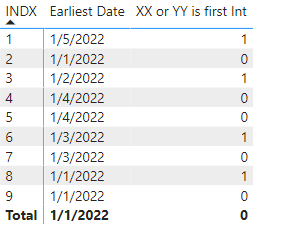
see attached.
Thank you for the challenge - the unpivoting part was tricky as it needed pairs of columns.
That source data is in rather bad shape. First step is to unpivot it into something usable
let
Source = Table.FromRows(Json.Document(Binary.Decompress(Binary.FromText("jZLLCoMwEEV/pWQt5GESzdIuRERQSxVF/P/faKbGIQ8tXQTiwZzJ3Mm2EU4y8rKLaco4FUwI+/EGUFImTzABkNQyB3oAnDJzgsE58MiyAFFo3bONAB/t4kVczK/+dG4Ej8sFwtzuus4V0mFp4Rna1jWAZF3jf1K7RJd/cppiMoad2pagJ85+ypXdNU2sqmsgxsuxquLA5tnVM/d2DSMZnAtPHlHpJIbcI3gnFcbp3/IgRTDbAm/v2/r++qz6a7zl5aAOg/9AvhkFde+dBp0qeSA8SUYn6cn73PcP", BinaryEncoding.Base64), Compression.Deflate)), let _t = ((type nullable text) meta [Serialized.Text = true]) in type table [INDX = _t, #"INT 1" = _t, #"DATE INT 1" = _t, #"INT 2" = _t, #"DATE INT 2" = _t, #"INT 3" = _t, #"DATE INT 3" = _t, #"INT 4" = _t, #"DATE INT 4" = _t, #"INT 5" = _t, #"DATE INT 5" = _t, #"INT 6" = _t, #"DATE INT 6" = _t]),
CT = (List.Count(Table.ColumnNames(Source))-1)/2,
#"Merged Columns1" = List.Accumulate({1..CT},Source,(state,current)=>Table.CombineColumns(state,{"INT " & Text.From(current), "DATE INT " & Text.From(current)},Combiner.CombineTextByDelimiter(",", QuoteStyle.None),"Merged " & Text.From(current))),
#"Unpivoted Other Columns" = Table.UnpivotOtherColumns(#"Merged Columns1", {"INDX"}, "Attribute", "Value"),
#"Filtered Rows" = Table.SelectRows(#"Unpivoted Other Columns", each ([Value] <> " , ")),
#"Split Column by Delimiter" = Table.SplitColumn(#"Filtered Rows", "Value", Splitter.SplitTextByDelimiter(",", QuoteStyle.Csv), {"INT", "Date"}),
#"Changed Type with Locale" = Table.TransformColumnTypes(#"Split Column by Delimiter", {{"Date", type date}}, "en-GB"),
#"Changed Type" = Table.TransformColumnTypes(#"Changed Type with Locale",{{"INDX", Int64.Type}}),
#"Removed Other Columns" = Table.SelectColumns(#"Changed Type",{"INDX", "INT", "Date"})
in
#"Removed Other Columns"
After that you can create a measure that implements your desired logic
XX or YY is first Int =
var a = min('Table'[Date])
var i = CALCULATE(min('Table'[INT]),'Table'[Date]=a)
return if (i in {"XX","YY"},1,0)
see attached.
Thank you for the challenge - the unpivoting part was tricky as it needed pairs of columns.
Check out the November 2025 Power BI update to learn about new features.
Advance your Data & AI career with 50 days of live learning, contests, hands-on challenges, study groups & certifications and more!
| User | Count |
|---|---|
| 57 | |
| 43 | |
| 41 | |
| 22 | |
| 17 |
| User | Count |
|---|---|
| 183 | |
| 114 | |
| 93 | |
| 62 | |
| 45 |