cancel
Showing results for 
Search instead for 
Did you mean: 

The Power BI Data Visualization World Championships is back! Get ahead of the game and start preparing now! Learn more

Reply
Anonymous
Not applicable

Find datediff with missing dates

I have 2 date columns: RFC Date and Completed date, with some missing dates.

Currently using this DAX to create a new column


Date_diff = IF('Table1'[RFC Date] = BLANK(), "", (DATEDIFF([RFC Date], [Completed Date], DAY)))


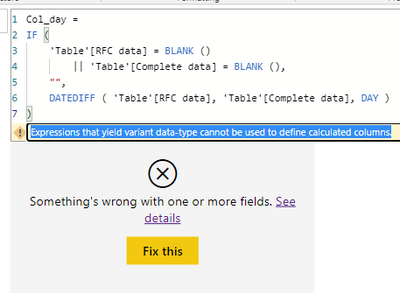
The above gives me an error "expression that yield variant data-type cannot be used to define calculated columns"


1 ACCEPTED SOLUTION
v-henryk-mstf
Community Support
Community Support

Hi @Anonymous ,


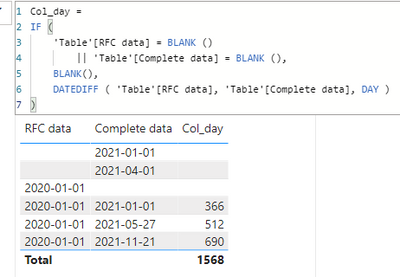
The reason for the above result is that "" is not supported. For this type of format, if the date field is empty, use blank() instead of "". I did the following test:

Col_day = 
IF (
    'Table'[RFC data] = BLANK ()
        || 'Table'[Complete data] = BLANK (),
    BLANK(),
    DATEDIFF ( 'Table'[RFC data], 'Table'[Complete data], DAY )
)

v-henryk-mstf_0-1617937230126.png

v-henryk-mstf_1-1617937249240.png

In addition, before writing the formula, make sure that the referenced field is a date type, otherwise an error will be reported.


If the problem is still not resolved, please provide detailed error information and let me know immediately. Looking forward to your reply.


Best Regards,
Henry


If this post helps, then please consider Accept it as the solution to help the other members find it more quickly.

View solution in original post

3 REPLIES 3
v-henryk-mstf
Community Support
Community Support

Hi @Anonymous ,


The reason for the above result is that "" is not supported. For this type of format, if the date field is empty, use blank() instead of "". I did the following test:

Col_day = 
IF (
    'Table'[RFC data] = BLANK ()
        || 'Table'[Complete data] = BLANK (),
    BLANK(),
    DATEDIFF ( 'Table'[RFC data], 'Table'[Complete data], DAY )
)

v-henryk-mstf_0-1617937230126.png

v-henryk-mstf_1-1617937249240.png

In addition, before writing the formula, make sure that the referenced field is a date type, otherwise an error will be reported.


If the problem is still not resolved, please provide detailed error information and let me know immediately. Looking forward to your reply.


Best Regards,
Henry


If this post helps, then please consider Accept it as the solution to help the other members find it more quickly.

Ashish_Mathur
Super User
Super User

Hi,

Check the data type of the entries in the RFC Date and Completed Date columns.  They are probably not proper dates.  In the Query Editor, ensure that those 2 columns are set as Date columns.


Regards,
Ashish Mathur
http://www.ashishmathur.com
https://www.linkedin.com/in/excelenthusiasts/
Vera_33
Resident Rockstar
Resident Rockstar

Hi @Anonymous 

try it

Date_diff = IF('Table1'[RFC Date] = BLANK(), BLANK(), DATEDIFF([RFC Date], [Completed Date], DAY))


Helpful resources

Announcements
Power BI DataViz World Championships

Power BI Dataviz World Championships

The Power BI Data Visualization World Championships is back! Get ahead of the game and start preparing now!

December 2025 Power BI Update Carousel

Power BI Monthly Update - December 2025

Check out the December 2025 Power BI Holiday Recap!

FabCon Atlanta 2026 carousel

FabCon Atlanta 2026

Join us at FabCon Atlanta, March 16-20, for the ultimate Fabric, Power BI, AI and SQL community-led event. Save $200 with code FABCOMM.