FabCon is coming to Atlanta
Join us at FabCon Atlanta from March 16 - 20, 2026, for the ultimate Fabric, Power BI, AI and SQL community-led event. Save $200 with code FABCOMM.
Register now!- Power BI forums
- Get Help with Power BI
- Desktop
- Service
- Report Server
- Power Query
- Mobile Apps
- Developer
- DAX Commands and Tips
- Custom Visuals Development Discussion
- Health and Life Sciences
- Power BI Spanish forums
- Translated Spanish Desktop
- Training and Consulting
- Instructor Led Training
- Dashboard in a Day for Women, by Women
- Galleries
- Data Stories Gallery
- Themes Gallery
- Contests Gallery
- QuickViz Gallery
- Quick Measures Gallery
- Visual Calculations Gallery
- Notebook Gallery
- Translytical Task Flow Gallery
- TMDL Gallery
- R Script Showcase
- Webinars and Video Gallery
- Ideas
- Custom Visuals Ideas (read-only)
- Issues
- Issues
- Events
- Upcoming Events
The Power BI Data Visualization World Championships is back! Get ahead of the game and start preparing now! Learn more
- Power BI forums
- Forums
- Get Help with Power BI
- Desktop
- Re: Find Latest Transaction Date for Each Customer
- Subscribe to RSS Feed
- Mark Topic as New
- Mark Topic as Read
- Float this Topic for Current User
- Bookmark
- Subscribe
- Printer Friendly Page


- Mark as New
- Bookmark
- Subscribe
- Mute
- Subscribe to RSS Feed
- Permalink
- Report Inappropriate Content
Find Latest Transaction Date for Each Customer
I am trying to accomplish several things here - but the first goal is to determine the most recent or last transaction for each customer.
I have tried about 8 different things but fall a little short each time in accomplishing the real goal: The Sales info and the Customer are two separate tables - but have a relationship.
This is the most recent attempt in DAX:
Last Transaction = Filter(ALL(Customer[Customer Name]), Sales Detail[SalesTxnTimeModifed] = MAX(Sales Details[SalesTxnTimeModifed]))
But it gives this error: 'A table of multiple values was supplied where a single value was expected'
All I'm trying to do is generate a list of customers with their last transaction. From there I will look at a Rolling 11 months and a Rolling 13 months. When a customer goes 11 months without any activity - it will show in the report. And then when they go 13 months without any activty it will show in the 13 month report. But I have to have that list first.
Here's an example of the data I'm looking at:
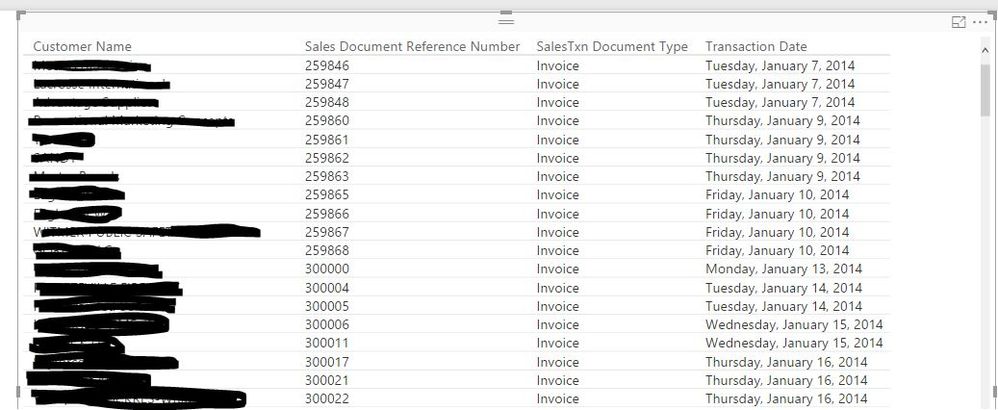
Solved! Go to Solution.


- Mark as New
- Bookmark
- Subscribe
- Mute
- Subscribe to RSS Feed
- Permalink
- Report Inappropriate Content
I have successfully used LASTDATE.
Customer Last Transaction = LASTDATE('Sales'[OrderDate])
Then I populate the rows with the customer ID. My sales table is matched to my customer table using the ID.
Did I answer your question? Mark my post as a solution!
Proud to be a Super User!

- Mark as New
- Bookmark
- Subscribe
- Mute
- Subscribe to RSS Feed
- Permalink
- Report Inappropriate Content
@heathernicole I have not read the whole post but give this a try...
Last Transaction =
CALCULATE (
    LASTDATE ( 'Sales Details'[SalesTxnTimeModified] ),
    ALLEXCEPT ( 'Customer', 'Customer'[Customer Name] )
)
- Mark as New
- Bookmark
- Subscribe
- Mute
- Subscribe to RSS Feed
- Permalink
- Report Inappropriate Content
Hello @heathernicole! I don't know what to tell you???
I use this exact Measure to calculate Last Payment by Purchaser - and there are MANY MANY duplicate dates!
I just tried it and it works as a Calculated Column as well.
You know the May Update was released today - have you updated? (Even though this should not be the issue!)
https://powerbi.microsoft.com/en-us/blog/
- Mark as New
- Bookmark
- Subscribe
- Mute
- Subscribe to RSS Feed
- Permalink
- Report Inappropriate Content
@heathernicole Try this...
Go to Modeling Tab => Click New Table button => type this...
Summary Table =
SUMMARIZE (
    'Sales Details',
    'Sales Details'[Customer ID],
    "Last Transaction", MAX ( 'Sales Details'[SalesTxnTimeModified] )
)


- Mark as New
- Bookmark
- Subscribe
- Mute
- Subscribe to RSS Feed
- Permalink
- Report Inappropriate Content
Using RANKX could also help. Then you can find out the latest transactions(TransactionOrderByDateDesc=1) for each customer.
TransactionOrderByDateDesc = RANKX(FILTER(Table3,Table3[Customer]=EARLIER(Table3[Customer])),Table3[Date],,DESC,Skip)
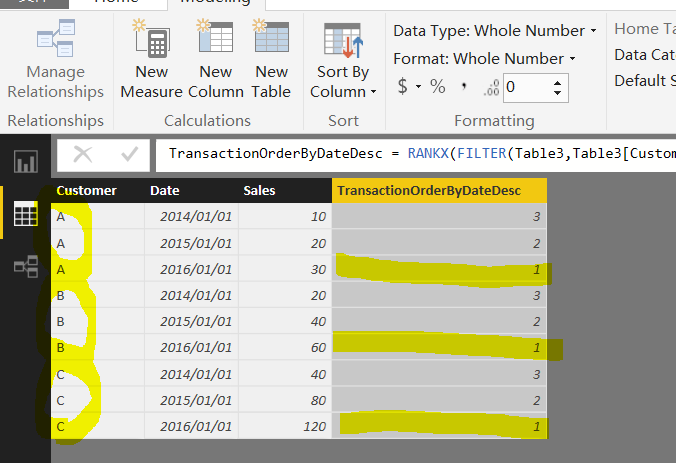
If you have any question, feel free to let me know.
- Mark as New
- Bookmark
- Subscribe
- Mute
- Subscribe to RSS Feed
- Permalink
- Report Inappropriate Content
How can I rank the dates in ascending order?
- Mark as New
- Bookmark
- Subscribe
- Mute
- Subscribe to RSS Feed
- Permalink
- Report Inappropriate Content
I have successfully used LASTDATE.
Customer Last Transaction = LASTDATE('Sales'[OrderDate])
Then I populate the rows with the customer ID. My sales table is matched to my customer table using the ID.
Did I answer your question? Mark my post as a solution!
Proud to be a Super User!
- Mark as New
- Bookmark
- Subscribe
- Mute
- Subscribe to RSS Feed
- Permalink
- Report Inappropriate Content
What if I need to create a column with last transaction date for each customer? LASTDATE('Sales'[OrderDate]) will give only a single date for all customers. Am I right?
For Example:
Mathew - 12/03/ 2019
John - 09/ 07/ 2018
Raju - 08/ 08/ 2019 etc
I tried:
CALCULATE(LASTDATE(SDimProCltDept[Admission]), SDimProCltDept[ClientSK] = Clients[ClientSK])
but throwing an error


- Mark as New
- Bookmark
- Subscribe
- Mute
- Subscribe to RSS Feed
- Permalink
- Report Inappropriate Content
Last date worked for me! I've been looking for the solution for a few hours now and finally stumbled upon this. I added
Last Date = LASTDATE(Visits_Data[Date])
to a "New Column" so that i could use this data in a "Stacked Column Sheet" to show the last visit date on a job.
Thanks again!

- Mark as New
- Bookmark
- Subscribe
- Mute
- Subscribe to RSS Feed
- Permalink
- Report Inappropriate Content
how and where i should put this code ?
- Mark as New
- Bookmark
- Subscribe
- Mute
- Subscribe to RSS Feed
- Permalink
- Report Inappropriate Content
@kcantor - Hello! Hope you had a good weekend!
I tried LastDate on the Transaction Date Modified - and this is the error I got
A date column containing duplicate dates was specified in the call to function 'LASTDATE'. This is not supported.The current operation was cancelled because another operation in the transaction failed.
If I use this formula on the Calendar Table - no problem
- Mark as New
- Bookmark
- Subscribe
- Mute
- Subscribe to RSS Feed
- Permalink
- Report Inappropriate Content
That is odd. I use it on a Sales Fact Table that has many duplicates. In fact, I use it on all of my models so that other users know how new the data is.
Did I answer your question? Mark my post as a solution!
Proud to be a Super User!
- Mark as New
- Bookmark
- Subscribe
- Mute
- Subscribe to RSS Feed
- Permalink
- Report Inappropriate Content
@heathernicole I have not read the whole post but give this a try...
Last Transaction =
CALCULATE (
    LASTDATE ( 'Sales Details'[SalesTxnTimeModified] ),
    ALLEXCEPT ( 'Customer', 'Customer'[Customer Name] )
)
- Mark as New
- Bookmark
- Subscribe
- Mute
- Subscribe to RSS Feed
- Permalink
- Report Inappropriate Content
- Mark as New
- Bookmark
- Subscribe
- Mute
- Subscribe to RSS Feed
- Permalink
- Report Inappropriate Content
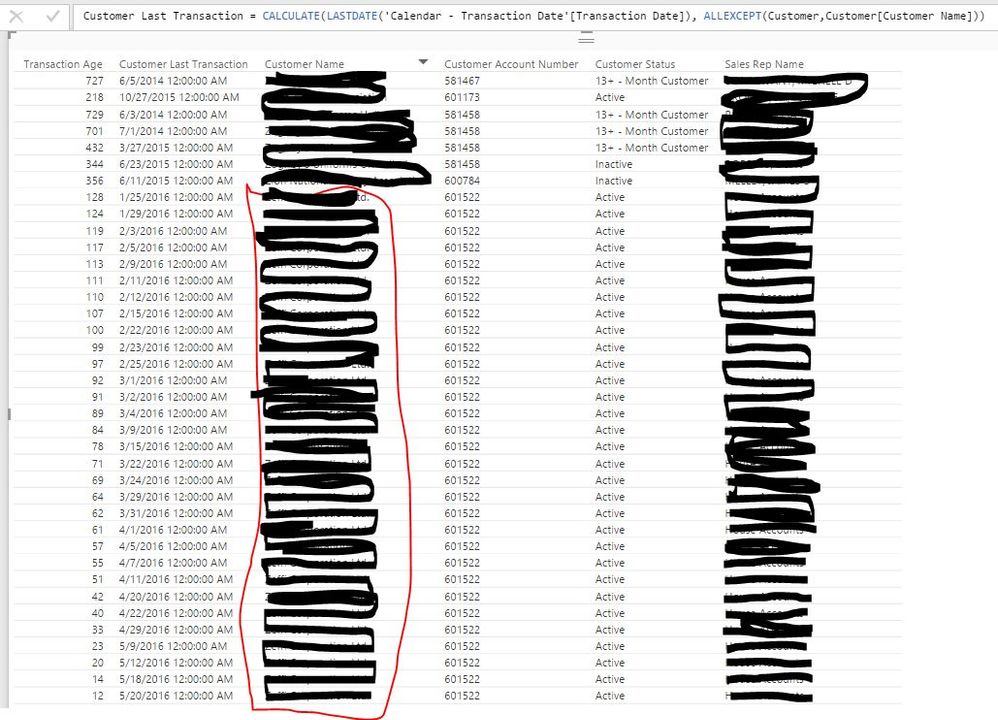
Well - I got the function to work - but it's not pull the proper data. The items grouped in red are the same customer. What it appears to be doing is pulling EACH transaction for the customer; NOT the LAST transaction. So I'm not sure what it's doing.
I've tried all of the suggestions from yesterday. None of them give errors but all of them are producing the same results it seems. I've also tried switching out MAX for LASTDATE.
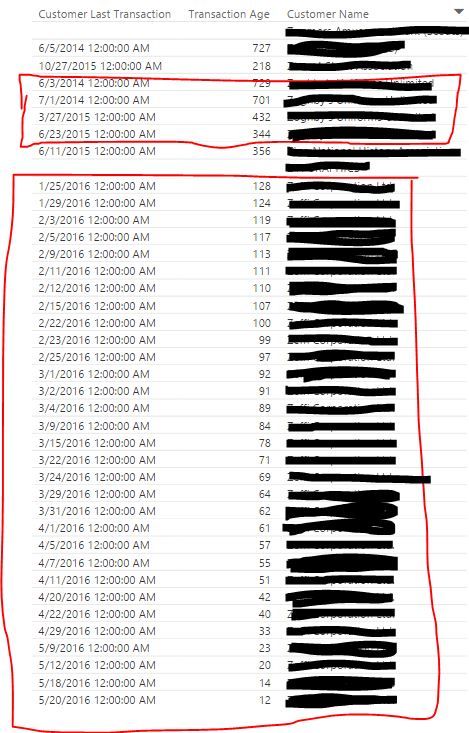
Any ideas or thoughts about what might be the problem? I'm not sure what to do. I've tried using the LAST transaction date, the LAST salesTxnTime created, Time modified - I'm thinking it has to do with how Quickbooks handles data but I'm not entirely sure. @arify @Eric_Zhang - any thoughts or input you have is greatly appreciated! 🙂
- Mark as New
- Bookmark
- Subscribe
- Mute
- Subscribe to RSS Feed
- Permalink
- Report Inappropriate Content
@heathernicole Are you using this as a measure or as a calculated column? I have one application of this where I add it as a calculated column in my customer table. that way is pulls a single date per customer from the sales fact table to the customer table. Perhaps this method would work for you?
Did I answer your question? Mark my post as a solution!
Proud to be a Super User!
- Mark as New
- Bookmark
- Subscribe
- Mute
- Subscribe to RSS Feed
- Permalink
- Report Inappropriate Content
@kcantor I am using a calculated column - not a measure. I wonder if a measure WOULD work better in this case. Although I'm not sure why it would.

- Mark as New
- Bookmark
- Subscribe
- Mute
- Subscribe to RSS Feed
- Permalink
- Report Inappropriate Content
Maybe using this:
Calculated Column
CustomerLastDateTransaction = CALCULATE(LASTDATE('Transaction'[TransactionDate]);ALLEXCEPT('Transaction';'Transaction'[CustomerName]))

Lima - Peru
- Mark as New
- Bookmark
- Subscribe
- Mute
- Subscribe to RSS Feed
- Permalink
- Report Inappropriate Content
- Mark as New
- Bookmark
- Subscribe
- Mute
- Subscribe to RSS Feed
- Permalink
- Report Inappropriate Content
Can share us the data model:
How many tables using for this and his relationship.
Customers
Transactions
anything else?
Tanks
Lima - Peru
- Mark as New
- Bookmark
- Subscribe
- Mute
- Subscribe to RSS Feed
- Permalink
- Report Inappropriate Content
@Vvelarde 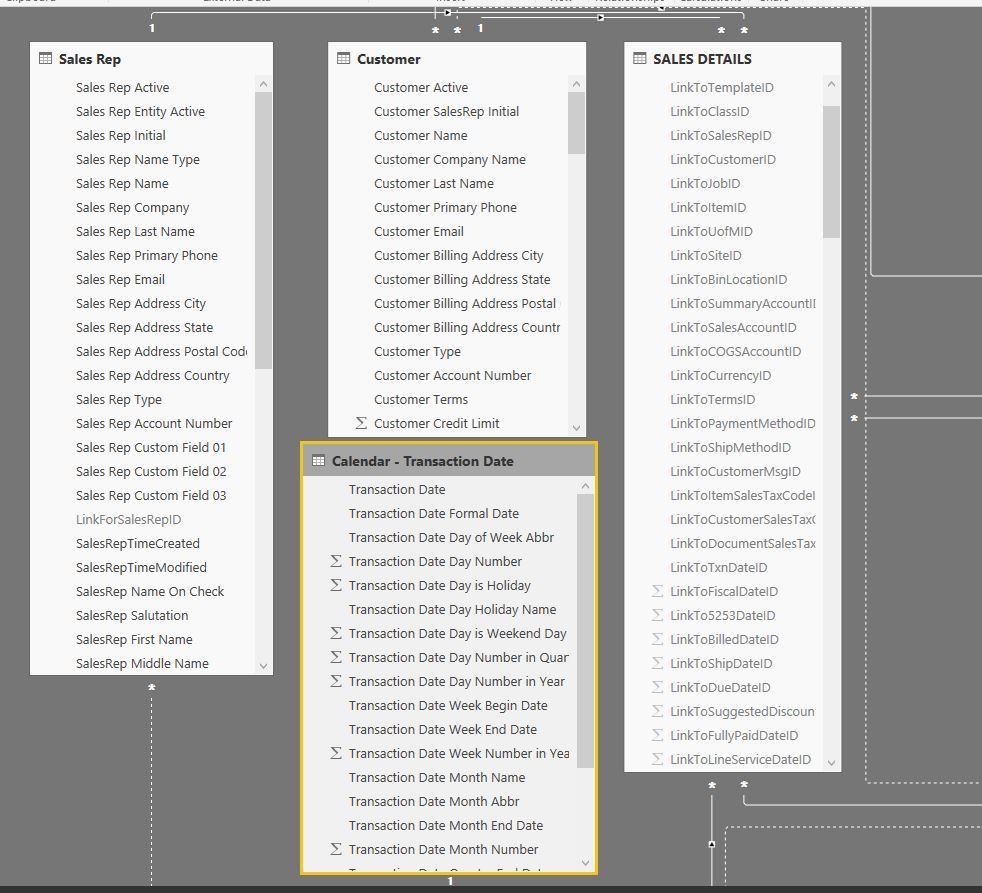
Raw Data to work with if anyone wants it. I couldn't show customer Names though so I just did a count.
| Transaction Age | Customer Last Transaction | Count of Customer Name | Customer Status |
| 330 | 7/7/2015 0:00 | 3919 | 11-Month Customer |
| 882 | 1/1/2014 0:00 | 3919 | 13+ - Month Customer |
| 877 | 1/6/2014 0:00 | 3919 | 13+ - Month Customer |
| 876 | 1/7/2014 0:00 | 3919 | 13+ - Month Customer |
| 875 | 1/8/2014 0:00 | 3919 | 13+ - Month Customer |
| 874 | 1/9/2014 0:00 | 3919 | 13+ - Month Customer |
| 873 | 1/10/2014 0:00 | 3919 | 13+ - Month Customer |
| 870 | 1/13/2014 0:00 | 3919 | 13+ - Month Customer |
| 869 | 1/14/2014 0:00 | 3919 | 13+ - Month Customer |
| 868 | 1/15/2014 0:00 | 3919 | 13+ - Month Customer |
| 867 | 1/16/2014 0:00 | 3919 | 13+ - Month Customer |
| 866 | 1/17/2014 0:00 | 3919 | 13+ - Month Customer |
| 863 | 1/20/2014 0:00 | 3919 | 13+ - Month Customer |
| 862 | 1/21/2014 0:00 | 3919 | 13+ - Month Customer |
| 861 | 1/22/2014 0:00 | 3919 | 13+ - Month Customer |
| 860 | 1/23/2014 0:00 | 3919 | 13+ - Month Customer |
| 859 | 1/24/2014 0:00 | 3919 | 13+ - Month Customer |
| 856 | 1/27/2014 0:00 | 3919 | 13+ - Month Customer |
| 855 | 1/28/2014 0:00 | 3919 | 13+ - Month Customer |
| 854 | 1/29/2014 0:00 | 3919 | 13+ - Month Customer |
| 853 | 1/30/2014 0:00 | 3919 | 13+ - Month Customer |
| 852 | 1/31/2014 0:00 | 3919 | 13+ - Month Customer |
| 849 | 2/3/2014 0:00 | 3919 | 13+ - Month Customer |
| 848 | 2/4/2014 0:00 | 3919 | 13+ - Month Customer |
| 847 | 2/5/2014 0:00 | 3919 | 13+ - Month Customer |
| 846 | 2/6/2014 0:00 | 3919 | 13+ - Month Customer |
| 845 | 2/7/2014 0:00 | 3919 | 13+ - Month Customer |
| 842 | 2/10/2014 0:00 | 3919 | 13+ - Month Customer |
| 841 | 2/11/2014 0:00 | 3919 | 13+ - Month Customer |
- Mark as New
- Bookmark
- Subscribe
- Mute
- Subscribe to RSS Feed
- Permalink
- Report Inappropriate Content
@heathernicole what is the relationship between these 3 tables?
First you were using 'Sales Details' and 'Customer'
Now it seems you are using "Calendar - Transaction Date' and 'Customer'
Where is the Last Date you are looking for in 'Sales Details' or 'Calendar - Transaction Date'?
And how are these 3 tables related?
- Mark as New
- Bookmark
- Subscribe
- Mute
- Subscribe to RSS Feed
- Permalink
- Report Inappropriate Content
@Sean - I've tried a couple of different solutions.
The Sales Details has all transaction information - that was what I was originally using. When that wasn't producing the correct results I attempted the Calendar - Transaction Date Table which is linked to the Sales Details table.
Sales Details is linked to Customer table with a Customer ID Link and the Calendar Table.
The Calendar table is simply a lookup table.
Information, such as the Customer Name are in the Customer Table - NOT the Sales Details table but they are related to each other.
- Mark as New
- Bookmark
- Subscribe
- Mute
- Subscribe to RSS Feed
- Permalink
- Report Inappropriate Content
@heathernicole I think you should stick to 'Sales Details' and 'Customer'
So you say they have a direct relationship based on Customer ID
'Sales Details' is on the MANY side * => 1 'Customer' on the 1 side of the relationship
Have you tried a table visualization with just these 2 items => Customer Name and Last Transaction (Measure)
Last Transaction =
CALCULATE (
    LASTDATE ( 'Sales Details'[SalesTxnTimeModified] ),
    ALLEXCEPT ( 'Customer', 'Customer'[Customer Name] )
)

Helpful resources

Power BI Dataviz World Championships
The Power BI Data Visualization World Championships is back! Get ahead of the game and start preparing now!

Power BI Monthly Update - December 2025
Check out the December 2025 Power BI Holiday Recap!

FabCon Atlanta 2026
Join us at FabCon Atlanta, March 16-20, for the ultimate Fabric, Power BI, AI and SQL community-led event. Save $200 with code FABCOMM.

| User | Count |
|---|---|
| 39 | |
| 37 | |
| 33 | |
| 32 | |
| 29 |


| User | Count |
|---|---|
| 132 | |
| 88 | |
| 82 | |
| 68 | |
| 64 |


