cancel
Showing results for 
Search instead for 
Did you mean: 

The Power BI Data Visualization World Championships is back! It's time to submit your entry. Live now!

Reply
Mike_Mace
Resolver I
Resolver I

Filtering multiple curves

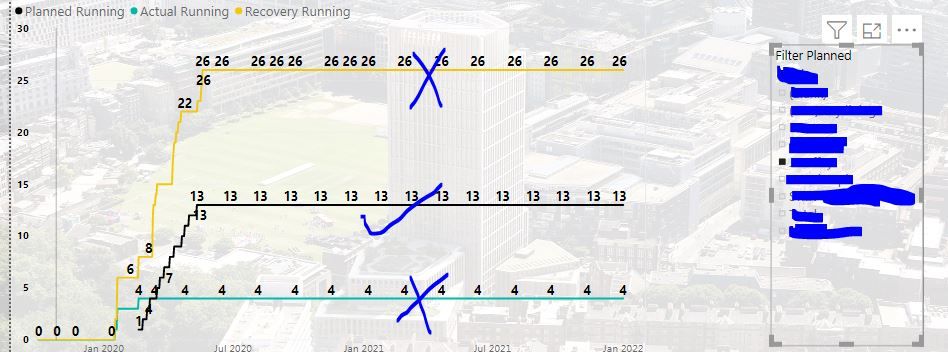
Curves below show running values across many companies. 

When trying to filter by company only one of the curves gets filtered as per second snip. In this respect it would take three standalone filters to show per company values.

I've created a relationship on the company column between three curves but it is not working.

The relationship was set as many2many and inactive. 

There is another active relationship on dates. The filtering visual though should activate second relationship??


all companiesall companiesfiltering planned onlyfiltering planned only

1 ACCEPTED SOLUTION

Hi @Mike_Mace ,


Thank you for your so detail relationship picture. We can try to create a calculated table as Dim table


CompanySlicer =
UNION (
    ADDCOLUMNS ( DISTINCT ( 'Actuals'[Company] ), "Type", "Actuals" ),
    ADDCOLUMNS ( DISTINCT ( 'Recovery'[Company] ), "Type", "Recovery" ),
    ADDCOLUMNS ( DISTINCT ( 'Planned'[Company] ), "Type", "Planned" )
)


After create relationship with three fact tables ,then you can put the company column and type column into two slicer(or hieracy slicer).


Best regards,


Community Support Team _ Dong Li
If this post helps, then please consider Accept it as the solution to help the other members find it more quickly.

View solution in original post

4 REPLIES 4
v-lid-msft
Community Support
Community Support

Hi @Mike_Mace ,


Sorry for that, We cannot understand your data model clearly, Could you please describe the fields of each tables ,  the relations between tables simply and the field used in the chart?

Please don't contain any Confidential Information or Real data in your reply.


Best regards,

Community Support Team _ Dong Li
If this post helps, then please consider Accept it as the solution to help the other members find it more quickly.

Hi @v-lid-msft,


Thanks for the message. Info below:


1. describe the fields of each tables 

There are three sets of deliverables per company. Planned, Actual, Recovery. 

I use a DAX to measure the Running values.

Because each set of deliverable uses a different date-set. I use a calendar base date set on the running DAX

DAX:

Planned Running =
CALCULATE(
    SUM('Planned'[Planned]),
    FILTER(
        ALLSELECTED('Date Calendar'[Date Calendar]),
        'Date Calendar'[Date Calendar] <= MAX('Date Calendar'[Date Calendar])
    )
)


2. the relations between tables simply 

Yellow highlighted is the active relationship between all date sets. Very much needed to be able to plot all curves against one date set. 

Blue underlined is my attempt to create another relationship under company
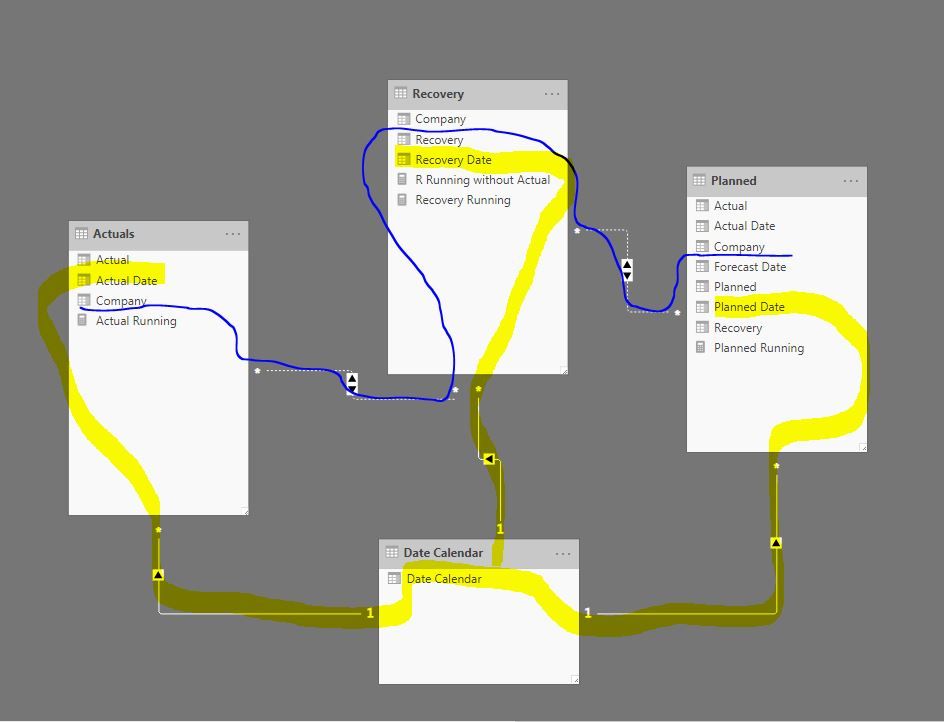
relationshipsrelationships


3. the field used in the chart?

The measures for the 3 Running totals are on the chart and a calendar based date set on the X axis.

Since the Scurves are global, filtering down to company level is needed.

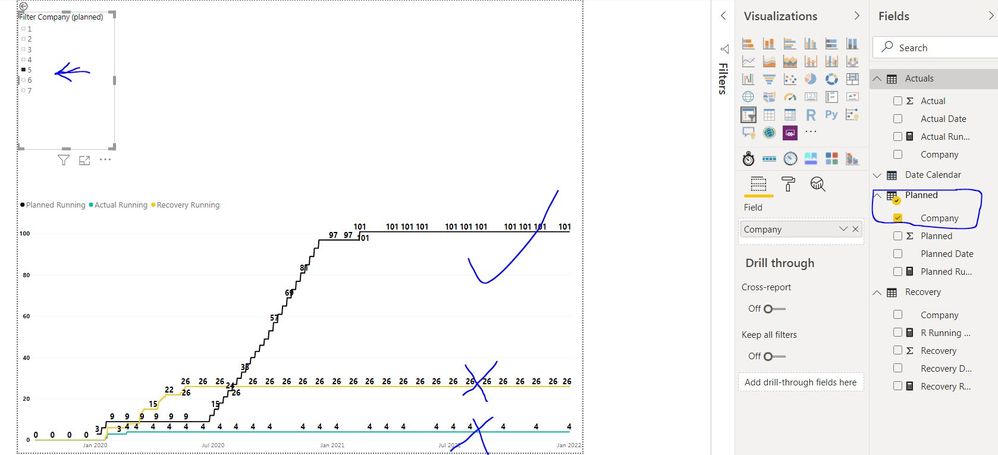
Snip below extents view to Fields section.

I used a filter based on Company from Planned table. Filtering on Company 5 filters the planned curve but not the other two which means my attempt to create a relationship on company columns between Planned, Actual, Recovery data was unsuccessful 🙂


Could easily create 3 Filters. One for each Planned, Actual, Recovery company column.

But that would only confuse users 


snip 4.JPG

Hi @Mike_Mace ,


Thank you for your so detail relationship picture. We can try to create a calculated table as Dim table


CompanySlicer =
UNION (
    ADDCOLUMNS ( DISTINCT ( 'Actuals'[Company] ), "Type", "Actuals" ),
    ADDCOLUMNS ( DISTINCT ( 'Recovery'[Company] ), "Type", "Recovery" ),
    ADDCOLUMNS ( DISTINCT ( 'Planned'[Company] ), "Type", "Planned" )
)


After create relationship with three fact tables ,then you can put the company column and type column into two slicer(or hieracy slicer).


Best regards,


Community Support Team _ Dong Li
If this post helps, then please consider Accept it as the solution to help the other members find it more quickly.
Greg_Deckler
Community Champion
Community Champion

Please see this post regarding How to Get Your Question Answered Quickly: https://community.powerbi.com/t5/Community-Blog/How-to-Get-Your-Question-Answered-Quickly/ba-p/38490


Follow on LinkedIn
@ me in replies or I'll lose your thread!!!
Instead of a Kudo, please vote for this idea
Become an expert!: Enterprise DNA
External Tools: MSHGQM
YouTube Channel!: Microsoft Hates Greg
Latest book!:
DAX For Humans

DAX is easy, CALCULATE makes DAX hard...

Helpful resources

Announcements
Power BI DataViz World Championships

Power BI Dataviz World Championships

The Power BI Data Visualization World Championships is back! It's time to submit your entry.

January Power BI Update Carousel

Power BI Monthly Update - January 2026

Check out the January 2026 Power BI update to learn about new features.

FabCon Atlanta 2026 carousel

FabCon Atlanta 2026

Join us at FabCon Atlanta, March 16-20, for the ultimate Fabric, Power BI, AI and SQL community-led event. Save $200 with code FABCOMM.