cancel
Showing results for 
Search instead for 
Did you mean: 

Join the FabCon + SQLCon recap series. Up next: Power BI, Real-Time Intelligence, IQ and AI, and Data Factory take center stage. All sessions are available on-demand after the live show. Register now

Reply
Anonymous
Not applicable

Filtering matrix rows based on multiples columns

Hello,

Can anyone help me with a solution to this?
We have built a Matrix report but need to filter rows based on the value of at least two column in a matrix.


VendorCorporateEnergyDefence
Supplier 1Z04MZ06M 
Supplier 2Z06M  
Supplier 3 Z06MZ06M
Supplier 4Z09M  
Supplier 5Z09MZ03M 


We want to keep only Supplier 1, 3 & 5.

(and the dream could be only keep Supplier 1 & 5 because value are not the same)

Thanks for your help,
Julian.

1 ACCEPTED SOLUTION

@Anonymous First your table needs to be transformed for better design, basically unpivot your table, to unpivot follow these steps:


- transform data
- select vendor column
- right-click, unpivot other columns it will add two columns, attribute, and value, rename these as per your requirement

- filter blank values rows (we don't need these)
- close and apply

To visualize,
- matrix visual:
- add vendor on rows,
- add attribute on columns
- add value on values section

Add the following measure:


Count Measure = CALCULATE ( DISTINCTCOUNT ( Vendor[Value] ), ALLEXCEPT ( Vendor, Vendor[Vendor] ) )


and use this measure as visual level filter on above matrix visual
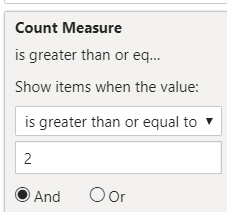
 

image.png


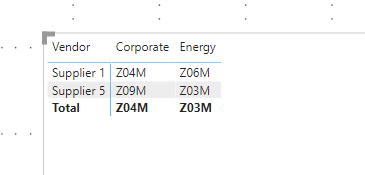
and here is the result

image.png


Here is  M script to unpivot, create a blank query and in advanced editor paste the following code:


let
    Source = Table.FromRows(Json.Document(Binary.Decompress(Binary.FromText("i45WCi4tKMjJTC1SMFTSUYoyMPEFU2YgSkEpVgdJgRGyDIasMVQYqgJMoSgwAYta4tBuipCNMjAGUUqxsQA=", BinaryEncoding.Base64), Compression.Deflate)), let _t = ((type text) meta [Serialized.Text = true]) in type table [Vendor = _t, Corporate = _t, Energy = _t, Defence = _t]),
    #"Changed Type" = Table.TransformColumnTypes(Source,{{"Vendor", type text}, {"Corporate", type text}, {"Energy", type text}, {"Defence", type text}}),
    #"Unpivoted Other Columns" = Table.UnpivotOtherColumns(#"Changed Type", {"Vendor"}, "Attribute", "Value"),
    #"Filtered Rows" = Table.SelectRows(#"Unpivoted Other Columns", each ([Value] <> "" and [Value] <> " "))
in
    #"Filtered Rows"


I would  Kudos if my solution helped. 👉 If you can spend time posting the question, you can also make efforts to give Kudos whoever helped to solve your problem. It is a token of appreciation!


Subscribe to the @PowerBIHowTo YT channel for an upcoming video on List and Record functions in Power Query!!

Learn Power BI and Fabric - subscribe to our YT channel - Click here: @PowerBIHowTo

If my solution proved useful, I'd be delighted to receive Kudos. When you put effort into asking a question, it's equally thoughtful to acknowledge and give Kudos to the individual who helped you solve the problem. It's a small gesture that shows appreciation and encouragement! ❤


Did I answer your question? Mark my post as a solution. Proud to be a Super User! Appreciate your Kudos 🙂
Feel free to email me with any of your BI needs.

View solution in original post

4 REPLIES 4
amitchandak
Super User
Super User

Filter on Energy <> Blank (Visual level)


Or have a measure like

Calculate(Sum(Table[Value]),not(isblank(Table[Energy])))

Share with Power BI Enthusiasts: Full Power BI Video (20 Hours) YouTube
Microsoft Fabric Series 60+ Videos YouTube
Microsoft Fabric Hindi End to End YouTube

@Anonymous First your table needs to be transformed for better design, basically unpivot your table, to unpivot follow these steps:


- transform data
- select vendor column
- right-click, unpivot other columns it will add two columns, attribute, and value, rename these as per your requirement

- filter blank values rows (we don't need these)
- close and apply

To visualize,
- matrix visual:
- add vendor on rows,
- add attribute on columns
- add value on values section

Add the following measure:


Count Measure = CALCULATE ( DISTINCTCOUNT ( Vendor[Value] ), ALLEXCEPT ( Vendor, Vendor[Vendor] ) )


and use this measure as visual level filter on above matrix visual


image.png


and here is the result

image.png


Here is  M script to unpivot, create a blank query and in advanced editor paste the following code:


let
    Source = Table.FromRows(Json.Document(Binary.Decompress(Binary.FromText("i45WCi4tKMjJTC1SMFTSUYoyMPEFU2YgSkEpVgdJgRGyDIasMVQYqgJMoSgwAYta4tBuipCNMjAGUUqxsQA=", BinaryEncoding.Base64), Compression.Deflate)), let _t = ((type text) meta [Serialized.Text = true]) in type table [Vendor = _t, Corporate = _t, Energy = _t, Defence = _t]),
    #"Changed Type" = Table.TransformColumnTypes(Source,{{"Vendor", type text}, {"Corporate", type text}, {"Energy", type text}, {"Defence", type text}}),
    #"Unpivoted Other Columns" = Table.UnpivotOtherColumns(#"Changed Type", {"Vendor"}, "Attribute", "Value"),
    #"Filtered Rows" = Table.SelectRows(#"Unpivoted Other Columns", each ([Value] <> "" and [Value] <> " "))
in
    #"Filtered Rows"


I would  Kudos if my solution helped. 👉 If you can spend time posting the question, you can also make efforts to give Kudos whoever helped to solve your problem. It is a token of appreciation!


Subscribe to the @PowerBIHowTo YT channel for an upcoming video on List and Record functions in Power Query!!

Learn Power BI and Fabric - subscribe to our YT channel - Click here: @PowerBIHowTo

If my solution proved useful, I'd be delighted to receive Kudos. When you put effort into asking a question, it's equally thoughtful to acknowledge and give Kudos to the individual who helped you solve the problem. It's a small gesture that shows appreciation and encouragement! ❤


Did I answer your question? Mark my post as a solution. Proud to be a Super User! Appreciate your Kudos 🙂
Feel free to email me with any of your BI needs.

Anonymous
Not applicable

Thanks lot @parry2k , it's perfect 🤗.
(Apologies, my initial source was not build as i explain, i appreciate your recommandation).

Anonymous
Not applicable

Hello @amitchandak,
the filter is not based on "Energy" column but for rows with a value in at least 2 columns.

Helpful resources

Announcements
April Power BI Update Carousel

Power BI Monthly Update - April 2026

Check out the April 2026 Power BI update to learn about new features.

New to Fabric survey Carousel

New to Fabric Survey

If you have recently started exploring Fabric, we'd love to hear how it's going. Your feedback can help with product improvements.

Power BI DataViz World Championships carousel

Power BI DataViz World Championships - June 2026

A new Power BI DataViz World Championship is coming this June! Don't miss out on submitting your entry.

FabCon and SQLCon Highlights Carousel

FabCon &SQLCon Highlights

Experience the highlights from FabCon & SQLCon, available live and on-demand starting April 14th.