A new Data Days event is coming soon!
This time we’re going bigger than ever. Fabric, Power BI, SQL, AI and more. We're covering it all. You won't want to miss it.
Learn more- Power BI forums
- Get Help with Power BI
- Desktop
- Service
- Report Server
- Power Query
- Mobile Apps
- Developer
- DAX Commands and Tips
- Custom Visuals Development Discussion
- Health and Life Sciences
- Power BI Spanish forums
- Translated Spanish Desktop
- Training and Consulting
- Instructor Led Training
- Dashboard in a Day for Women, by Women
- Galleries
- Data Stories Gallery
- Themes Gallery
- Contests Gallery
- QuickViz Gallery
- Quick Measures Gallery
- Visual Calculations Gallery
- Notebook Gallery
- Translytical Task Flow Gallery
- TMDL Gallery
- R Script Showcase
- Webinars and Video Gallery
- Ideas
- Custom Visuals Ideas (read-only)
- Issues
- Issues
- Events
- Upcoming Events
Get Fabric Certified for FREE during AI Skills Fest. This week only. Secure your voucher now.
- Power BI forums
- Forums
- Get Help with Power BI
- Desktop
- Filtering data
- Subscribe to RSS Feed
- Mark Topic as New
- Mark Topic as Read
- Float this Topic for Current User
- Bookmark
- Subscribe
- Printer Friendly Page

- Mark as New
- Bookmark
- Subscribe
- Mute
- Subscribe to RSS Feed
- Permalink
- Report Inappropriate Content
Filtering data
Hi all,
I hope someone can help me with the following.
below is a small dataset.
I want to set up a filter which gives me only the details of the orders in which ONLY partnr AMS300037 is mentioned.
In this example only order nr 8998429 and 8998478.
As the other orders containts more partnumbers than only AMS300037, these orders must be ignored in this filter.
Thanks for your help!
This is the set which must be filtered:
| Order nr | partnr |
| 8998407 | AMS300065 |
| 8998407 | AMS300037 |
| 8998407 | AMS900010 |
| 8998421 | AMS300037 |
| 8998421 | AC120043303 |
| 8998421 | AMS900010 |
| 8998421 | 120074500SV |
| 8998429 | AMS300037 |
| 8998478 | AMS300037 |
This must be the outcome of the filter
| 8998429 | AMS300037 |
| 8998478 | AMS300037 |
Solved! Go to Solution.


- Mark as New
- Bookmark
- Subscribe
- Mute
- Subscribe to RSS Feed
- Permalink
- Report Inappropriate Content
Hi, @Anonymous
I am not quite sure whether the below picture is what you are looking for.
Please check the sample pbix file's link down below, and the measure.

https://www.dropbox.com/s/8s9wmfeebhzoxgg/jwi.pbix?dl=0
Hi, My name is Jihwan Kim.
If this post helps, then please consider accept it as the solution to help other members find it faster, and give a big thumbs up.
Linkedin: https://www.linkedin.com/in/jihwankim1975/
If this post helps, then please consider accepting it as the solution to help other members find it faster, and give a big thumbs up.
Click here to visit my LinkedIn page
- Mark as New
- Bookmark
- Subscribe
- Mute
- Subscribe to RSS Feed
- Permalink
- Report Inappropriate Content
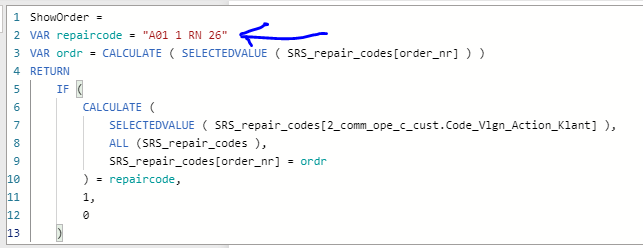
Hi @AlexisOlson , Can you help me a little bit further please?
I have changed the formula a bit, I am using the REPAIR CODE now.
This works fine, but now I want to be able to change the repair code, using a slicer.
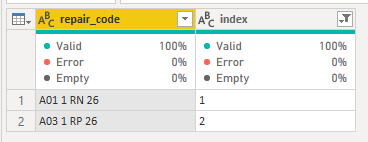
I have already created a slicer with two repair codes, by using a simple table.
Is it now possible to change the VAR REPAIRCODE?
Meaning, If I click on A03 1 RP 26, the measure must work with this code instead of A01 1 RN 26
Thanks!


- Mark as New
- Bookmark
- Subscribe
- Mute
- Subscribe to RSS Feed
- Permalink
- Report Inappropriate Content
I would try applying the filter ShowOrder is 1 on your visual where
ShowOrder =
VAR partnr = "AMS300037"
VAR ordr = CALCULATE ( SELECTEDVALUE ( Table1[Order] ) )
RETURN
    IF (
        CALCULATE (
            SELECTEDVALUE ( Table1[partnr] ),
            ALL ( Table1 ),
            Table1[order] = ordr
        ) = partnr,
        1,
        0
)- Mark as New
- Bookmark
- Subscribe
- Mute
- Subscribe to RSS Feed
- Permalink
- Report Inappropriate Content
@AlexisOlson This seems to work fine!
Now I have an additional question: if I want the partnumber to be a variable (via a filter or so), is that also possible?
- Mark as New
- Bookmark
- Subscribe
- Mute
- Subscribe to RSS Feed
- Permalink
- Report Inappropriate Content
Sure. Read it in just like I did with ordr.
- Mark as New
- Bookmark
- Subscribe
- Mute
- Subscribe to RSS Feed
- Permalink
- Report Inappropriate Content
Hi @AlexisOlson , Can you help me a little bit further please?
I have changed the formula a bit, I am using the REPAIR CODE now.
This works fine, but now I want to be able to change the repair code, using a slicer.
I have already created a slicer with two repair codes, by using a simple table.
Is it now possible to change the VAR REPAIRCODE?
Meaning, If I click on A03 1 RP 26, the measure must work with this code instead of A01 1 RN 26
Thanks!
- Mark as New
- Bookmark
- Subscribe
- Mute
- Subscribe to RSS Feed
- Permalink
- Report Inappropriate Content
VAR repaircode = CALCULATE ( SELECTEDVALUE ( SRS_repair_codes[2_comm_op....Klant] ) )
- Mark as New
- Bookmark
- Subscribe
- Mute
- Subscribe to RSS Feed
- Permalink
- Report Inappropriate Content
Hi, @Anonymous
I am not quite sure whether the below picture is what you are looking for.
Please check the sample pbix file's link down below, and the measure.
https://www.dropbox.com/s/8s9wmfeebhzoxgg/jwi.pbix?dl=0
Hi, My name is Jihwan Kim.
If this post helps, then please consider accept it as the solution to help other members find it faster, and give a big thumbs up.
Linkedin: https://www.linkedin.com/in/jihwankim1975/
If this post helps, then please consider accepting it as the solution to help other members find it faster, and give a big thumbs up.
Click here to visit my LinkedIn page
- Mark as New
- Bookmark
- Subscribe
- Mute
- Subscribe to RSS Feed
- Permalink
- Report Inappropriate Content
- Mark as New
- Bookmark
- Subscribe
- Mute
- Subscribe to RSS Feed
- Permalink
- Report Inappropriate Content
Are you trying to do this in the query editor or with DAX?
- Mark as New
- Bookmark
- Subscribe
- Mute
- Subscribe to RSS Feed
- Permalink
- Report Inappropriate Content
Hi @AlexisOlson
Preferable with DAX, because this is just an example.
If I know how to do this I am planning to make it workable for other partnumbers as well.
- Mark as New
- Bookmark
- Subscribe
- Mute
- Subscribe to RSS Feed
- Permalink
- Report Inappropriate Content
OK. How are you using this filter? Are you trying to define a calculated table or is it part of a measure or are you trying to limit what is showing in a visual or what?
- Mark as New
- Bookmark
- Subscribe
- Mute
- Subscribe to RSS Feed
- Permalink
- Report Inappropriate Content
I am trying to limit what is showing in a visual.
If I select a partnumber via a filter, then the visual is only showing me the data as described above.
Thanks for your help so far.
Helpful resources

Power BI Monthly Update - May 2026
Check out the May 2026 Power BI update to learn about new features.

Data Days 2026 coming soon!
Sign up to receive a private message when registration opens and key events begin.

New to Fabric Survey
If you have recently started exploring Fabric, we'd love to hear how it's going. Your feedback can help with product improvements.

Power BI DataViz World Championships - June 2026
A new Power BI DataViz World Championship is coming this June! Don't miss out on submitting your entry.

| User | Count |
|---|---|
| 25 | |
| 24 | |
| 22 | |
| 21 | |
| 19 |


| User | Count |
|---|---|
| 56 | |
| 52 | |
| 49 | |
| 25 | |
| 25 |


