cancel
Showing results for 
Search instead for 
Did you mean: 

Learn from the best! Meet the four finalists headed to the FINALS of the Power BI Dataviz World Championships! Register now

Reply
Anonymous
Not applicable

Filtering between dates via user defined variable

I have a list of policies with a start date and an end date and i'd like to be able to filter that list to display only policies which are active at a specified date, and as input i want to specify a month.

For example, if the user selects 'August', the policy list filteres all policies which are live in August (inception before August and Expiry after august).

I looked at using a what-if parameter then filters but i can't see a way to use dates.


(using date format day/month/year in example here)


Full Table:

Policy Name | Inception Date | Expiry date

A                   |  01.01.2020      |  01.04.2021

B                   |  05.04.2020      |  01.09.2021

C                   |  01.02.2020      |  01.10.2021

D                   |  01.09.2020      |  06.12.2021


User defined filter:

'August' (from drop down list or manual typed in search box etc.)


Table Returns:

Policy Name | Inception Date | Expiry date

B                   |  01.04.2020      |  01.09.2021

C                   |  01.02.2020      |  01.10.2021


Any advice on the best way to do this? I've looked at what-if parameters to be used as a filter, but it doesn't seem compatible with dates. The user needs to be able to select the month from a drop down/list/manual entry rather than editing the powerbi built in filters.


Many thanks in advance


2 ACCEPTED SOLUTIONS
v-henryk-mstf
Community Support
Community Support

Hi @Anonymous ,


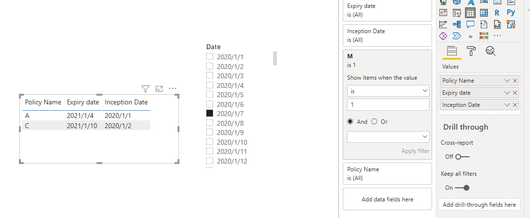
Need to create a separate calendar table, and then create a measure. I did the test:

M = 
VAR a =
    SELECTEDVALUE ( 'Calendar'[Date] )
RETURN
    IF (
        a >= MAX ( 'Table'[Inception Date] )
            && a <= MAX ( 'Table'[Expiry date] ),
        1,
        0
    )

vhenrykmstf_0-1631605644249.png


If the problem is still not resolved, please provide detailed error information and let me know immediately. Looking forward to your reply.


Best Regards,
Henry


If this post helps, then please consider Accept it as the solution to help the other members find it more quickly.

View solution in original post

Anonymous
Not applicable

Thank you, very helpful suggestion

View solution in original post

3 REPLIES 3
v-henryk-mstf
Community Support
Community Support

Hi @Anonymous ,


Need to create a separate calendar table, and then create a measure. I did the test:

M = 
VAR a =
    SELECTEDVALUE ( 'Calendar'[Date] )
RETURN
    IF (
        a >= MAX ( 'Table'[Inception Date] )
            && a <= MAX ( 'Table'[Expiry date] ),
        1,
        0
    )

vhenrykmstf_0-1631605644249.png


If the problem is still not resolved, please provide detailed error information and let me know immediately. Looking forward to your reply.


Best Regards,
Henry


If this post helps, then please consider Accept it as the solution to help the other members find it more quickly.

Anonymous
Not applicable

Thank you, very helpful suggestion

amitchandak
Super User
Super User

@Anonymous , with help from an independent date table, used in slicer


measure =
VAR _max = MAXX(allselected('Date'),'Date' [Date])
return
calculate(countrows(table), filter(Table, Table[Inception date] <_max && [Expiry Date] >=_max))


refer if you need a check for date table

Need of an Independent Date Table:https://www.youtube.com/watch?v=44fGGmg9fHI

Share with Power BI Enthusiasts: Full Power BI Video (20 Hours) YouTube
Microsoft Fabric Series 60+ Videos YouTube
Microsoft Fabric Hindi End to End YouTube

Helpful resources

Announcements
Join our Fabric User Panel

Join our Fabric User Panel

Share feedback directly with Fabric product managers, participate in targeted research studies and influence the Fabric roadmap.

February Power BI Update Carousel

Power BI Monthly Update - February 2026

Check out the February 2026 Power BI update to learn about new features.

FabCon Atlanta 2026 carousel

FabCon Atlanta 2026

Join us at FabCon Atlanta, March 16-20, for the ultimate Fabric, Power BI, AI and SQL community-led event. Save $200 with code FABCOMM.