This is best Fabric, Power BI, SQL and AI community event. How do we know? The last event sold out! Save €200 with code FABCMTY200.
Register nowA new Data Days event is coming soon! This time we’re going bigger than ever. Fabric, Power BI, SQL, AI and more. Don't miss out.
Hi All,
I am stuck in a problem. Here are the details. I have a sales data which has sales with customer name and order date fields. I need to count customer which were active 4 months ago but are not active now. Basically I need to find lost values. E.g
If my data set has maximum order date as 30th November then 4 month ago i.e July 1st to July 31 who were the active customer then and out of those how many are active now. The difference is lost customers.
Data
Customer Date
A 2nd July
B 4th July
C 10th July
D 20th July
A 10th November
B 20th November
Here A,B,C,D were active 4 months ago but now only A and B are active. Basically we have 2 lost customer. I want to filter based on filtered active customer.
Solved! Go to Solution.
Hi @Anonymous ,
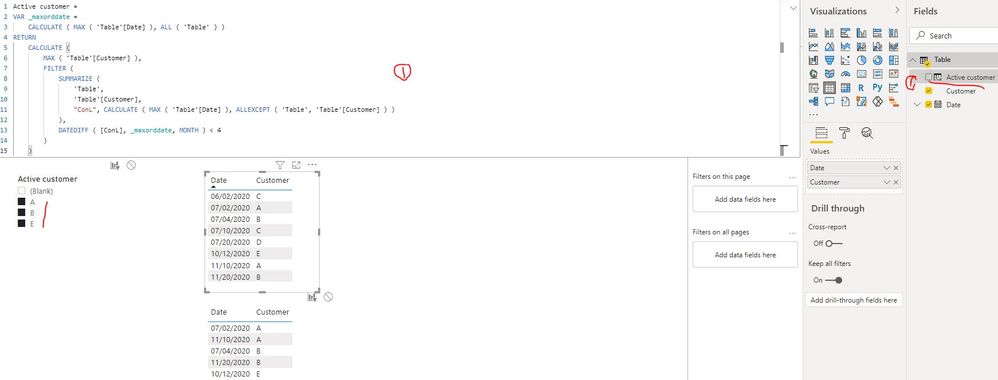
You can create a calculated column as below:
Active customer =
VAR _maxorddate =
CALCULATE ( MAX ( 'Table'[Date] ), ALL ( 'Table' ) )
RETURN
CALCULATE (
MAX ( 'Table'[Customer] ),
FILTER (
SUMMARIZE (
'Table',
'Table'[Customer],
"ConL", CALCULATE ( MAX ( 'Table'[Date] ), ALLEXCEPT ( 'Table', 'Table'[Customer] ) )
),
DATEDIFF ( [ConL], _maxorddate, MONTH ) < 4
)
)
If the above one is not applicable for your scenario, please provide your expected result with more explanation. Thank you.
Best Regards
Hi @Anonymous ,
You can create a calculated column as below:
Active customer =
VAR _maxorddate =
CALCULATE ( MAX ( 'Table'[Date] ), ALL ( 'Table' ) )
RETURN
CALCULATE (
MAX ( 'Table'[Customer] ),
FILTER (
SUMMARIZE (
'Table',
'Table'[Customer],
"ConL", CALCULATE ( MAX ( 'Table'[Date] ), ALLEXCEPT ( 'Table', 'Table'[Customer] ) )
),
DATEDIFF ( [ConL], _maxorddate, MONTH ) < 4
)
)
If the above one is not applicable for your scenario, please provide your expected result with more explanation. Thank you.
Best Regards
@Anonymous , With the help from date table and time intelligence . Create measures like
MTD Sales = CALCULATE(SUM(Sales[Sales Amount]),DATESMTD('Date'[Date]))
last MTD Sales = CALCULATE(SUM(Sales[Sales Amount]),DATESMTD(dateadd('Date'[Date],-4,MONTH)))
Not active now = countx(values(Table[Customer]), if(isblank([MTD Sales]) && not(isblank(last MTD Sales)),Table[Customer], blank()))
To get the best of the time intelligence function. Make sure you have a date calendar and it has been marked as the date in model view. Also, join it with the date column of your fact/s. Refer :radacad sqlbi My Video Series Appreciate your Kudos.
Check out the May 2026 Power BI update to learn about new features.
Sign up to receive a private message when registration opens and key events begin.
If you have recently started exploring Fabric, we'd love to hear how it's going. Your feedback can help with product improvements.
| User | Count |
|---|---|
| 29 | |
| 25 | |
| 24 | |
| 21 | |
| 14 |
| User | Count |
|---|---|
| 61 | |
| 48 | |
| 26 | |
| 21 | |
| 20 |