Don't miss your chance to take the Fabric Data Engineer (DP-600) exam for FREE! Find out how by attending the DP-600 session on April 23rd (pacific time), live or on-demand.
Learn moreNext up in the FabCon + SQLCon recap series: The roadmap for Microsoft SQL and Maximizing Developer experiences in Fabric. All sessions are available on-demand after the live show. Register now
I am looking to filter my budget table based 2 values. Id like to filter each month as well as always display the “Monthly” items. I’m not sure how best to go about this. I have tried disconnected slicers with DAX.
Title | Start Date | Budget Type | Amount |
Travel | 2/2/2020 | Once | 200 |
Office Supplies | 1/1/2020 | Monthly | 500 |
Rental Equipment | 1/1/2020 | Monthly | 100 |
Meals | 1/1/2020 | Monthly | 200 |
Project 1 | 5/5/2020 | Once | 5000 |
Project 2 | 7/5/2020 | Once | 8000 |
Solved! Go to Solution.
Hi @Grayfox88 ,
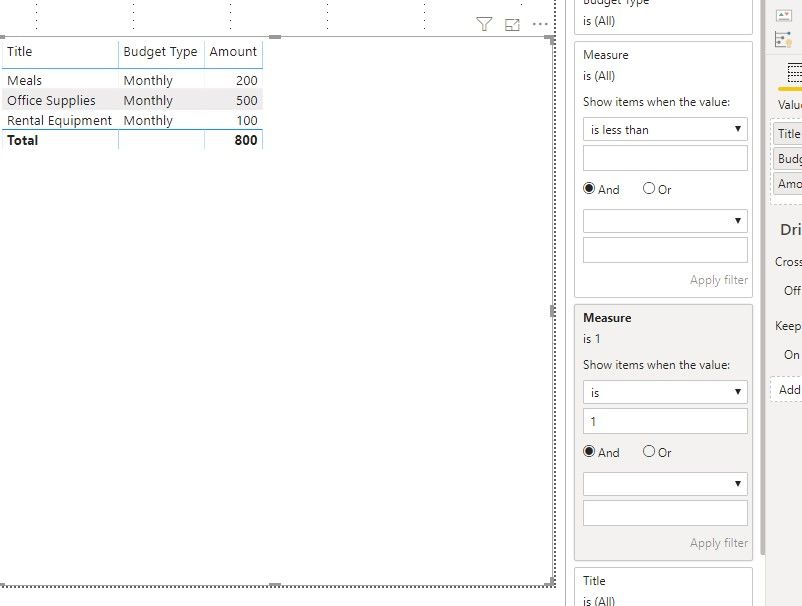
We can create a measure and use it in visual filter to meet your requirement:
Measure = var t = FILTER(ALLSELECTED('Budget'), 'Budget'[Start Date].[Year] = YEAR(SELECTEDVALUE('Budget'[Start Date])) && 'Budget'[Start Date].[MonthNo] = MONTH(SELECTEDVALUE('Budget'[Start Date]) ))
return
IF(COUNTROWS(FILTER(t,'Budget'[Budget Type]<>"Monthly"))+0 = 0 && COUNTROWS('Budget') <> 0 ,1,-1)
If it doesn't meet your requirement, Please show the exact expected result based on the Tables that you have shared.
Best regards,
To handle dates better create a date table and join with your date. And try like
MTD Sales = CALCULATE(SUM(budget[Amount]),DATESMTD('Date'[Date]),Budget[Budget Type]="Monthly")To get the best of the time intelligence function. Make sure you have a date calendar and it has been marked as the date in model view. Also, join it with the date column of your fact/s.
Refer
https://radacad.com/creating-calendar-table-in-power-bi-using-dax-functions
Appreciate your Kudos. In case, this is the solution you are looking for, mark it as the Solution. In case it does not help, please provide additional information and mark me with @
Thanks. My Recent Blog -
https://community.powerbi.com/t5/Community-Blog/Winner-Topper-on-Map-How-to-Color-States-on-a-Map-wi...
https://community.powerbi.com/t5/Community-Blog/HR-Analytics-Active-Employee-Hire-and-Termination-tr...
https://community.powerbi.com/t5/Community-Blog/Power-BI-Working-with-Non-Standard-Time-Periods/ba-p...
https://community.powerbi.com/t5/Community-Blog/Comparing-Data-Across-Date-Ranges/ba-p/823601
Doing a join to dates for this scenario won’t work. As far as I can tell all filters are treated as an "and". Everytime you would filter on a month it will hide all other rows. For example, you select February and it only shows items with a start date of February, thus hiding all rows that are marked as monthly that have a different start date.
For a quick solution I have made a new calculated column that returns month name and if the row is a monthly item it will set it as *Monthly. This gives me a single point to filter on.
Budget Month = IF([Budget Type] = "Monthly","*Monthly",TEXT([Start Date],"mmmm")
This now creates a new problem where I can't display the total for the month for a monthly item calculated based on number of months shown
TotalPerMonth = IF (CONTAINS(Budget,Budget[Budget Type],"Monthly"),(SUM(Budget[Amount])*'Budget'[CountOfBudgetMonths]),SUM(Budget[Amount]))
Hi @Grayfox88 ,
How about the result after you follow the suggestions mentioned in my original post?Could you please provide more details about it If it doesn't meet your requirement?
Best regards,
Hi @Grayfox88 ,
We can create a measure and use it in visual filter to meet your requirement:
Measure = var t = FILTER(ALLSELECTED('Budget'), 'Budget'[Start Date].[Year] = YEAR(SELECTEDVALUE('Budget'[Start Date])) && 'Budget'[Start Date].[MonthNo] = MONTH(SELECTEDVALUE('Budget'[Start Date]) ))
return
IF(COUNTROWS(FILTER(t,'Budget'[Budget Type]<>"Monthly"))+0 = 0 && COUNTROWS('Budget') <> 0 ,1,-1)
If it doesn't meet your requirement, Please show the exact expected result based on the Tables that you have shared.
Best regards,
If you have recently started exploring Fabric, we'd love to hear how it's going. Your feedback can help with product improvements.
A new Power BI DataViz World Championship is coming this June! Don't miss out on submitting your entry.
Share feedback directly with Fabric product managers, participate in targeted research studies and influence the Fabric roadmap.
| User | Count |
|---|---|
| 48 | |
| 45 | |
| 41 | |
| 20 | |
| 17 |
| User | Count |
|---|---|
| 69 | |
| 63 | |
| 32 | |
| 31 | |
| 25 |