cancel
Showing results for 
Search instead for 
Did you mean: 

The Power BI Data Visualization World Championships is back! Get ahead of the game and start preparing now! Learn more

Reply
Anonymous
Not applicable

Filtering a text column for a specific pattern

Hi all,


I have a text column containing part numbers. There are many different patterns for the part number, some containing just numbers, some having numbers separated by a hyphen, different lengths etc. 12345-678, ABCDEF, ABC-1234, 9876543, ZYXWVUT ...


I am trying to filter just those that have the specific format : first 3 characters are always letters followed by a hyphen followed by 4 numbers and nothing else after that eg ABC-1234. 


I have explored SEARCH, FIND, LEFT, RIGHT, ... but none are able to filter just the part numbers I am lookign for. Is there a way to filter based on a text template, or some other way to achieve what I am lookign for?


All help and suggestions greatefully received. 

1 ACCEPTED SOLUTION
Chihiro
Solution Sage
Solution Sage

Best bet is to create custom function. But it requires iterating through string, not particulary smart or easy to do.


I'd suggest using R Script in the query editor.


pattern <- "^[[:alpha:]]{3}\\-\\d{4}"
isMatch <- function(x) {grepl(pattern, as.character(x), ignore.case=TRUE)}
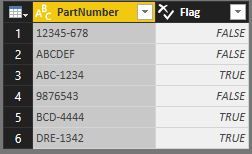
return <- within(dataset,{Flag=isMatch(dataset$PartNumber)})

Replace "PartNumber" with your actual column name.


return.

0.JPG


Then it's simply filtering based on "Flag" column.


Edit: You can find RegEx pattern cheat sheet for R in link below.

https://www.rstudio.com/wp-content/uploads/2016/09/RegExCheatsheet.pdf

View solution in original post

5 REPLIES 5
Anonymous
Not applicable

I have managed to do it with the below! 🙂

PlentyL_0-1683804397421.png


Chihiro
Solution Sage
Solution Sage

Best bet is to create custom function. But it requires iterating through string, not particulary smart or easy to do.


I'd suggest using R Script in the query editor.


pattern <- "^[[:alpha:]]{3}\\-\\d{4}"
isMatch <- function(x) {grepl(pattern, as.character(x), ignore.case=TRUE)}
return <- within(dataset,{Flag=isMatch(dataset$PartNumber)})

Replace "PartNumber" with your actual column name.


return.

0.JPG


Then it's simply filtering based on "Flag" column.


Edit: You can find RegEx pattern cheat sheet for R in link below.

https://www.rstudio.com/wp-content/uploads/2016/09/RegExCheatsheet.pdf

Hi, thanks for you solution. what if I'd like to apply it to multiple columns? thanks in advance

Anonymous
Not applicable

Genius, many thanks Chihiro.


I had not played with R before, but installed, ran your script and it worked first time.


I did notice that after running the script it seemed to have created 2 rows with ")" in the PartNumber field. I have deleted these rows but not sure how they get there. They are definitely created by running the R script as they are not there before.

You are welcom. I can't think of any reason why it would create extra rows...


R is very powerful tool and compliments PowerBI very well.

Helpful resources

Announcements
Power BI DataViz World Championships

Power BI Dataviz World Championships

The Power BI Data Visualization World Championships is back! Get ahead of the game and start preparing now!

December 2025 Power BI Update Carousel

Power BI Monthly Update - December 2025

Check out the December 2025 Power BI Holiday Recap!

FabCon Atlanta 2026 carousel

FabCon Atlanta 2026

Join us at FabCon Atlanta, March 16-20, for the ultimate Fabric, Power BI, AI and SQL community-led event. Save $200 with code FABCOMM.