Don't miss your chance to take the Fabric Data Engineer (DP-700) exam on us!
Learn moreNext up in the FabCon + SQLCon recap series: The roadmap for Microsoft SQL and Maximizing Developer experiences in Fabric. All sessions are available on-demand after the live show. Register now
Hi guys,
I’m trying to create a year/month slicer wherein it will:
1.) Display all entries wherein that year/month is included, and
2.) Will calculate the minutes and seconds for that year/monthly ONLY.
Example:
If I filter: October 2019
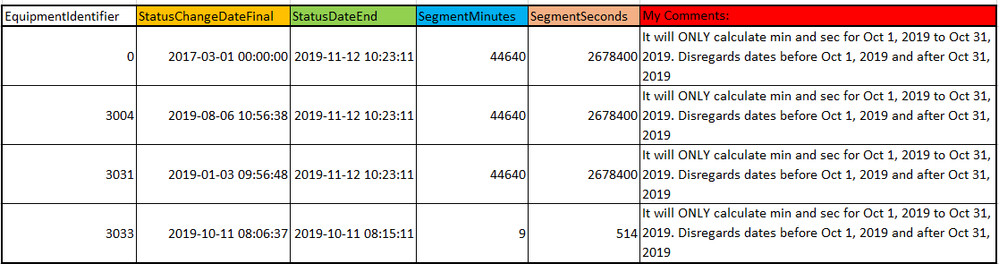
It will show the following results:
As you can see, if I filter for October 2019 it will show all entries wherein the month/year Oct 19 is in or in between the “StatusChangeDateFinal” (start date) and StatusDateEnd (end).
The “SegmentMinutes” and “SegmentSeconds” only computes the Oct 1, 2019 to Oct 31, 2019 range only. It will not include any dates before Oct 1, 2019 or after Oct 31, 2019.
Is there a way to filter like this and at the same time compute the minutes and seconds as date range (yr/mo) selected?
I have attached the raw data ("Raw Data" tab) and the data obtained when Oct 2019 is used ("October 2019" tab) for reference.
Sample Data
Greatly appreciate your kind assistance. Thanks!
Best regards,
Mark V.
Solved! Go to Solution.
Hi @markefrody,
Please check following steps and see if the result achieve your expectation:
1. Create calculate table as slicer:
Table 2 =
UNION (
SELECTCOLUMNS (
'Table',
"yearmonth", FORMAT ( 'Table'[StatusChangeDateFinal ], "YYYYMM" )
),
SELECTCOLUMNS (
'Table',
"yearmonth", FORMAT ( 'Table'[StatusDateEnd], "YYYYMM" )
)
)
2. Create measures:
SegmentMinutes =
VAR sv =
SELECTEDVALUE ( 'Table 2'[yearmonth] )
VAR monthstart =
DATE ( MID ( sv, 1, 4 ), MID ( sv, 5, 2 ), "01" )
VAR monthend =
EDATE ( monthstart, 1 )
VAR finalym =
FORMAT ( MAX ( 'Table'[StatusChangeDateFinal ] ), "YYYYMM" )
VAR endym =
FORMAT ( MAX ( 'Table'[StatusDateEnd] ), "YYYYMM" )
VAR diff1 =
DATEDIFF (
MAX ( 'Table'[StatusChangeDateFinal ] ),
MAX ( 'Table'[StatusDateEnd] ),
MINUTE
)
VAR diff2 =
DATEDIFF ( monthstart, monthend, MINUTE )
VAR diff3 =
DATEDIFF ( monthstart, MAX ( 'Table'[StatusDateEnd] ), MINUTE )
VAR diff4 =
DATEDIFF ( MAX ( 'Table'[StatusChangeDateFinal ] ), monthend, MINUTE )
RETURN
IF (
NOT ( ISFILTERED ( 'Table 2'[yearmonth] ) ),
0,
IF (
finalym = sv
&& endym = sv,
diff1,
IF (
finalym < sv
&& endym > sv,
diff2,
IF (
finalym < sv
&& endym = sv,
diff3,
IF ( finalym = sv && endym > sv, diff4 )
)
)
)
)
And for SegmentSeconds we just need to replace “DATEDIFF(XX,YY,MINUTE)” to “DATEDIFF(XX,YY,SECOND)”.
3. Result would be shown as below:
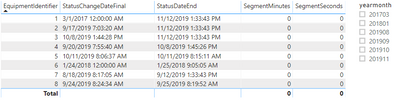
BTW, Pbix as attached, hopefully works for you.
Best Regards,
Jay
Community Support Team _ Jay Wang
If this post helps, then please consider Accept it as the solution to help the other members find it more quickly.
Hi @markefrody,
Please check following steps and see if the result achieve your expectation:
1. Create calculate table as slicer:
Table 2 =
UNION (
SELECTCOLUMNS (
'Table',
"yearmonth", FORMAT ( 'Table'[StatusChangeDateFinal ], "YYYYMM" )
),
SELECTCOLUMNS (
'Table',
"yearmonth", FORMAT ( 'Table'[StatusDateEnd], "YYYYMM" )
)
)
2. Create measures:
SegmentMinutes =
VAR sv =
SELECTEDVALUE ( 'Table 2'[yearmonth] )
VAR monthstart =
DATE ( MID ( sv, 1, 4 ), MID ( sv, 5, 2 ), "01" )
VAR monthend =
EDATE ( monthstart, 1 )
VAR finalym =
FORMAT ( MAX ( 'Table'[StatusChangeDateFinal ] ), "YYYYMM" )
VAR endym =
FORMAT ( MAX ( 'Table'[StatusDateEnd] ), "YYYYMM" )
VAR diff1 =
DATEDIFF (
MAX ( 'Table'[StatusChangeDateFinal ] ),
MAX ( 'Table'[StatusDateEnd] ),
MINUTE
)
VAR diff2 =
DATEDIFF ( monthstart, monthend, MINUTE )
VAR diff3 =
DATEDIFF ( monthstart, MAX ( 'Table'[StatusDateEnd] ), MINUTE )
VAR diff4 =
DATEDIFF ( MAX ( 'Table'[StatusChangeDateFinal ] ), monthend, MINUTE )
RETURN
IF (
NOT ( ISFILTERED ( 'Table 2'[yearmonth] ) ),
0,
IF (
finalym = sv
&& endym = sv,
diff1,
IF (
finalym < sv
&& endym > sv,
diff2,
IF (
finalym < sv
&& endym = sv,
diff3,
IF ( finalym = sv && endym > sv, diff4 )
)
)
)
)
And for SegmentSeconds we just need to replace “DATEDIFF(XX,YY,MINUTE)” to “DATEDIFF(XX,YY,SECOND)”.
3. Result would be shown as below:

BTW, Pbix as attached, hopefully works for you.
Best Regards,
Jay
Community Support Team _ Jay Wang
If this post helps, then please consider Accept it as the solution to help the other members find it more quickly.
Hi Jay @Anonymous ,
Your solution works perfectly! Thank you very much!
Best regards,
Mark V
Hi Jay (@Anonymous),
Thank you for your response. Please use the below link instead.
Sample Data
Please let me know if you need further information. Really appreciate your help.
Best regards,
Mark V
If you have recently started exploring Fabric, we'd love to hear how it's going. Your feedback can help with product improvements.
A new Power BI DataViz World Championship is coming this June! Don't miss out on submitting your entry.
Share feedback directly with Fabric product managers, participate in targeted research studies and influence the Fabric roadmap.
| User | Count |
|---|---|
| 48 | |
| 44 | |
| 42 | |
| 18 | |
| 18 |
| User | Count |
|---|---|
| 72 | |
| 66 | |
| 33 | |
| 32 | |
| 31 |