FabCon is coming to Atlanta
Join us at FabCon Atlanta from March 16 - 20, 2026, for the ultimate Fabric, Power BI, AI and SQL community-led event. Save $200 with code FABCOMM.
Register now!- Power BI forums
- Get Help with Power BI
- Desktop
- Service
- Report Server
- Power Query
- Mobile Apps
- Developer
- DAX Commands and Tips
- Custom Visuals Development Discussion
- Health and Life Sciences
- Power BI Spanish forums
- Translated Spanish Desktop
- Training and Consulting
- Instructor Led Training
- Dashboard in a Day for Women, by Women
- Galleries
- Data Stories Gallery
- Themes Gallery
- Contests Gallery
- QuickViz Gallery
- Quick Measures Gallery
- Visual Calculations Gallery
- Notebook Gallery
- Translytical Task Flow Gallery
- TMDL Gallery
- R Script Showcase
- Webinars and Video Gallery
- Ideas
- Custom Visuals Ideas (read-only)
- Issues
- Issues
- Events
- Upcoming Events
The Power BI Data Visualization World Championships is back! Get ahead of the game and start preparing now! Learn more
- Power BI forums
- Forums
- Get Help with Power BI
- Desktop
- Filtering Table
- Subscribe to RSS Feed
- Mark Topic as New
- Mark Topic as Read
- Float this Topic for Current User
- Bookmark
- Subscribe
- Printer Friendly Page


- Mark as New
- Bookmark
- Subscribe
- Mute
- Subscribe to RSS Feed
- Permalink
- Report Inappropriate Content
Filtering Table
Hi, I've got these three table:
TABLE 1
Id Param
1 Area
2 Volume
TABLE 2
ParamId Range
1 0-100
2 0-500
TABLE 3
Id Area Volume Description
1 52 102 Item1
2 300 800 Item2
and I've got two filters one for column Param (TABLE 1) and one for column Range (TABLE 2), I would like to display all TABLE 3's items with Area and Volume columns satisfying filters selection. How can I do?
Thanks a lot in advance for any clue!


- Mark as New
- Bookmark
- Subscribe
- Mute
- Subscribe to RSS Feed
- Permalink
- Report Inappropriate Content
hi Luca:
First in table 2 create a new column with the Max Value of the Range.
TABLE 2
ParamId Range MAX
1 0-100 100
2 0-500 500
Now create a measure:
FilterIndicator =
IF (
    [ParamSelected] = "Area",
    IF ( MIN ( Table3[Area] ) <= MIN ( Table2[Max] ), 1; BLANK () ),
    IF (
        [ParamSelected] = "Volume",
        IF ( MIN ( Table3[Volume] ) <= MIN ( Table2[Max] ), 1; BLANK () )
    )
)
And use in the visual filter.
Needs some adjustment to refine the filters selection but give you a light in the way.
Lima - Peru
- Mark as New
- Bookmark
- Subscribe
- Mute
- Subscribe to RSS Feed
- Permalink
- Report Inappropriate Content
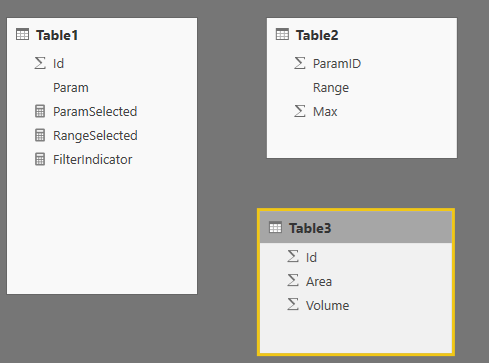
Thanks @Vvelarde for your suggestion, I can't make FilterIndicator measure valid (I've renamed your [ParamSelected] with Table1[Param]), probably because I have not all necessary relationships between tables: actually I've got only this relationship:
- Table1[Param] with Table2[ParamId]
I think I should have a ralationship which envolves Table3 but how?!? 
bye


- Mark as New
- Bookmark
- Subscribe
- Mute
- Subscribe to RSS Feed
- Permalink
- Report Inappropriate Content
Hi @laciodrom_80,
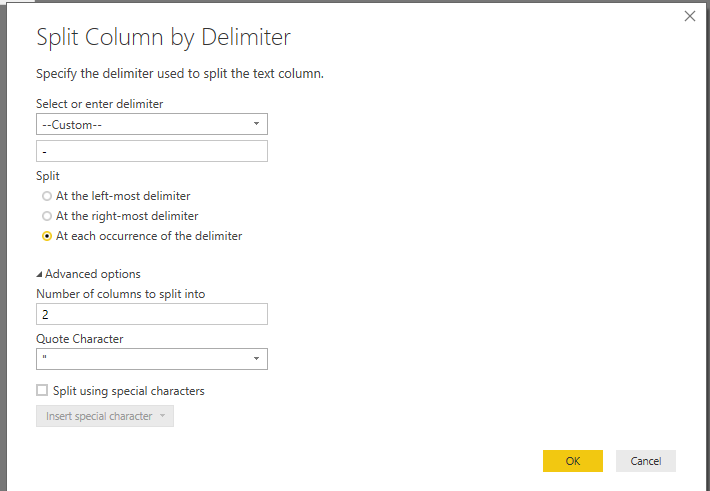
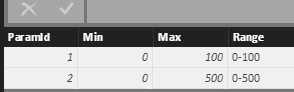
In your table, the data type of Range field is text, right? If it is, I suggest you split the column in Power Query Edit. Please see the following screenshot.
You will get the max value of range.
In addtion, I try to reproduce and create the measure as the @Vvelarde posted, I will post the update if I find new solution.
Best Regards,
Angelia
- Mark as New
- Bookmark
- Subscribe
- Mute
- Subscribe to RSS Feed
- Permalink
- Report Inappropriate Content
Hi Angela, no problem in finding Max value, as you can see in my answer at @Vvelarde I've got some doubts about the measure, in particular how to releate Table3 with others ones
bye
- Mark as New
- Bookmark
- Subscribe
- Mute
- Subscribe to RSS Feed
- Permalink
- Report Inappropriate Content
- Mark as New
- Bookmark
- Subscribe
- Mute
- Subscribe to RSS Feed
- Permalink
- Report Inappropriate Content
Thanks @Vvelarde, could you please let me see how you've defined ParamSelected and RangeSelected measures?
bye!
- Mark as New
- Bookmark
- Subscribe
- Mute
- Subscribe to RSS Feed
- Permalink
- Report Inappropriate Content
Of course, i forgot to include in my answer
ParamSelected = IF(HASONEVALUE(Table1[Param]),VALUES(Table1[Param]))
RangeSelected = IF(HASONEVALUE(Table2[Range]),VALUES(Table2[Range]))
Lima - Peru
- Mark as New
- Bookmark
- Subscribe
- Mute
- Subscribe to RSS Feed
- Permalink
- Report Inappropriate Content
Thanks @Vvelarde, but how can I use FilterIndicator measure to display in a table all Table3's items which satisfy ParamSelected and RangeSelected conditions? A measure returns a scalar...is there a trick?
Bye

Helpful resources

Power BI Dataviz World Championships
The Power BI Data Visualization World Championships is back! Get ahead of the game and start preparing now!

Power BI Monthly Update - December 2025
Check out the December 2025 Power BI Holiday Recap!

FabCon Atlanta 2026
Join us at FabCon Atlanta, March 16-20, for the ultimate Fabric, Power BI, AI and SQL community-led event. Save $200 with code FABCOMM.

| User | Count |
|---|---|
| 44 | |
| 43 | |
| 33 | |
| 30 | |
| 27 |


| User | Count |
|---|---|
| 134 | |
| 114 | |
| 58 | |
| 57 | |
| 57 |


