This time we’re going bigger than ever. Fabric, Power BI, SQL, AI and more. We're covering it all. You won't want to miss it.
Learn moreDid you hear? There's a new SQL AI Developer certification (DP-800). Start preparing now and be one of the first to get certified. Register now
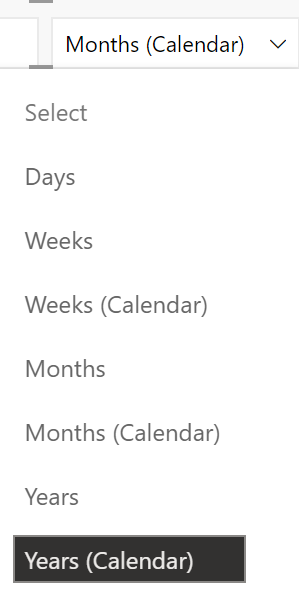
Is there a method to not allow the user to select Day from this filer. My data only includes month.
Solved! Go to Solution.
Hi, @NewbieJono ;
Sorry, This is by design and does not support the option to delete days.
You may vote the idea and comment there to improve this feature. It is a place for customers provide feedback about Microsoft Office products . What’s more, if a feedback is high voted there by other customers, it will be promising that Microsoft Product Team will take it into consideration when designing the next version in the future.
Best Regards,
Hi, @NewbieJono ;
Sorry, This is by design and does not support the option to delete days.
You may vote the idea and comment there to improve this feature. It is a place for customers provide feedback about Microsoft Office products . What’s more, if a feedback is high voted there by other customers, it will be promising that Microsoft Product Team will take it into consideration when designing the next version in the future.
Best Regards,
sorry, i am not sure whayt you mean?
@NewbieJono , if you are using a slicer, In the filter pane, you can use a visual level filter to control the values you want to show, See if that can help
it does not seem to remove Days from the options of the slicer drop down. i am guessing you can;t change the slicer options
Check out the April 2026 Power BI update to learn about new features.
Sign up to receive a private message when registration opens and key events begin.
If you have recently started exploring Fabric, we'd love to hear how it's going. Your feedback can help with product improvements.
| User | Count |
|---|---|
| 35 | |
| 32 | |
| 27 | |
| 23 | |
| 16 |
| User | Count |
|---|---|
| 65 | |
| 50 | |
| 30 | |
| 25 | |
| 24 |