Hello community,
I have a tricky situation & since I'm still learning and understanding DAX this has been a tough cookie to crack.
To make things difficult I'm using a published dataset which restricts my ability to do custom columns etc.
The problem I have is based on the Data Model image below.
I am trying to create a Measure that gives me a count for each Phone based on the below:
- [Flag] from Contract Table = "YES"
- [Publication Channel] from Fulfilment Table = "Digital" or "Print"
- Most importantly, I only want to identify [Phone Number] from Phone Table where [Account Code] from Service Table = "HCODE"
The issue is that I have a lot of Rows for [Phone Number] which makes it difficult. However, I've checked this, I only have around 2000 unique Phone numbers that match my 3rd requirement ( [Account Code] from Service Table = "HCODE"). So, essentially, I want to isolate these 2000 distinct Phone numbers to use with other Measures.
Below is what I've come up with:
Count =
VAR phonefilter =
FILTER ( 'Phone', 'Phone'[Phone Number] = "9852070618" )
VAR PubChannFilter =
CALCULATETABLE (
VALUES ( 'Fulfilment'[Publication Channel] ),
'Fulfilment'[Publication Channel] IN { "Digital", "Print" }
)
VAR CombinedTable =
SUMMARIZECOLUMNS (
'Phone'[Phone Number],
'Fulfilment'[Publication Channel],
phonefilter,
PubChannFilter
)
RETURN
COUNTROWS ( CombinedTable )
This works fine as I only am looking for a single [Phone Number] = "9852070618"
How can I create a list of only the 2000 unique Phone numbers that match my 3rd requirement ( [Account Code] from Service Table = "HCODE") so that I can use with VAR phonefilter instead of a single phone number.
I'm trying to do this so that I can have the Measure optimized.
The output on a Table Visual should look something like below:
| Phone | Phone Publication Channel | Flag | Count |
| 9852070618 | PRINT | Yes | 1 |
| 9852070618 | DIGITAL | Yes | 1 |
Hopefully someone can help me out. or Provide feedback on my existing DAX/variables.
Thanks.
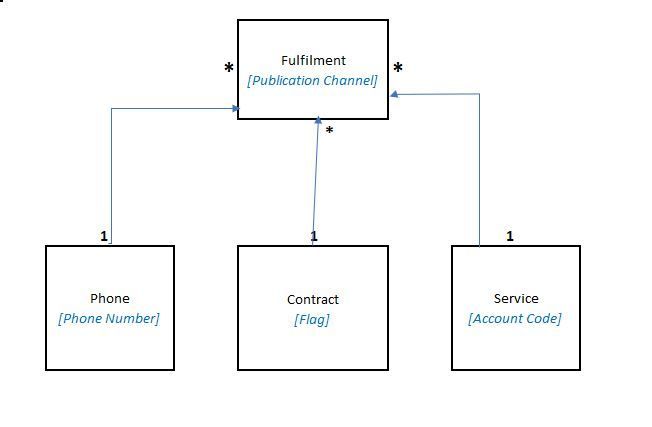 Data Model


