Join us at FabCon Atlanta from March 16 - 20, 2026, for the ultimate Fabric, Power BI, AI and SQL community-led event. Save $200 with code FABCOMM.
Register now!The Power BI Data Visualization World Championships is back! Get ahead of the game and start preparing now! Learn more
I have a table called "Export" with various columns including, "ID", "Budget Code", "Comment" & "Comment Date" with a similar layout to below...
| Building ID | Budget Code | Comment | Comment Date |
| 1 | 50 | Blah | 01/01/2022 |
| 1 | 60 | Blah, Blah | 02/01/2022 |
| 2 | 30 | ||
| 2 | 40 | ||
| 3 | 20 | Blah | 01/01/2022 |
and so on.
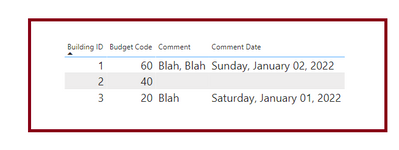
I need to somehow, filter or create a new table to display similar to below...
| Building ID | Budget Code | Comment | Comment Date |
| 1 | 60 | Blah, Blah | 02/01/2022 |
| 2 | 30 | ||
| 3 | 20 | Blah | 01/01/2022 |
so the criteria needs to be...
If a "Building ID" has multiple rows and comments, keep the row with the most recent comment date.
If a "Building ID" has multiple rows and no comments, keep any row.
If a "Building ID" has 1 row, keep that row, whether there are comments or not
I think that covers it and havent missed anything out.
Thanks in advance
Solved! Go to Solution.
Step 1
Thanks guys, will take a look shortly and get back to you with any questions.
You are welcome !!
Hi,
This M code works
let
Source = Table.FromRows(Json.Document(Binary.Decompress(Binary.FromText("i45WMlTSUTI1ABJOOYkZQMrAUBeIjAyMjJRidSDSZjBpHQWYIiMURUZAIWOQIiBSgIuYoIgYA1lGOOyJBQA=", BinaryEncoding.Base64), Compression.Deflate)), let _t = ((type nullable text) meta [Serialized.Text = true]) in type table [#"Building ID" = _t, #"Budget Code" = _t, Comment = _t, #"Comment Date" = _t]),
#"Grouped Rows" = Table.Group(Source, {"Building ID"}, {{"All", each Table.Max(_,"Comment Date")}}),
#"Expanded All" = Table.ExpandRecordColumn(#"Grouped Rows", "All", {"Budget Code", "Comment", "Comment Date"}, {"Budget Code", "Comment", "Comment Date"}),
#"Changed Type" = Table.TransformColumnTypes(#"Expanded All",{{"Comment Date", type date}})
in
#"Changed Type"
Hope this helps.
Hope this satisfies your requirement, if yes, kindly mark the answer as correct so that it can help others as well
Step 1
The Power BI Data Visualization World Championships is back! Get ahead of the game and start preparing now!
Check out the November 2025 Power BI update to learn about new features.
| User | Count |
|---|---|
| 59 | |
| 43 | |
| 42 | |
| 23 | |
| 17 |
| User | Count |
|---|---|
| 190 | |
| 122 | |
| 96 | |
| 66 | |
| 47 |