Join us at FabCon Atlanta from March 16 - 20, 2026, for the ultimate Fabric, Power BI, AI and SQL community-led event. Save $200 with code FABCOMM.
Register now!View all the Fabric Data Days sessions on demand. View schedule
Hey guys,
As the title suggests, I have a big set of data ranging from the last 2 years until today for everyday. I need to filter out only the first and last date of each month of these dates from last two years to reflect on my report. What would be the best way to achieve this?
Thank you and kind regards
Solved! Go to Solution.
Hi @p1nkman
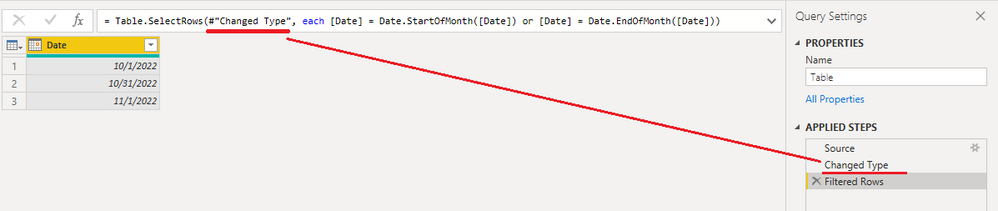
If you want to keep only the first and last date of each month in your data table, you can use Power Query Editor to filter the rows. Insert a step after the last step and paste below M code into the formula bar. Replace "previous step name" with the last step's name.
= Table.SelectRows(#"previous step name", each [Date] = Date.StartOfMonth([Date]) or [Date] = Date.EndOfMonth([Date]))
Best Regards,
Community Support Team _ Jing
If this post helps, please Accept it as Solution to help other members find it.
Hi @p1nkman
If you want to keep only the first and last date of each month in your data table, you can use Power Query Editor to filter the rows. Insert a step after the last step and paste below M code into the formula bar. Replace "previous step name" with the last step's name.
= Table.SelectRows(#"previous step name", each [Date] = Date.StartOfMonth([Date]) or [Date] = Date.EndOfMonth([Date]))
Best Regards,
Community Support Team _ Jing
If this post helps, please Accept it as Solution to help other members find it.
Check out the November 2025 Power BI update to learn about new features.
Advance your Data & AI career with 50 days of live learning, contests, hands-on challenges, study groups & certifications and more!