FabCon is coming to Atlanta
Join us at FabCon Atlanta from March 16 - 20, 2026, for the ultimate Fabric, Power BI, AI and SQL community-led event. Save $200 with code FABCOMM.
Register now!- Power BI forums
- Get Help with Power BI
- Desktop
- Service
- Report Server
- Power Query
- Mobile Apps
- Developer
- DAX Commands and Tips
- Custom Visuals Development Discussion
- Health and Life Sciences
- Power BI Spanish forums
- Translated Spanish Desktop
- Training and Consulting
- Instructor Led Training
- Dashboard in a Day for Women, by Women
- Galleries
- Data Stories Gallery
- Themes Gallery
- Contests Gallery
- Quick Measures Gallery
- Notebook Gallery
- Translytical Task Flow Gallery
- TMDL Gallery
- R Script Showcase
- Webinars and Video Gallery
- Ideas
- Custom Visuals Ideas (read-only)
- Issues
- Issues
- Events
- Upcoming Events
Join the Fabric FabCon Global Hackathon—running virtually through Nov 3. Open to all skill levels. $10,000 in prizes! Register now.
- Power BI forums
- Forums
- Get Help with Power BI
- Desktop
- Filter measure dates relative to date slicer
- Subscribe to RSS Feed
- Mark Topic as New
- Mark Topic as Read
- Float this Topic for Current User
- Bookmark
- Subscribe
- Printer Friendly Page

- Mark as New
- Bookmark
- Subscribe
- Mute
- Subscribe to RSS Feed
- Permalink
- Report Inappropriate Content
Filter measure dates relative to date slicer
I want to filter my measure dates based on a date slider that's on the same page.
I want a measure to get dates starting day before period that is selected with slicer.
For example if I have the following slider on the report page...
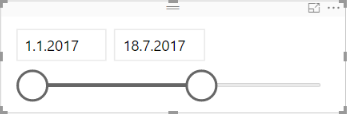
...the measure would get rows between dates 31.12.2016-18.7.2017; starting 1 day earlier than the slicer.
So if I create a table with the measure it would include rows starting from 31.12.2016 and ending to 18.7.2017
Any tips how I could achieve this?
Solved! Go to Solution.
- Mark as New
- Bookmark
- Subscribe
- Mute
- Subscribe to RSS Feed
- Permalink
- Report Inappropriate Content
@Anonymous,
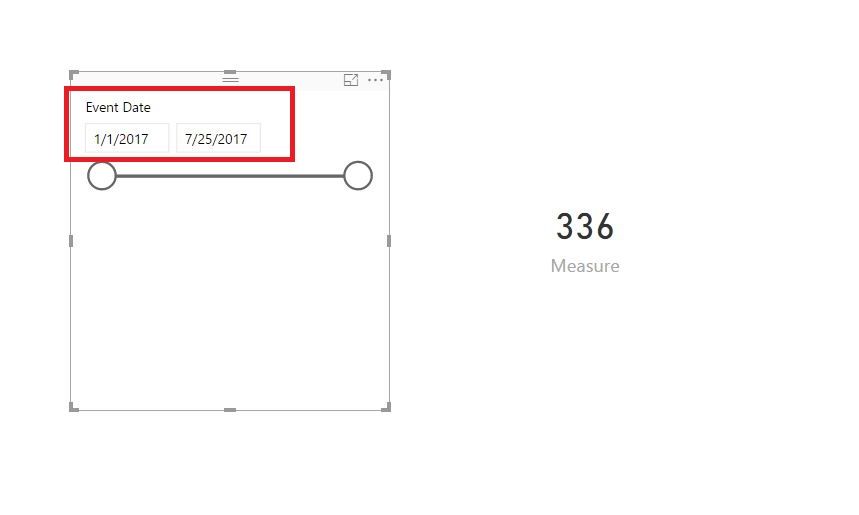
Create measue using dax below.
Measure = VAR minDate = MIN('Final data'[Event Date])-1

VAR MaxDate = MAX('Final data'[Event Date])
RETURN
    CALCULATE(SUM('Final data'[Number of persons]),DATESBETWEEN('Final data'[Event Date],minDate,MaxDate))
Regards,
Lydia

- Mark as New
- Bookmark
- Subscribe
- Mute
- Subscribe to RSS Feed
- Permalink
- Report Inappropriate Content
@Anonymous,
Create measue using dax below.
Measure = VAR minDate = MIN('Final data'[Event Date])-1

VAR MaxDate = MAX('Final data'[Event Date])
RETURN
    CALCULATE(SUM('Final data'[Number of persons]),DATESBETWEEN('Final data'[Event Date],minDate,MaxDate))
Regards,
Lydia
- Mark as New
- Bookmark
- Subscribe
- Mute
- Subscribe to RSS Feed
- Permalink
- Report Inappropriate Content
Thank you, that works wonders!

- Mark as New
- Bookmark
- Subscribe
- Mute
- Subscribe to RSS Feed
- Permalink
- Report Inappropriate Content
is it possible to set the same date slicer to a default value?


- Mark as New
- Bookmark
- Subscribe
- Mute
- Subscribe to RSS Feed
- Permalink
- Report Inappropriate Content
If you date slicer is tied to a separate Calendar table, then you could always just get the MIN and MAX of that table and do a DATEADD, something like:
m_Measure = CALCULATE(SUM(Table[Column]),FILTER(Table,[Date]>=DATEADD(MIN(Calendar[Date]),-1,day) && Table[Date]<=MAX(Calendar[Date]))
Something like that.
Follow on LinkedIn
@ me in replies or I'll lose your thread!!!
Instead of a Kudo, please vote for this idea
Become an expert!: Enterprise DNA
External Tools: MSHGQM
YouTube Channel!: Microsoft Hates Greg
Latest book!: DAX For Humans
DAX is easy, CALCULATE makes DAX hard...
- Mark as New
- Bookmark
- Subscribe
- Mute
- Subscribe to RSS Feed
- Permalink
- Report Inappropriate Content
Thank you for your reply.
I have a separate calendar table and tried your method but it gives an error:
A function 'MIN' has been used in a True/False expression that is used as a table filter expression. This is not allowed.
- Mark as New
- Bookmark
- Subscribe
- Mute
- Subscribe to RSS Feed
- Permalink
- Report Inappropriate Content
That's kind of strange. Try this:
m_Measure = VAR myMin = DATEADD(MIN(Calendar[Date]),-1,day)
VAR myMax = MAX(Calendar[Date]
RETURN
 CALCULATE(SUM(Table[Column]),FILTER(Table,[Date]>=myMin && Table[Date]<=myMax))
Follow on LinkedIn
@ me in replies or I'll lose your thread!!!
Instead of a Kudo, please vote for this idea
Become an expert!: Enterprise DNA
External Tools: MSHGQM
YouTube Channel!: Microsoft Hates Greg
Latest book!: DAX For Humans
DAX is easy, CALCULATE makes DAX hard...
- Mark as New
- Bookmark
- Subscribe
- Mute
- Subscribe to RSS Feed
- Permalink
- Report Inappropriate Content
Giving the same error about the MIN on the first row.
I'm trying this with a simple dataset containing a 'Calendar' table which contains 'Date' and table 'Final data' which has two columns: 'Event Date' and 'Number or persons'.
Just to be sure I'm not messing something up here's the method:
m_Measure = VAR myMin = DATEADD(MIN(Calendar[Date]);-1;day)
VAR myMax = MAX(Calendar[Date])
RETURN
    CALCULATE(SUM('Final data'[Number of persons]);FILTER('Final data';[Event Date]>=myMin && 'Final data'[Event Date]<=myMax))
- Mark as New
- Bookmark
- Subscribe
- Mute
- Subscribe to RSS Feed
- Permalink
- Report Inappropriate Content
That's a really weird error for that. Try this:
m_Measure = VAR myDate = MIN(Calendar[Date])
VAR myMin = DATEADD(myDate;-1;day)
VAR myMax = MAX(Calendar[Date])
RETURN
    CALCULATE(SUM('Final data'[Number of persons]);FILTER('Final data';[Event Date]>=myMin && 'Final data'[Event Date]<=myMax))
Follow on LinkedIn
@ me in replies or I'll lose your thread!!!
Instead of a Kudo, please vote for this idea
Become an expert!: Enterprise DNA
External Tools: MSHGQM
YouTube Channel!: Microsoft Hates Greg
Latest book!: DAX For Humans
DAX is easy, CALCULATE makes DAX hard...
- Mark as New
- Bookmark
- Subscribe
- Mute
- Subscribe to RSS Feed
- Permalink
- Report Inappropriate Content
That gives:
"The first argument to 'DATEADD' must specify a column."
Helpful resources

Power BI Monthly Update - September 2025
Check out the September 2025 Power BI update to learn about new features.

FabCon Atlanta 2026
Join us at FabCon Atlanta, March 16-20, for the ultimate Fabric, Power BI, AI and SQL community-led event. Save $200 with code FABCOMM.


