Join us at FabCon Atlanta from March 16 - 20, 2026, for the ultimate Fabric, Power BI, AI and SQL community-led event. Save $200 with code FABCOMM.
Register now!The Power BI Data Visualization World Championships is back! It's time to submit your entry. Live now!
Hello,
For simplicity sake I'm going to explain the problem in an example scenario.
All the data from different company's is stored in one database (MySQL).
Each company has its own salesmen.
Goal:
First a parameter needs to be given that equals one of the company's names.
Then you can only see data from that particular company in the data tab. So that data from other company's cannot be used when making visualisations.
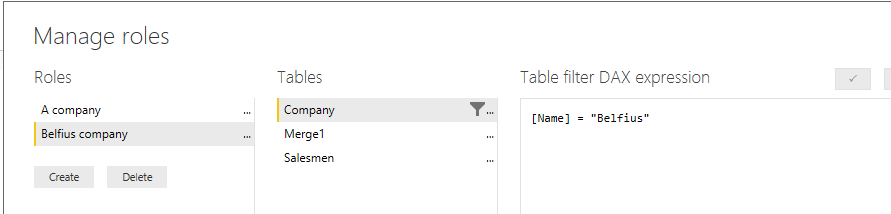
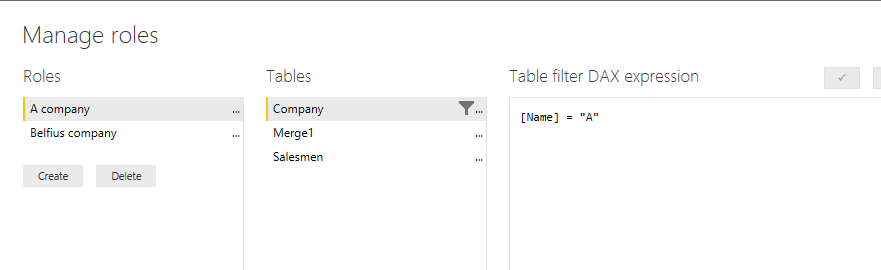
What I tried:
Expected outcome:
only data from the one company (in this case "Belfius") can be accesed when making visualisations.
Actual outcome:
I can still see data from other company's.
I tried to explain it briefly and I hope that you an idea what I'm trying to achieve. If you have any further questions please ask.
Cheers,
Vincent Neuts
Solved! Go to Solution.
@vincentn,
"Goal:
First a parameter needs to be given that equals one of the company's names.
Then you can only see data from that particular company in the data tab. So that data from other company's cannot be used when making visualisations. "
You can review the PBIX file about how to set filter parameter, However, to achieve the above goal, you can also create RLS roles.
Regards,
Lydia
@vincentn,
"Goal:
First a parameter needs to be given that equals one of the company's names.
Then you can only see data from that particular company in the data tab. So that data from other company's cannot be used when making visualisations. "
You can review the PBIX file about how to set filter parameter, However, to achieve the above goal, you can also create RLS roles.
Regards,
Lydia
The Power BI Data Visualization World Championships is back! It's time to submit your entry.
Check out the January 2026 Power BI update to learn about new features.
| User | Count |
|---|---|
| 67 | |
| 44 | |
| 33 | |
| 27 | |
| 23 |
| User | Count |
|---|---|
| 142 | |
| 121 | |
| 59 | |
| 40 | |
| 33 |