Share feedback directly with Fabric product managers, participate in targeted research studies and influence the Fabric roadmap.
Sign up nowGet Fabric certified for FREE! Don't miss your chance! Learn more
Hi ,
I am trying to filter submissions count by a range of dates enterd in slicer (between)
For example if a user enter a range of date the table should show the count of submissions for that range of dates.
I created this formula, it works when I choose one date but not a range, any help
Current_Submission =
var startdate= max(DimDate[Date])
var enddate = min(DimDate[Date]) Return
calculate(DISTINCTCOUNT(
Submisions[Submission Number]),
Filter (Submisions, Submisions[Submission Date]>= startdate && Submisions[Submission Date] <= enddate ) )
Solved! Go to Solution.
Hi @Manar,
Based on my test, you could refer to below steps:
Sample data:
Create a measure:
Current_Submission =
var startdate= max(DimDate[Date])
var enddate = min(DimDate[Date]) Return
calculate(DISTINCTCOUNT(Submission[Number]),
Filter (ALL(Submission), Submission[Date]<= startdate&&Submission[Date]>= enddate))
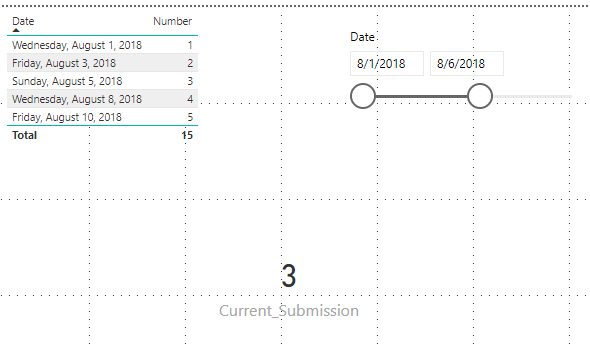
Now you could see the result:
You can also download the PBIX file to have a view.
Regards,
Daniel He
Hi @Manar,
Based on my test, you could refer to below steps:
Sample data:
Create a measure:
Current_Submission =
var startdate= max(DimDate[Date])
var enddate = min(DimDate[Date]) Return
calculate(DISTINCTCOUNT(Submission[Number]),
Filter (ALL(Submission), Submission[Date]<= startdate&&Submission[Date]>= enddate))
Now you could see the result:
You can also download the PBIX file to have a view.
Regards,
Daniel He
Current_Submission = VAR startdate= MIN(DimDate[Date]) VAR enddate = MAX(DimDate[Date]) Return calculate(DISTINCTCOUNT(Submisions[Submission Number]), Filter (Submisions,Submisions[Submission Date]>= startdate &&
Submisions[Submission Date]<= enddate )
)
Try this.
Thanks
Raj
If you love stickers, then you will definitely want to check out our Community Sticker Challenge!
Check out the January 2026 Power BI update to learn about new features.
| User | Count |
|---|---|
| 62 | |
| 59 | |
| 47 | |
| 21 | |
| 18 |
| User | Count |
|---|---|
| 119 | |
| 116 | |
| 37 | |
| 34 | |
| 30 |