cancel
Showing results for 
Search instead for 
Did you mean: 

The Power BI Data Visualization World Championships is back! Get ahead of the game and start preparing now! Learn more

Reply
CloudMonkey
Post Prodigy
Post Prodigy

Filter context using MAX

Hi,


I'm using this pbix file https://ufile.io/8gy9deoz and I'm using the following equation to find the cumulative total. I'm confused because max('Product'[Date]) appears to find the maximum Product[Date] in the current filter context (i.e. the date of the axis of the visualisation), whereas I thought ALL('Product') clears all filters (including the visualisation's axis?). Please can someone help me understand why MAX seems to be respecting the filter context of the visualisation axis despite ALL being used?


Cumulative Volume = CALCULATE(sum('Product'[Volume]),filter(ALL('Product'),
    'Product'[Date] <= max('Product'[Date])
))


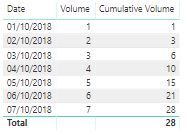
Output visualisation:

cumulative.JPG

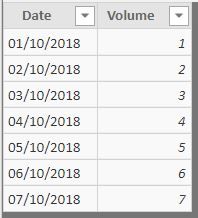
Source table:

backend.JPG

1 ACCEPTED SOLUTION
parry2k
Super User
Super User

@CloudMonkey I guess this will answer your question if you change your measure as below.


CALCULATE(sum('Product'[Volume]), 
FILTER(
all('Product'),
    'Product'[Date] <= CALCULATE( max('Product'[Date]) )
)
)


Subscribe to the @PowerBIHowTo YT channel for an upcoming video on List and Record functions in Power Query!!

Learn Power BI and Fabric - subscribe to our YT channel - Click here: @PowerBIHowTo

If my solution proved useful, I'd be delighted to receive Kudos. When you put effort into asking a question, it's equally thoughtful to acknowledge and give Kudos to the individual who helped you solve the problem. It's a small gesture that shows appreciation and encouragement! ❤


Did I answer your question? Mark my post as a solution. Proud to be a Super User! Appreciate your Kudos 🙂
Feel free to email me with any of your BI needs.

View solution in original post

2 REPLIES 2
parry2k
Super User
Super User

@CloudMonkey I guess this will answer your question if you change your measure as below.


CALCULATE(sum('Product'[Volume]), 
FILTER(
all('Product'),
    'Product'[Date] <= CALCULATE( max('Product'[Date]) )
)
)


Subscribe to the @PowerBIHowTo YT channel for an upcoming video on List and Record functions in Power Query!!

Learn Power BI and Fabric - subscribe to our YT channel - Click here: @PowerBIHowTo

If my solution proved useful, I'd be delighted to receive Kudos. When you put effort into asking a question, it's equally thoughtful to acknowledge and give Kudos to the individual who helped you solve the problem. It's a small gesture that shows appreciation and encouragement! ❤


Did I answer your question? Mark my post as a solution. Proud to be a Super User! Appreciate your Kudos 🙂
Feel free to email me with any of your BI needs.

Thanks @parry2k I think the penny's dropped. So ALL doesn't change the filter context of the whole of the calculate statement, just for the table expression used for iteration (not sure if iteration is the correct word!)


Thanks,


CM

Helpful resources

Announcements
November Power BI Update Carousel

Power BI Monthly Update - November 2025

Check out the November 2025 Power BI update to learn about new features.

Fabric Data Days Carousel

Fabric Data Days

Advance your Data & AI career with 50 days of live learning, contests, hands-on challenges, study groups & certifications and more!

FabCon Atlanta 2026 carousel

FabCon Atlanta 2026

Join us at FabCon Atlanta, March 16-20, for the ultimate Fabric, Power BI, AI and SQL community-led event. Save $200 with code FABCOMM.

Top Kudoed Authors