cancel
Showing results for 
Search instead for 
Did you mean: 

The Power BI Data Visualization World Championships is back! Get ahead of the game and start preparing now! Learn more

Reply
jthomson
Solution Sage
Solution Sage

Filter context help needed

Hi,


I have the following data:


id montha monthb monthc revenue
1 1 1 1 500
2 1 2 2 700
3 1 3 3 600
4 1 4 4 550
5 2 1 2 250
6 2 2 3 400
7 2 3 4 800
8 3 1 3 450
9 3 2 4 500
10 4 1 4 750


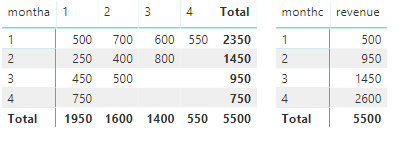
Which I'm using to create the following visuals:


triangles.PNG


Both matrices - first one's put montha as rows, monthb as columns then just summing up the revenue column. The second one's doing the same, except for monthc as rows. What I want to be able to display is this:


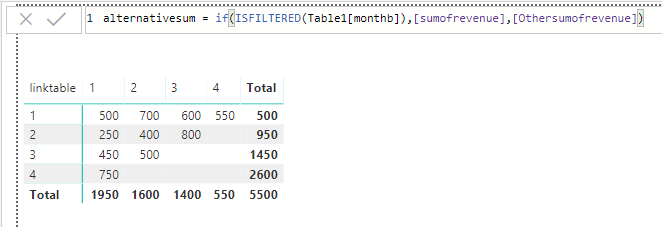
alternativesum.PNG


Here I've created a separate single column table with the numbers 1-4, an active relationship between that and montha, an inactive relationship between that and monthc, and then put the separate table into the rows instead, put alternativesum into values instead of sumofrevenue, where the othersumofrevenue measure just telling Power BI to use the inactive relationship. Unfortunately the real data I have is on SSAS, so I don't have the option to enter additional data or create relationship, so would need to leave montha as rows in the matrix. I've tried all sorts of filter, all, earlier etc to try to get something to work but haven't been able to get close - does anyone have any ideas how I can get the behaviour that I'm after? Thanks in advance

1 ACCEPTED SOLUTION

Hi,


Thanks for the reply - we managed to get an import working rather than sticking with a live connection, so are likely going down that route instead, using a separate month number table and using multiple relationships/userelationship to get the results we're after.


In our actual data we've got close to 40 months' worth of data which is going to keep increasing, so I don't what sort of performance issues we'd have with a switch command of that size - probably useful to bear this technique in mind for the future though

View solution in original post

2 REPLIES 2
v-juanli-msft
Community Support
Community Support

Hi @jthomson 

I test with data in live connection,

Create measures in this table

total_c =
CALCULATE (
    SUM ( Table1[revenue] ),
    FILTER ( ALL ( Table1 ), Table1[monthc] = MAX ( Table1[monthc] ) )
)

switch_total =
SWITCH (
    MAX ( Table1[montha] ),
    1, CALCULATE ( [total_c], FILTER ( ALL ( Table1 ), [monthc] = 1 ) ),
    2, CALCULATE ( [total_c], FILTER ( ALL ( Table1 ), [monthc] = 2 ) ),
    3, CALCULATE ( [total_c], FILTER ( ALL ( Table1 ), [monthc] = 3 ) ),
    4, CALCULATE ( [total_c], FILTER ( ALL ( Table1 ), [monthc] = 4 ) )
)
 
Measure_modified = IF(ISINSCOPE(Table1[monthb]),SUM(Table1[revenue]),[switch_total])

11.png

Best Regards
Maggie


Community Support Team _ Maggie Li
If this post helps, then please consider Accept it as the solution to help the other members find it more quickly.

Hi,


Thanks for the reply - we managed to get an import working rather than sticking with a live connection, so are likely going down that route instead, using a separate month number table and using multiple relationships/userelationship to get the results we're after.


In our actual data we've got close to 40 months' worth of data which is going to keep increasing, so I don't what sort of performance issues we'd have with a switch command of that size - probably useful to bear this technique in mind for the future though

Helpful resources

Announcements
Power BI DataViz World Championships

Power BI Dataviz World Championships

The Power BI Data Visualization World Championships is back! Get ahead of the game and start preparing now!

December 2025 Power BI Update Carousel

Power BI Monthly Update - December 2025

Check out the December 2025 Power BI Holiday Recap!

FabCon Atlanta 2026 carousel

FabCon Atlanta 2026

Join us at FabCon Atlanta, March 16-20, for the ultimate Fabric, Power BI, AI and SQL community-led event. Save $200 with code FABCOMM.

Top Solution Authors