Join us at FabCon Atlanta from March 16 - 20, 2026, for the ultimate Fabric, Power BI, AI and SQL community-led event. Save $200 with code FABCOMM.
Register now!The Power BI Data Visualization World Championships is back! Get ahead of the game and start preparing now! Learn more
I have a large table with a number of values in a field that have 3-6 decimal places - I would like to see/extract these rows only. Is there a way I can do this using filters in Power BI Desktop?
Solved! Go to Solution.
Hi @Anonymous,
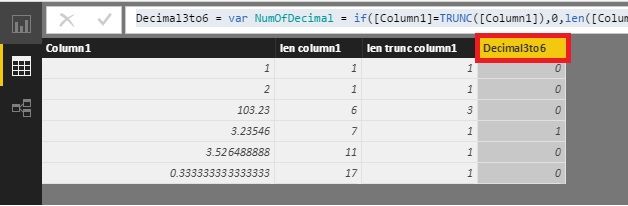
Maybe you could try this formula as a calculated column. Please test it before using it.
Decimal3to6 =
VAR NumOfDecimal =
IF (
[Column1] = TRUNC ( [Column1] ),
0,
LEN ( [Column1] ) - LEN ( TRUNC ( [Column1] ) )
- 1
)
RETURN
IF ( NumOfDecimal >= 3 && NumOfDecimal <= 6, 1, 0 )
Best Regards!
Dale
Hi @Anonymous,
Could you please mark the proper answer if it's convenient for you? That will be a help to others.
Best Regards!
Dale
Hi @Anonymous,
Maybe you could try this formula as a calculated column. Please test it before using it.
Decimal3to6 =
VAR NumOfDecimal =
IF (
[Column1] = TRUNC ( [Column1] ),
0,
LEN ( [Column1] ) - LEN ( TRUNC ( [Column1] ) )
- 1
)
RETURN
IF ( NumOfDecimal >= 3 && NumOfDecimal <= 6, 1, 0 )
Best Regards!
Dale
Hi @Anonymous
The way I would go about it is to go into the Query Editor and do the following:
Then in your report view you could use this as filter or slicer in your data.
The Power BI Data Visualization World Championships is back! Get ahead of the game and start preparing now!
| User | Count |
|---|---|
| 39 | |
| 38 | |
| 38 | |
| 28 | |
| 27 |
| User | Count |
|---|---|
| 124 | |
| 88 | |
| 73 | |
| 66 | |
| 65 |