cancel
Showing results for 
Search instead for 
Did you mean: 

We've captured the moments from FabCon & SQLCon that everyone is talking about, and we are bringing them to the community, live and on-demand. Starts on April 14th. Register now

Reply
JamesR2D2
Frequent Visitor

Filter by Year-Month and show all months of same name

Hi there,


Suppose I have this dataset:


DateValue
2020-Sep95
2020-Dec94
2021-Mar102
2021-Jun119
2021-Sep118
2021-Dec101
2022-Mar180
2022-Jun204
2022-Sep178
2022-Dec193
2023-Mar352
2023-Jun358


I have a Slicer that selects the quarter (year-month). Is there a way I can select a quarter, and have it show the both selected quarter and the equivalent previous quarters? By example, how can I select 2023-Jun and get a bar graph showing all 'June' quarters?

1 ACCEPTED SOLUTION
Anonymous
Not applicable

Hi @JamesR2D2 ,

Provide another way of thinking, Here I assume that the [Date] column is a text type.
Reference Table 1 in PowerQuery and create a table like this one.
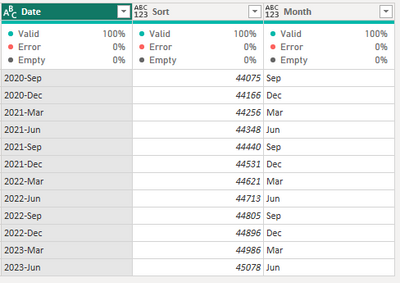
vcgaomsft_1-1694744316412.png

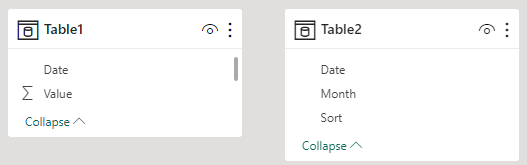
Model:

vcgaomsft_2-1694744479601.png

Then create a new measure for the visual's filter.

Measure = 
VAR _quarter = SELECTEDVALUE('Table2'[Date])
VAR _month = SELECTEDVALUE('Table2'[Month])
VAR _filter = IF(ISBLANK(_quarter) || MAX('Table1'[Date])=_quarter || RIGHT(MAX('Table1'[Date]),3)=_month,1)
RETURN
_filter

Output:
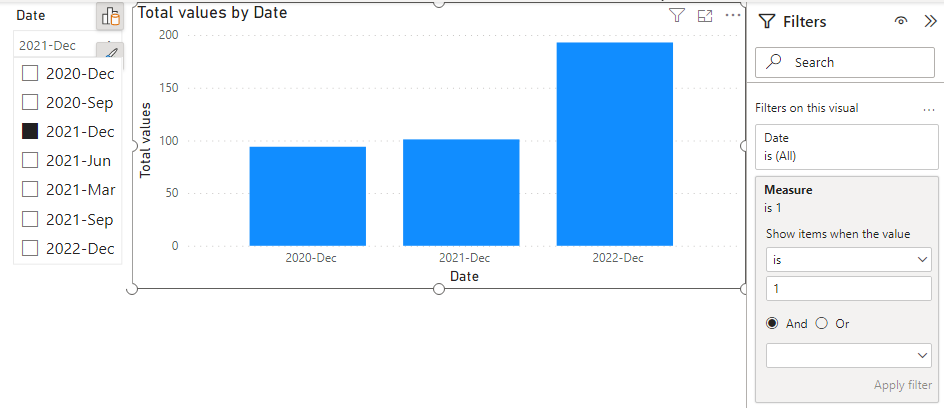
vcgaomsft_0-1694744156640.png
If [Date] is listed as a date type, the whole process is similar, and the date function is used at the end to determine the condition.

Best Regards,
Gao

Community Support Team


If there is any post helps, then please consider Accept it as the solution  to help the other members find it more quickly.
If I misunderstand your needs or you still have problems on it, please feel free to let us know. Thanks a lot!

How to get your questions answered quickly --  How to provide sample data in the Power BI Forum

View solution in original post

4 REPLIES 4
Anonymous
Not applicable

Hi @JamesR2D2 ,

Provide another way of thinking, Here I assume that the [Date] column is a text type.
Reference Table 1 in PowerQuery and create a table like this one.

vcgaomsft_1-1694744316412.png

Model:

vcgaomsft_2-1694744479601.png

Then create a new measure for the visual's filter.

Measure = 
VAR _quarter = SELECTEDVALUE('Table2'[Date])
VAR _month = SELECTEDVALUE('Table2'[Month])
VAR _filter = IF(ISBLANK(_quarter) || MAX('Table1'[Date])=_quarter || RIGHT(MAX('Table1'[Date]),3)=_month,1)
RETURN
_filter

Output:

vcgaomsft_0-1694744156640.png
If [Date] is listed as a date type, the whole process is similar, and the date function is used at the end to determine the condition.

Best Regards,
Gao

Community Support Team


If there is any post helps, then please consider Accept it as the solution  to help the other members find it more quickly.
If I misunderstand your needs or you still have problems on it, please feel free to let us know. Thanks a lot!

How to get your questions answered quickly --  How to provide sample data in the Power BI Forum

Thank you Gao, exactly what I needed. Cheers!

amitchandak
Super User
Super User

@JamesR2D2 , the slicer needs to be on an independent date/qtr table


Assume you have two tables with Quarter, Year, and Quarter Year


//Date1 is independent Date table, Date is joined with Table
new measure =
var _max = maxx(allselected(Date1),Date1[Quarter])
return
calculate( sum(Table[Value]), filter('Date', 'Date'[Quarter] =_max))


Need of an Independent Date Table:https://www.youtube.com/watch?v=44fGGmg9fHI


Show month names instead of Current Month Vs Last Month- https://youtu.be/x0DvPn1QeO4

Share with Power BI Enthusiasts: Full Power BI Video (20 Hours) YouTube
Microsoft Fabric Series 60+ Videos YouTube
Microsoft Fabric Hindi End to End YouTube

Thanks amitchandak, this makes good sense now 🙂 Cheers

Helpful resources

Announcements
New to Fabric survey Carousel

New to Fabric Survey

If you have recently started exploring Fabric, we'd love to hear how it's going. Your feedback can help with product improvements.

Power BI DataViz World Championships carousel

Power BI DataViz World Championships - June 2026

A new Power BI DataViz World Championship is coming this June! Don't miss out on submitting your entry.

Join our Fabric User Panel

Join our Fabric User Panel

Share feedback directly with Fabric product managers, participate in targeted research studies and influence the Fabric roadmap.

March Power BI Update Carousel

Power BI Community Update - March 2026

Check out the March 2026 Power BI update to learn about new features.