FabCon is coming to Atlanta
Join us at FabCon Atlanta from March 16 - 20, 2026, for the ultimate Fabric, Power BI, AI and SQL community-led event. Save $200 with code FABCOMM.
Register now!- Power BI forums
- Get Help with Power BI
- Desktop
- Service
- Report Server
- Power Query
- Mobile Apps
- Developer
- DAX Commands and Tips
- Custom Visuals Development Discussion
- Health and Life Sciences
- Power BI Spanish forums
- Translated Spanish Desktop
- Training and Consulting
- Instructor Led Training
- Dashboard in a Day for Women, by Women
- Galleries
- Data Stories Gallery
- Themes Gallery
- Contests Gallery
- QuickViz Gallery
- Quick Measures Gallery
- Visual Calculations Gallery
- Notebook Gallery
- Translytical Task Flow Gallery
- TMDL Gallery
- R Script Showcase
- Webinars and Video Gallery
- Ideas
- Custom Visuals Ideas (read-only)
- Issues
- Issues
- Events
- Upcoming Events
The Power BI Data Visualization World Championships is back! Get ahead of the game and start preparing now! Learn more
- Power BI forums
- Forums
- Get Help with Power BI
- Desktop
- Re: Filter Table With Greater than, Less Than Form...
- Subscribe to RSS Feed
- Mark Topic as New
- Mark Topic as Read
- Float this Topic for Current User
- Bookmark
- Subscribe
- Printer Friendly Page

- Mark as New
- Bookmark
- Subscribe
- Mute
- Subscribe to RSS Feed
- Permalink
- Report Inappropriate Content
Filter Table With Greater than, Less Than Formula
Hi
I need to create a filer on a report to will allow the user to dynamically filter an animal table based on animal age in months with greater than less than. Eg show me animals aged between 1 and 36 months
I have the age of animal age in months, my issue is that I don't know how to create a filter that will give me a list of the animals that match the filter criteria
Here is a demo of data I want to filter:
RAW TABLE DATA:
CLIENTID ANIMALID AGE(MTHS)
client 1 animal 1 12
client 1 animal 2 15
client 2 animal 3 13
client 2 animal 4 19
END USER FILTER:
Age(mths) >= 12 and Age(mths) <= 14
END RESULT:
CLIENTID ANIMALID AGE(MTHS)
client 1 animal 1 12
client 2 animal 3 13
To Surmise I need a way to filter the data based on a greater than less than and a way for the user to select these parameters from a filter on the report
Thanks for any help, it is much appreciated
Solved! Go to Solution.
- Mark as New
- Bookmark
- Subscribe
- Mute
- Subscribe to RSS Feed
- Permalink
- Report Inappropriate Content
@justinMcC,
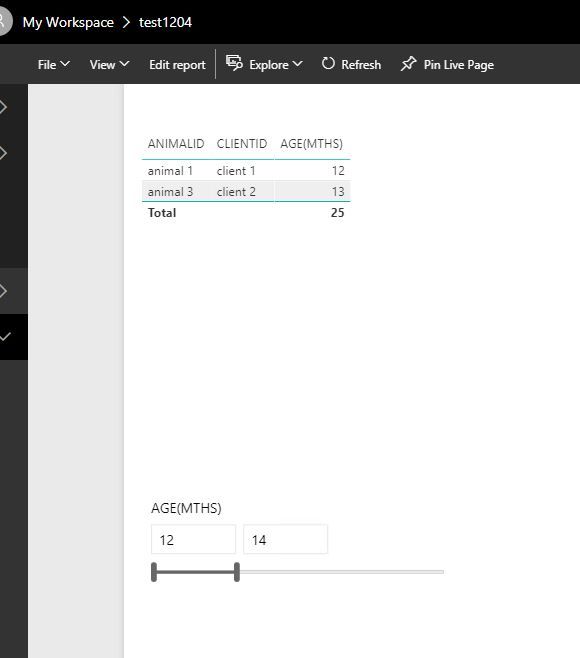
Although there is no between option in Power BI Service, when I publish PBIX file which has between option in numeric range slicer, the slicer works as expected and I set different values in the slicer, please review my screenshot.
Regards,
Lydia


- Mark as New
- Bookmark
- Subscribe
- Mute
- Subscribe to RSS Feed
- Permalink
- Report Inappropriate Content
Can you just use a Slicer visualization for Age set to Between? It's the little drop down arrow next to the eraser on the Slicer visualization.
Follow on LinkedIn
@ me in replies or I'll lose your thread!!!
Instead of a Kudo, please vote for this idea
Become an expert!: Enterprise DNA
External Tools: MSHGQM
YouTube Channel!: Microsoft Hates Greg
Latest book!: DAX For Humans
DAX is easy, CALCULATE makes DAX hard...
- Mark as New
- Bookmark
- Subscribe
- Mute
- Subscribe to RSS Feed
- Permalink
- Report Inappropriate Content
Hi Smoupre
I have tried the slicer visualisation filter however the only option available are list and dropdown. The Age(Mth) figures are formatted as a whole number
I did find this option in a number of articles, however in recent comments users have identified that this option no longer works (https://docs.microsoft.com/en-us/power-bi/desktop-slicer-numeric-range)
If the slicer needs 'fixed' by PowerBI then I am trying to find a workournd for this
Thanks for your help


- Mark as New
- Bookmark
- Subscribe
- Mute
- Subscribe to RSS Feed
- Permalink
- Report Inappropriate Content
It seems to be a preview option on mine, try playing with your settings to turn it on maybe?
- Mark as New
- Bookmark
- Subscribe
- Mute
- Subscribe to RSS Feed
- Permalink
- Report Inappropriate Content
Hi @jthomson
Thanks for your reply, I did try the numeric slicer, it works great in preview, however when I publish the report it converts the numeric slicer to a list
As this option doesn't work on a published report, is there a workaround?
- Mark as New
- Bookmark
- Subscribe
- Mute
- Subscribe to RSS Feed
- Permalink
- Report Inappropriate Content
@justinMcC,
Although there is no between option in Power BI Service, when I publish PBIX file which has between option in numeric range slicer, the slicer works as expected and I set different values in the slicer, please review my screenshot.
Regards,
Lydia
- Mark as New
- Bookmark
- Subscribe
- Mute
- Subscribe to RSS Feed
- Permalink
- Report Inappropriate Content
Thanks to everyone for your replies, I can use 'between' as a workaround for now.
Hopefully the numerical slicer will have full functionality available from preview to published soon

Helpful resources

Power BI Monthly Update - November 2025
Check out the November 2025 Power BI update to learn about new features.

Fabric Data Days
Advance your Data & AI career with 50 days of live learning, contests, hands-on challenges, study groups & certifications and more!

FabCon Atlanta 2026
Join us at FabCon Atlanta, March 16-20, for the ultimate Fabric, Power BI, AI and SQL community-led event. Save $200 with code FABCOMM.


