Join us at FabCon Atlanta from March 16 - 20, 2026, for the ultimate Fabric, Power BI, AI and SQL community-led event. Save $200 with code FABCOMM.
Register now!Learn from the best! Meet the four finalists headed to the FINALS of the Power BI Dataviz World Championships! Register now
New to PowerBI. Thanks in advance.
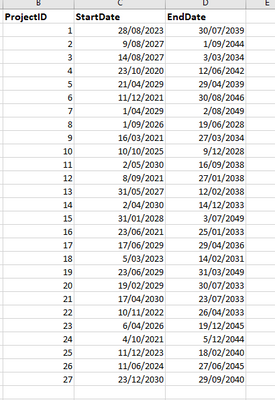
I am wokring on a report with powerbi to display the projects that's going on in each financial Year. I have a dataset like this:
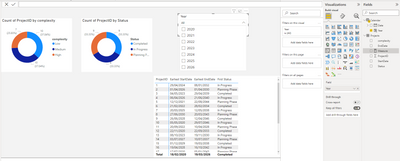
and I try to create a dashboard like this,
I hope I can use the year slicer to filter the projects that are going on,
For example, if I choose year 2026, project 1 should be included as well, because it covers.
and I need the other charts to be interactive as well.
Just wondering is there an easy way for this.
Thank you.
Hi Thank you so much for the quick response. That's really helpful.
Just two more questions that might seem bit silly:
1. so I would need to create a measure for each visual so that I can use one slicer to filter other visuals as well?
2. For the matrix in the report, there aren't any calculations, just a display of the rows in original dataset. How to write the code for this?
Thank you.
Share feedback directly with Fabric product managers, participate in targeted research studies and influence the Fabric roadmap.
Check out the February 2026 Power BI update to learn about new features.
| User | Count |
|---|---|
| 52 | |
| 51 | |
| 35 | |
| 15 | |
| 14 |
| User | Count |
|---|---|
| 92 | |
| 75 | |
| 41 | |
| 26 | |
| 25 |