Join us at FabCon Atlanta from March 16 - 20, 2026, for the ultimate Fabric, Power BI, AI and SQL community-led event. Save $200 with code FABCOMM.
Register now!The Power BI Data Visualization World Championships is back! Get ahead of the game and start preparing now! Learn more
Good
Currently, we use a calendar table containing years from 1999 to 2100. We have detected that this generates problems when filtering a year, since they come out of the table every year.
I am proposing ways to filter the calendar table, but I would not be able to say which is the most correct and if there would be any better option.
I have contemplated the following cases:
Could you help me? I think there has to be a simpler and more optimal way to do that.
Solved! Go to Solution.
Hi, @Syndicate_Admin ;
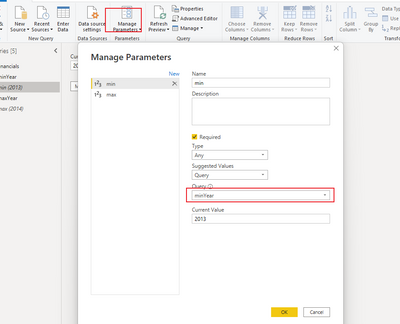
Do you mean filter in power query? if so ,you could set the parameter about min date and max date. then filter by parameter.
https://docs.microsoft.com/en-us/power-query/power-query-query-parameters
Best Regards,
Community Support Team _ Yalan Wu
If this post helps, then please consider Accept it as the solution to help the other members find it more quickly.
Hi, @Syndicate_Admin ;
Do you mean filter in power query? if so ,you could set the parameter about min date and max date. then filter by parameter.
https://docs.microsoft.com/en-us/power-query/power-query-query-parameters
Best Regards,
Community Support Team _ Yalan Wu
If this post helps, then please consider Accept it as the solution to help the other members find it more quickly.
Thanks a lot!
I don't know why the query parameters don't work for me. Even if I define the query as a list, many times it does not let me select the query in the parameter.
On the other hand, when you select the query, I see that it forces you to put a value to the parameter, that value will be updated with the value resulting from the query?
In the end, I have done it by other means.
I tried with the query defined on this website:
https://excelcute.com/fechas-minimo-maximo-power-query/
This option is very interesting because it allows us to obtain the minimum and maximum dates of all the tables of the model. Unfortunately, I don't know why, but although the queries gave me correct results in the query editor, when I did the data loading into the model, the queries were blank....
Another website I found useful was this:
https://powerbiexpertos.com/power-query/fecha-maxima-de-power-query-de-otra-tabla/
In the end, since the parameters did not work for me, I ended up creating a filter that used the result of the query directly, without the use of parameters.
The Power BI Data Visualization World Championships is back! Get ahead of the game and start preparing now!
| User | Count |
|---|---|
| 38 | |
| 36 | |
| 33 | |
| 33 | |
| 29 |
| User | Count |
|---|---|
| 132 | |
| 86 | |
| 85 | |
| 68 | |
| 64 |