cancel
Showing results for 
Search instead for 
Did you mean: 

The Power BI Data Visualization World Championships is back! Get ahead of the game and start preparing now! Learn more

Reply
marcos_osorio
Helper II
Helper II

Filter/Calculate Problem

HI, I'm having a problem and I would like to know if you can help me.


I have to resume the sales vs Budgets for our companny.


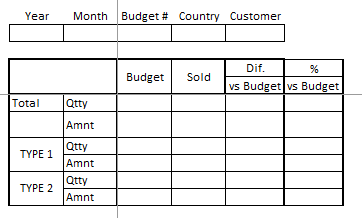
My boss asked to do something like this:

pobi.png

The problem is that in the database I have a [Type] field of the records (Sold, Budget 1, Budget 2, Budget 3, Budget 4) and a Type2 that marks as Budget when is B1, 2, 3 or 4.

If I try to make something like this by Type2 , Qtty is ok but for Budget because It sum all budgets, and I couldn't make a filter to act in the case of the Type2 = Budget filtering by the Slicer.   Is there a Way to solve it?


I already made measures only for Sold and Budget(this one using hasonfiltered and Switch to display the right budget amount.)  But is there a way to group them?


Thank you in advance.


1 ACCEPTED SOLUTION
amitchandak
Super User
Super User

@marcos_osorio .


I doubt you can the exact format. you can try workaround bt create a table like this and display

union(
summarize(table,table[Type],"Measure","Qty", "Budget",[Budget], "Sold",[Sold],  "diff",[diff]",diff %",[dif%]),
summarize(table,table[Type],"Measure","Amnt", "Budget",[Budget], "Sold",[Sold],  "diff",[diff]",diff %",[dif%])
)
Share with Power BI Enthusiasts: Full Power BI Video (20 Hours) YouTube
Microsoft Fabric Series 60+ Videos YouTube
Microsoft Fabric Hindi End to End YouTube

View solution in original post

3 REPLIES 3
amitchandak
Super User
Super User

@marcos_osorio .


I doubt you can the exact format. you can try workaround bt create a table like this and display

union(
summarize(table,table[Type],"Measure","Qty", "Budget",[Budget], "Sold",[Sold],  "diff",[diff]",diff %",[dif%]),
summarize(table,table[Type],"Measure","Amnt", "Budget",[Budget], "Sold",[Sold],  "diff",[diff]",diff %",[dif%])
)
Share with Power BI Enthusiasts: Full Power BI Video (20 Hours) YouTube
Microsoft Fabric Series 60+ Videos YouTube
Microsoft Fabric Hindi End to End YouTube
Anonymous
Not applicable

HI @marcos_osorio,

Can you please share some sample data for test? It will help to test and coding formulas.

How to Get Your Question Answered Quickly 

In addition, you can also take a look at the following link about the total level measure calculate:

Measure Totals, The Final Word  

Regards,

Xiaoxin Sheng

amitchandak
Super User
Super User

The information you have provided is not making the problem clear to me. Can you please explain with an example.

The nearest solution I can think of now is

https://community.powerbi.com/t5/Desktop/Slicer-MTD-QTD-YTD-to-filter-dates-using-the-slicer/td-p/50...


Appreciate your Kudos. In case, this is the solution you are looking for, mark it as the Solution.
In case it does not help, please provide additional information and mark me with @

Thanks. My Recent Blogs -Decoding Direct Query - Time Intelligence, Winner Coloring on MAP, HR Analytics, Power BI Working with Non-Standard TimeAnd Comparing Data Across Date Ranges
Proud to be a Datanaut Connect on Linkedin


Share with Power BI Enthusiasts: Full Power BI Video (20 Hours) YouTube
Microsoft Fabric Series 60+ Videos YouTube
Microsoft Fabric Hindi End to End YouTube

Helpful resources

Announcements
Power BI DataViz World Championships

Power BI Dataviz World Championships

The Power BI Data Visualization World Championships is back! Get ahead of the game and start preparing now!

December 2025 Power BI Update Carousel

Power BI Monthly Update - December 2025

Check out the December 2025 Power BI Holiday Recap!

FabCon Atlanta 2026 carousel

FabCon Atlanta 2026

Join us at FabCon Atlanta, March 16-20, for the ultimate Fabric, Power BI, AI and SQL community-led event. Save $200 with code FABCOMM.