Join us at FabCon Atlanta from March 16 - 20, 2026, for the ultimate Fabric, Power BI, AI and SQL community-led event. Save $200 with code FABCOMM.
Register now!The Power BI Data Visualization World Championships is back! It's time to submit your entry. Live now!
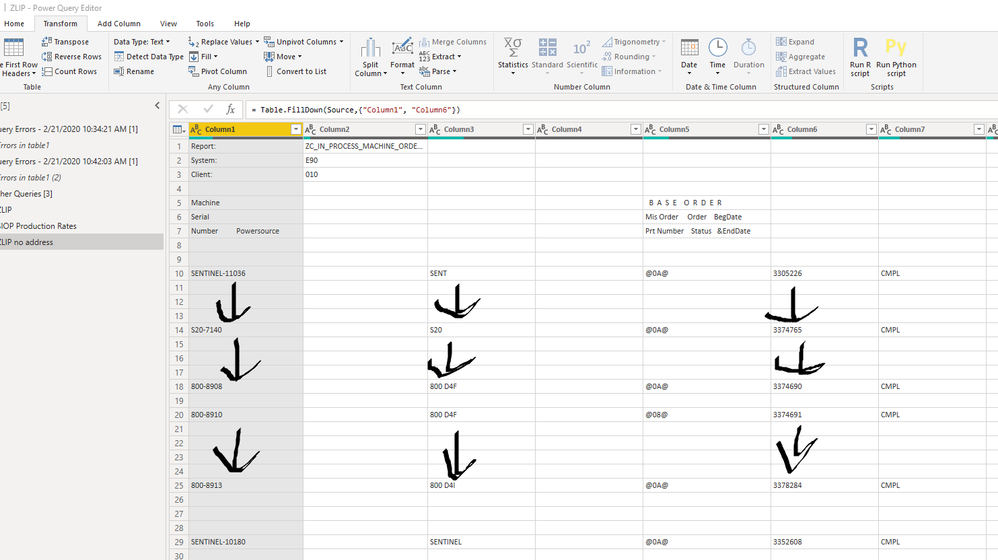
I have a table where I want to "Fill Down" some rows. I highlight the entire column and select Fill Down but nothing happens. A formula popls up that says = Table.FillDown(Source,{"Column1","Column6}) so I feel like I'm doing it right.
The error must be on my end or is there something wrong with my data? See screen shot with arrows I drew on where I want to apply fill down.
Solved! Go to Solution.
Hi @Anonymous ,
Please replace your value to null, then you can use the Fill Down.
Please try.
Aiolos Zhao
Is fill down not working for you. Same option in power bi edit query mode
https://www.excelcampus.com/library/fill-down-blank-null-cells-power-query/
Hi @Anonymous ,
Please replace your value to null, then you can use the Fill Down.
Please try.
Aiolos Zhao
The Power BI Data Visualization World Championships is back! It's time to submit your entry.
Check out the January 2026 Power BI update to learn about new features.
| User | Count |
|---|---|
| 58 | |
| 43 | |
| 39 | |
| 23 | |
| 21 |
| User | Count |
|---|---|
| 144 | |
| 106 | |
| 63 | |
| 38 | |
| 31 |