FabCon is coming to Atlanta
Join us at FabCon Atlanta from March 16 - 20, 2026, for the ultimate Fabric, Power BI, AI and SQL community-led event. Save $200 with code FABCOMM.
Register now!- Power BI forums
- Get Help with Power BI
- Desktop
- Service
- Report Server
- Power Query
- Mobile Apps
- Developer
- DAX Commands and Tips
- Custom Visuals Development Discussion
- Health and Life Sciences
- Power BI Spanish forums
- Translated Spanish Desktop
- Training and Consulting
- Instructor Led Training
- Dashboard in a Day for Women, by Women
- Galleries
- Data Stories Gallery
- Themes Gallery
- Contests Gallery
- QuickViz Gallery
- Quick Measures Gallery
- Visual Calculations Gallery
- Notebook Gallery
- Translytical Task Flow Gallery
- TMDL Gallery
- R Script Showcase
- Webinars and Video Gallery
- Ideas
- Custom Visuals Ideas (read-only)
- Issues
- Issues
- Events
- Upcoming Events
The Power BI Data Visualization World Championships is back! Get ahead of the game and start preparing now! Learn more
- Power BI forums
- Forums
- Get Help with Power BI
- Desktop
- Re: Failed to save modifications to the server whe...
- Subscribe to RSS Feed
- Mark Topic as New
- Mark Topic as Read
- Float this Topic for Current User
- Bookmark
- Subscribe
- Printer Friendly Page


- Mark as New
- Bookmark
- Subscribe
- Mute
- Subscribe to RSS Feed
- Permalink
- Report Inappropriate Content
Failed to save modifications to the server when calling API
Hi everyone
I am getting the following error when I click "Apply Now" in power query.
Failed to save modifications to the server. Error returned: 'Expression in partition 'n/a' in table 'n/a' references an unknown entity.
I have an advanced query I wrote that works perfectly in power query until I hit the apply button to go back to my report.
The query calls an API and using paging to get all the data before constructing my final table.
Does anyone know what this error is?
Thanks
Patto
Solved! Go to Solution.

- Mark as New
- Bookmark
- Subscribe
- Mute
- Subscribe to RSS Feed
- Permalink
- Report Inappropriate Content
I have a similar problem and fix it to solve it NOT using the feaure preview "Store datasets using enhanced metadata format"

- Mark as New
- Bookmark
- Subscribe
- Mute
- Subscribe to RSS Feed
- Permalink
- Report Inappropriate Content
The solution that worked for me was to delete files or programs stored on my local C disk, after that the message no longer appeared.


- Mark as New
- Bookmark
- Subscribe
- Mute
- Subscribe to RSS Feed
- Permalink
- Report Inappropriate Content
I had the same problem and none of the suggested solutions worked. I found that I had some nasty anti-patterns, where I had a calculated table having a relationship to a table included in the calculation. When I refactored to eliminate that, the problem disappeared.
- Mark as New
- Bookmark
- Subscribe
- Mute
- Subscribe to RSS Feed
- Permalink
- Report Inappropriate Content
Unforturnatley turning off the preview feature didnt fix the issue for me with desktop version May 2020.
I'm doing something similar where I'm applying a custom function to a column in a table that returns more rows. I most likely will have to resort to using Python

- Mark as New
- Bookmark
- Subscribe
- Mute
- Subscribe to RSS Feed
- Permalink
- Report Inappropriate Content
I am experiencing the same issue but have narrowed it down to the following. If I replace the text of the web path "https://www.examplesite.com/testfile.xls" with a function fnPathFile does this dynamically then I get the error. Any ideas would be helpful
Web.Contents("https://www.examplesite.com/testfile.xls")
Web.Contents(fnPathFile)
fnPathFile returns: https://www.examplesite.com/testfile.xls


- Mark as New
- Bookmark
- Subscribe
- Mute
- Subscribe to RSS Feed
- Permalink
- Report Inappropriate Content
I had the same issue, but was nothing mentioned above, but then realised that the 'partition' relates to incremental refresh. (thanks to Daniel Otykier videos on Tabular Editor!) Once I removed the incremental refresh policies on all the tables, it allowed the Query to be applied successfully!
- Mark as New
- Bookmark
- Subscribe
- Mute
- Subscribe to RSS Feed
- Permalink
- Report Inappropriate Content
I have a similar problem and fix it to solve it NOT using the feaure preview "Store datasets using enhanced metadata format"
- Mark as New
- Bookmark
- Subscribe
- Mute
- Subscribe to RSS Feed
- Permalink
- Report Inappropriate Content
Same Problem. It was the solution. Thank you.
- Mark as New
- Bookmark
- Subscribe
- Mute
- Subscribe to RSS Feed
- Permalink
- Report Inappropriate Content
Hi ian_teoh,
Thanks a lot for the solution, this is working perfectly.
File
Options
Options and Settings
Options
Preview Features
uncheck "Store datasets using the enhanced metadata format".
- Mark as New
- Bookmark
- Subscribe
- Mute
- Subscribe to RSS Feed
- Permalink
- Report Inappropriate Content
- Mark as New
- Bookmark
- Subscribe
- Mute
- Subscribe to RSS Feed
- Permalink
- Report Inappropriate Content
Perfect, champion that was it!
Phew, thats been driving me nuts - hopefully the Power BI team take that on board to fix that preview feature going forward.
Cheers


- Mark as New
- Bookmark
- Subscribe
- Mute
- Subscribe to RSS Feed
- Permalink
- Report Inappropriate Content
Refer if these can help
https://community.powerbi.com/t5/Desktop/Failed-to-save-modifications-to-server/m-p/345109
- Mark as New
- Bookmark
- Subscribe
- Mute
- Subscribe to RSS Feed
- Permalink
- Report Inappropriate Content
Thanks for replying but unfortunately neither of these solutions helped in my case.
Any other ideas?
Cheers
- Mark as New
- Bookmark
- Subscribe
- Mute
- Subscribe to RSS Feed
- Permalink
- Report Inappropriate Content
Hi @Patto ,
Could you please provide the source code for every query in Advanced Editor? Is there any warning icon in front of every query? Need to check the data source of every query, and if they refer any invalid data...
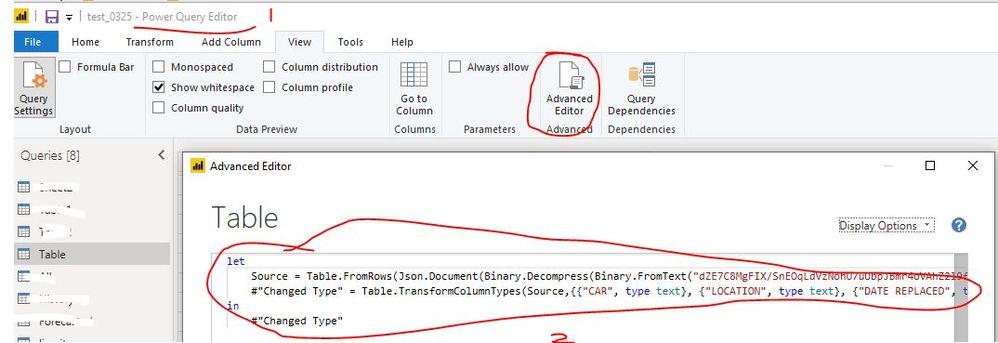
Best Regards
Rena
- Mark as New
- Bookmark
- Subscribe
- Mute
- Subscribe to RSS Feed
- Permalink
- Report Inappropriate Content
Hi @Anonymous
Thanks for replying, please find my advanced query below (I XXXXX'd out my apikey and Url):
You could basically do the same thing with any paged api call.
let
    BaseUrl = "https://api.XXXXXXXXX.com/v1/bookings?",
    EntitiesPerPage = 10,

    GetJson = (Url) =>
        let Options = [Headers=[apiKey="XXXXXXXXXXXXXXXXXXXXXXXX"]],
            RawData = Web.Contents(Url, Options),
            Json = Json.Document(RawData)
        in Json,

    GetEntityCount = () =>
        let Count = 20
        in Count,

    GetPage = (Index) =>
        let Offset = "&offset=" & Text.From(Index * EntitiesPerPage),
            Limit = "&limit=" & Text.From(EntitiesPerPage),
            Url = BaseUrl & Offset & "&" & Limit,
            Json = GetJson(Url),
            Value = Json[#"bookings"]
        in Value,

    EntityCount = List.Max({ EntitiesPerPage, GetEntityCount() }),
    PageCount = Number.RoundUp(EntityCount / EntitiesPerPage),
    PageIndices = { 0 .. PageCount - 1 },
    Pages = List.Transform(PageIndices, each GetPage(_)),
    Entities = List.Union(Pages),
    Table = Table.FromList(Entities, Splitter.SplitByNothing(), null, null, ExtraValues.Error),
    #"Expanded Column1" = Table.ExpandRecordColumn(Table, "Column1", {"orderNumber", "status", "supplierId", "supplierName", "supplierAlias", "createdBy", "customer", "items", "totalAmount", "totalCurrency", "totalPaid", "totalDue", "dateCreated", "dateConfirmed", "datePaid", "comments", "internalNotes", "payments", "fields", "source", "sourceChannel", "resellerComments", "vouchers", "resellerReference"}, {"Column1.orderNumber", "Column1.status", "Column1.supplierId", "Column1.supplierName", "Column1.supplierAlias", "Column1.createdBy", "Column1.customer", "Column1.items", "Column1.totalAmount", "Column1.totalCurrency", "Column1.totalPaid", "Column1.totalDue", "Column1.dateCreated", "Column1.dateConfirmed", "Column1.datePaid", "Column1.comments", "Column1.internalNotes", "Column1.payments", "Column1.fields", "Column1.source", "Column1.sourceChannel", "Column1.resellerComments", "Column1.vouchers", "Column1.resellerReference"})
in
    #"Expanded Column1"
Cheers


- Mark as New
- Bookmark
- Subscribe
- Mute
- Subscribe to RSS Feed
- Permalink
- Report Inappropriate Content
Hi @Patto ,
I just came across this same problem when just messing around with some public info with the below M script. Not sure why this erroring as it loads the data ok in power query. Sorry I can't answer your problem but maybe someone can answer this one which may be the same as your problem.
let
    Now1 = DateTime.LocalNow(),
    Date1 = DateTime.ToText(Now1,"yyy-MM-dd"),
    Source = Excel.Workbook(Web.Contents("https://www.ecdc.europa.eu/sites/default/files/documents/COVID-19-geographic-disbtribution-worldwide-" & Date1 & ".xlsx"), null, true),
    #"COVID-19-geographic-disbtributi_Sheet" = Source{[Item="COVID-19-geographic-disbtributi",Kind="Sheet"]}[Data],
    #"Promoted Headers" = Table.PromoteHeaders(#"COVID-19-geographic-disbtributi_Sheet", [PromoteAllScalars=true]),
    #"Changed Type" = Table.TransformColumnTypes(#"Promoted Headers",{{"DateRep", type date}, {"Day", Int64.Type}, {"Month", Int64.Type}, {"Year", Int64.Type}, {"Cases", Int64.Type}, {"Deaths", Int64.Type}, {"Countries and territories", type text}, {"GeoId", type text}, {"Pop_Data.2018", Int64.Type}}),
    #"Renamed Columns" = Table.RenameColumns(#"Changed Type",{{"Pop_Data.2018", "Pop_Data_2018"}})
in
    #"Renamed Columns"
- Mark as New
- Bookmark
- Subscribe
- Mute
- Subscribe to RSS Feed
- Permalink
- Report Inappropriate Content
Thanks @gooranga1
Yeah as per above, the issue was a bug in one of the preview features I had turned on.
As soon as I turned it off, all was well in the world.
Cheers

- Mark as New
- Bookmark
- Subscribe
- Mute
- Subscribe to RSS Feed
- Permalink
- Report Inappropriate Content
I am also seeing the same problem. This really looks & feels like a bug.
This query works:
let
    //textmonth=Number.ToText(3),
    yesterday="0"&"3"&"-26-2020",
    url="https://raw.githubusercontent.com/CSSEGISandData/COVID-19/master/csse_covid_19_data/csse_covid_19_daily_reports/"&yesterday&".csv",
    Source = Csv.Document(Web.Contents(url),[Delimiter=",", Columns=12, Encoding=65001, QuoteStyle=QuoteStyle.None]),
    #"Promoted Headers" = Table.PromoteHeaders(Source, [PromoteAllScalars=true]),
    #"Added Custom" = Table.AddColumn(#"Promoted Headers", "Custom", each yesterday),
    #"Changed Type" = Table.TransformColumnTypes(#"Added Custom",{{"FIPS", Int64.Type}, {"Admin2", type text}, {"Province_State", type text}, {"Country_Region", type text}, {"Last_Update", type datetime}, {"Lat", type number}, {"Long_", type number}, {"Confirmed", Int64.Type}, {"Deaths", Int64.Type}, {"Recovered", Int64.Type}, {"Active", Int64.Type}, {"Combined_Key", type text}})
in
    #"Changed Type"
This following query results in an error. Note that I replaced "3" with textmonth which equals Number.ToText(3). This query should yeild an identical result but it actually results in an error.
let
    textmonth=Number.ToText(3),
    yesterday="0"&textmonth&"-26-2020",
    url="https://raw.githubusercontent.com/CSSEGISandData/COVID-19/master/csse_covid_19_data/csse_covid_19_daily_reports/"&yesterday&".csv",
    Source = Csv.Document(Web.Contents(url),[Delimiter=",", Columns=12, Encoding=65001, QuoteStyle=QuoteStyle.None]),
    #"Promoted Headers" = Table.PromoteHeaders(Source, [PromoteAllScalars=true]),
    #"Added Custom" = Table.AddColumn(#"Promoted Headers", "Custom", each yesterday),
    #"Changed Type" = Table.TransformColumnTypes(#"Added Custom",{{"FIPS", Int64.Type}, {"Admin2", type text}, {"Province_State", type text}, {"Country_Region", type text}, {"Last_Update", type datetime}, {"Lat", type number}, {"Long_", type number}, {"Confirmed", Int64.Type}, {"Deaths", Int64.Type}, {"Recovered", Int64.Type}, {"Active", Int64.Type}, {"Combined_Key", type text}})
in
    #"Changed Type"
Likegooranga1, the preview loads fine. It is once I close the query editor and attempt to refresh data that I see the same error.
Helpful resources

Power BI Dataviz World Championships
The Power BI Data Visualization World Championships is back! Get ahead of the game and start preparing now!

Power BI Monthly Update - December 2025
Check out the December 2025 Power BI Holiday Recap!

FabCon Atlanta 2026
Join us at FabCon Atlanta, March 16-20, for the ultimate Fabric, Power BI, AI and SQL community-led event. Save $200 with code FABCOMM.

| User | Count |
|---|---|
| 39 | |
| 38 | |
| 38 | |
| 28 | |
| 27 |


| User | Count |
|---|---|
| 124 | |
| 88 | |
| 73 | |
| 66 | |
| 65 |


