Join us at FabCon Atlanta from March 16 - 20, 2026, for the ultimate Fabric, Power BI, AI and SQL community-led event. Save $200 with code FABCOMM.
Register now!The Power BI Data Visualization World Championships is back! Get ahead of the game and start preparing now! Learn more
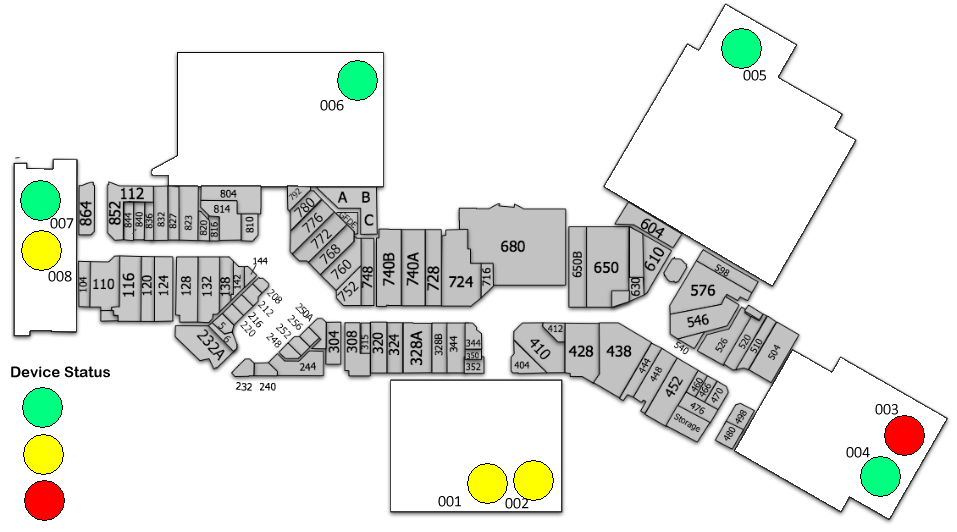
We are trying to make a visually appealing report for an IoT project which shows data and statuses of industrial equipment at a factory. Looking for ideas for how to implement a device operating status (good, warning, error) as traffic lights - something like the attached image.
The factory map is static and so are the device positioning for now. What are the best ways to change the status colors based on data changes?
Any help or pointers would be helpful.
Solved! Go to Solution.
You may take a look at https://appsource.microsoft.com/en-us/product/power-bi-visuals/WA104380873?src=office&tab=Overview.
@v-chuncz-msft I was able to get the custom visual, however not sure how to load a local map. I am not seeing any toolbar for the visual following the instructions.
Thanks.
The Power BI Data Visualization World Championships is back! Get ahead of the game and start preparing now!
| User | Count |
|---|---|
| 40 | |
| 38 | |
| 36 | |
| 29 | |
| 28 |
| User | Count |
|---|---|
| 127 | |
| 88 | |
| 78 | |
| 66 | |
| 65 |