Join us at FabCon Atlanta from March 16 - 20, 2026, for the ultimate Fabric, Power BI, AI and SQL community-led event. Save $200 with code FABCOMM.
Register now!The Power BI Data Visualization World Championships is back! Get ahead of the game and start preparing now! Learn more
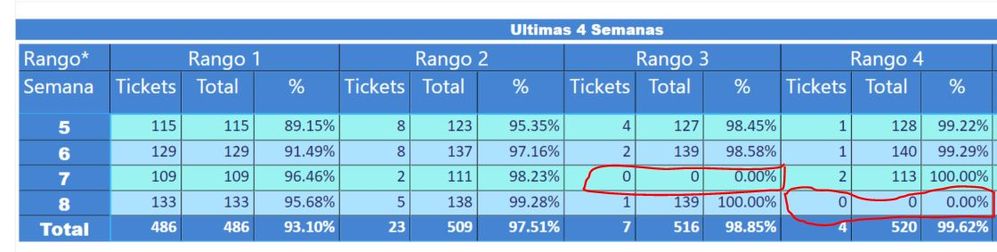
Dear community, I need to create an acumulative measure...What Ive used is quite close with what I need, eventhough I need to fix the last problem and I got stacked:
In the exampleI you will see 4 ranges (Rango 1 ; Rango 2 ...) and if I have data in every single range the comulative measure works good but if I dont have anything in the range, the measure dont keep the last comulative value just a 0... anyone has an idea in order to solve my problem?
Thanks
Comulative =
IF(CALCULATE(
COUNTA('EXTR-INC&WO-Genérico v4 0 (Chil'[Ticket ID]);
FILTER(
ALLSELECTED('EXTR-INC&WO-Genérico v4 0 (Chil'[Rango*]);
ISONORAFTER('EXTR-INC&WO-Genérico v4 0 (Chil'[Rango*];
MAX('EXTR-INC&WO-Genérico v4 0 (Chil'[Rango*]);DESC
)
)
In Red what is supposed to keep the previous ammount but is it said "0"
Solved! Go to Solution.
Hi @christianfcbmx,
Well, it is complicated.
And I think your issue exists here. When the count <=0, you make it as 0 in IF() function.
Total Acumulado Rango =
IF(CALCULATE(
COUNTA('EXTR-INC&WO-Genérico v4 0 (Chil'[Ticket ID]),
FILTER(
ALLSELECTED('EXTR-INC&WO-Genérico v4 0 (Chil'[Rango*]),
ISONORAFTER('EXTR-INC&WO-Genérico v4 0 (Chil'[Rango*],
MAX('EXTR-INC&WO-Genérico v4 0 (Chil'[Rango*]),DESC
)
)
)<=0,0, (CALCULATE(
COUNTA('EXTR-INC&WO-Genérico v4 0 (Chil'[Ticket ID]),
FILTER(
ALLSELECTED('EXTR-INC&WO-Genérico v4 0 (Chil'[Rango*]),
ISONORAFTER('EXTR-INC&WO-Genérico v4 0 (Chil'[Rango*], MAX('EXTR-INC&WO-Genérico v4 0 (Chil'[Rango*]),DESC
)
)
)))To achieve your requirement, you need to add another formula when the count <=0. Like:
Total Acumulado Rango v2 =
VAR temp =
CALCULATE (
COUNTA ( 'EXTR-INC&WO-Genérico v4 0 (Chil'[Ticket ID] ),
FILTER (
ALLSELECTED ( 'EXTR-INC&WO-Genérico v4 0 (Chil'[Rango*] ),
ISONORAFTER (
'EXTR-INC&WO-Genérico v4 0 (Chil'[Rango*], MAX ( 'EXTR-INC&WO-Genérico v4 0 (Chil'[Rango*] ), DESC
)
)
)
VAR t1 =
CALCULATE (
[Total Acumulado Rango],
'EXTR-INC&WO-Genérico v4 0 (Chil'[Rango*] = "Rango 3"
)
RETURN
IF ( temp <= 0, t1, temp )Please be noticed that above formula is just a sample. Since I'm not quite familiar with your source data. You need to tune it yourself.
And change your table name please. It makes me crazy. ![]()
Thanks,
Xi Jin.
Hi @christianfcbmx,
Could you please share us some sample data which we can copy and paste directly and its corresponding expected result if possible? So that we can get a right direction and make some tests.
Also if you can share us your pbix file with One Drive or Google Drive. It'll help us a lot to troubleshoot your issue.
Thanks,
Xi Jin.
Hello @v-xjiin-msft thank you for helping me out...I thoght that maybe my case is too complicated because none was saying nothing!!! 😄
As you see the matrix logic, the Total Column and % column is comulative but I need when some range have no data I mean when the column named "tickets" is 0 the next columns (which have the comulative idea) keep the previous total and percentage...
This drove me really crazy... I hope you have a solution in you!!!
https://www.dropbox.com/s/pllx3r7hlve3stn/Prueba%20Community1.pbix?dl=0
![]()
Hi @christianfcbmx,
Well, it is complicated.
And I think your issue exists here. When the count <=0, you make it as 0 in IF() function.
Total Acumulado Rango =
IF(CALCULATE(
COUNTA('EXTR-INC&WO-Genérico v4 0 (Chil'[Ticket ID]),
FILTER(
ALLSELECTED('EXTR-INC&WO-Genérico v4 0 (Chil'[Rango*]),
ISONORAFTER('EXTR-INC&WO-Genérico v4 0 (Chil'[Rango*],
MAX('EXTR-INC&WO-Genérico v4 0 (Chil'[Rango*]),DESC
)
)
)<=0,0, (CALCULATE(
COUNTA('EXTR-INC&WO-Genérico v4 0 (Chil'[Ticket ID]),
FILTER(
ALLSELECTED('EXTR-INC&WO-Genérico v4 0 (Chil'[Rango*]),
ISONORAFTER('EXTR-INC&WO-Genérico v4 0 (Chil'[Rango*], MAX('EXTR-INC&WO-Genérico v4 0 (Chil'[Rango*]),DESC
)
)
)))To achieve your requirement, you need to add another formula when the count <=0. Like:
Total Acumulado Rango v2 =
VAR temp =
CALCULATE (
COUNTA ( 'EXTR-INC&WO-Genérico v4 0 (Chil'[Ticket ID] ),
FILTER (
ALLSELECTED ( 'EXTR-INC&WO-Genérico v4 0 (Chil'[Rango*] ),
ISONORAFTER (
'EXTR-INC&WO-Genérico v4 0 (Chil'[Rango*], MAX ( 'EXTR-INC&WO-Genérico v4 0 (Chil'[Rango*] ), DESC
)
)
)
VAR t1 =
CALCULATE (
[Total Acumulado Rango],
'EXTR-INC&WO-Genérico v4 0 (Chil'[Rango*] = "Rango 3"
)
RETURN
IF ( temp <= 0, t1, temp )Please be noticed that above formula is just a sample. Since I'm not quite familiar with your source data. You need to tune it yourself.
And change your table name please. It makes me crazy. ![]()
Thanks,
Xi Jin.
The Power BI Data Visualization World Championships is back! Get ahead of the game and start preparing now!
| User | Count |
|---|---|
| 40 | |
| 35 | |
| 34 | |
| 31 | |
| 28 |
| User | Count |
|---|---|
| 137 | |
| 102 | |
| 71 | |
| 67 | |
| 65 |