cancel
Showing results for 
Search instead for 
Did you mean: 

The Power BI Data Visualization World Championships is back! Get ahead of the game and start preparing now! Learn more

Reply
DeBIe
Post Partisan
Post Partisan

Extracting specific data format from column

Hi all!


I had an earlier request to extract license plates (1-ABC-123) from a column, which worked fine for me. All license plates with that format are being extracted and shown in my dashboard. The problem I am facing at the moment is that I have a new dataset where the format isn't always the same for a license plate. For example:


Data
1-ABC-123
1ABC123
1-1-2021 t/m 31-1-2021 1DEF456
CAR FUEL 1GHI789
1JKL123 LEASE


In some way, I need to be able to extract the license plates from the dataset which do not have the standard format "1-ABC-123".

The conditions are that the length should be 7 characters. A first character is a number (1), then 3 text characters, the last 3 are numbers (1ABC123).

The complexity here is that the license plates are not always filled in first in the data field, otherwise, I could extract the first 7 characters. Then do a check if the first character is a number, the next three are characters, and the last three are numbers. If that condition would be true then I can be almost 100% sure it would be a license plate. I've been breaking my mind to find a solution for this, while it sounds easy, every time I start trying things I end up failing.


Your help is much appreciated

1 ACCEPTED SOLUTION
PhilipTreacy
Super User
Super User

Hi @DeBIe 


Download sample PBIX


Give this Power Query code a go

let
    Source = Table.FromRows(Json.Document(Binary.Decompress(Binary.FromText("i45WMtR1dHLWNTQyVorVAfKAHDhb11DXyMDIUKFEP1fBGM4zdHF1MzE1AytxdgxScAt19VEwdPfwNLewhOjz8vYBmqHg4+oY7KoUGwsA", BinaryEncoding.Base64), Compression.Deflate)), let _t = ((type nullable text) meta [Serialized.Text = true]) in type table [Data = _t]),
    #"Changed Type" = Table.TransformColumnTypes(Source,{{"Data", type text}}),
    #"Added Custom" = Table.AddColumn(#"Changed Type", "Custom", each Text.Split([Data], " ")),
    #"Added Custom1" = Table.AddColumn(#"Added Custom", "Custom.1", each List.Select([Custom], each Text.Length(Text.Trim(_)) > 6)),
    #"Added Custom2" = Table.AddColumn(#"Added Custom1", "Custom.2", each Text.Combine(List.Select(List.Select([Custom.1], each Text.PositionOfAny(Text.Upper(_), {"0".."9"})>-1 ), each Text.PositionOfAny(Text.Upper(_), {"A".."Z"})>-1 ))),
    #"Added Custom3" = Table.AddColumn(#"Added Custom2", "Custom.3", each if Text.PositionOf([Custom.2], "-") <> 1 then Text.Insert(Text.Insert(Text.From([Custom.2]), 4 , "-"),1,"-") else [Custom.2]),
    #"Removed Columns" = Table.RemoveColumns(#"Added Custom3",{"Custom", "Custom.1", "Custom.2"})
    
in
    #"Removed Columns"
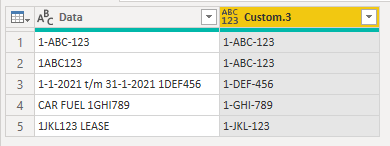
Screenshot 2021-03-25 205132.png


Regards

Phil


Did I answer your question? Then please mark my post as the solution.
If I helped you, click on the Thumbs Up to give Kudos.


Blog :: YouTube Channel :: Connect on Linkedin


Proud to be a Super User!


View solution in original post

4 REPLIES 4
DeBIe
Post Partisan
Post Partisan

@PhilipTreacy 


Thank you very much for your help. I have not been able to test it myself yet because of other business issues that came around. Will give it a try asap and let you know then!

@DeBIe 

OK, let me know if you have any issues with it.

Regards

Phil


Did I answer your question? Then please mark my post as the solution.
If I helped you, click on the Thumbs Up to give Kudos.


Blog :: YouTube Channel :: Connect on Linkedin


Proud to be a Super User!


Hi @PhilipTreacy 


I am happy to say that it worked for me! I had to do some small modifications to extract all license plates from the data. But you helped me perfectly to realize that!


PhilipTreacy
Super User
Super User

Hi @DeBIe 


Download sample PBIX


Give this Power Query code a go

let
    Source = Table.FromRows(Json.Document(Binary.Decompress(Binary.FromText("i45WMtR1dHLWNTQyVorVAfKAHDhb11DXyMDIUKFEP1fBGM4zdHF1MzE1AytxdgxScAt19VEwdPfwNLewhOjz8vYBmqHg4+oY7KoUGwsA", BinaryEncoding.Base64), Compression.Deflate)), let _t = ((type nullable text) meta [Serialized.Text = true]) in type table [Data = _t]),
    #"Changed Type" = Table.TransformColumnTypes(Source,{{"Data", type text}}),
    #"Added Custom" = Table.AddColumn(#"Changed Type", "Custom", each Text.Split([Data], " ")),
    #"Added Custom1" = Table.AddColumn(#"Added Custom", "Custom.1", each List.Select([Custom], each Text.Length(Text.Trim(_)) > 6)),
    #"Added Custom2" = Table.AddColumn(#"Added Custom1", "Custom.2", each Text.Combine(List.Select(List.Select([Custom.1], each Text.PositionOfAny(Text.Upper(_), {"0".."9"})>-1 ), each Text.PositionOfAny(Text.Upper(_), {"A".."Z"})>-1 ))),
    #"Added Custom3" = Table.AddColumn(#"Added Custom2", "Custom.3", each if Text.PositionOf([Custom.2], "-") <> 1 then Text.Insert(Text.Insert(Text.From([Custom.2]), 4 , "-"),1,"-") else [Custom.2]),
    #"Removed Columns" = Table.RemoveColumns(#"Added Custom3",{"Custom", "Custom.1", "Custom.2"})
    
in
    #"Removed Columns"

Screenshot 2021-03-25 205132.png


Regards

Phil


Did I answer your question? Then please mark my post as the solution.
If I helped you, click on the Thumbs Up to give Kudos.


Blog :: YouTube Channel :: Connect on Linkedin


Proud to be a Super User!


Helpful resources

Announcements
Power BI DataViz World Championships

Power BI Dataviz World Championships

The Power BI Data Visualization World Championships is back! Get ahead of the game and start preparing now!

November Power BI Update Carousel

Power BI Monthly Update - November 2025

Check out the November 2025 Power BI update to learn about new features.

FabCon Atlanta 2026 carousel

FabCon Atlanta 2026

Join us at FabCon Atlanta, March 16-20, for the ultimate Fabric, Power BI, AI and SQL community-led event. Save $200 with code FABCOMM.