Don't miss your chance to take exam DP-600 or DP-700 on us!
Request nowLearn from the best! Meet the four finalists headed to the FINALS of the Power BI Dataviz World Championships! Register now
Hello PowerBI community,
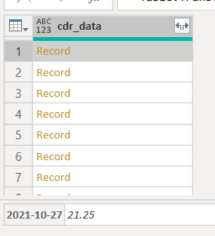
I could not find an answer anywhere on the forum, I am trying to extract dates and an associated values from a JSON field. For each row, I have one or muliple dates with a value attributed to each date. I would like to transform them into a table with 2 columns "Date" and "Value". Could you please help?
You can find below how the data looks like, I would like to transform it to have it in format:
Date Value
2021-10-27 21.25
2021-02-13 7.0833333333
2021-03-13 7.0833333333
2021-04-13 7.0833333333
etc.
Thank you in advance!
Solved! Go to Solution.
Hi @Anonymous
OK, you can extract the date and corresponding value using this query instead
let
Source = { [#"2021-02-13" = 7.08333333], [#"2021-03-13" = 7.08333333], [#"2021-04-13" = 7.08333333] },
#"Converted to Table" = Table.FromList(Source, Splitter.SplitByNothing(), null, null, ExtraValues.Error),
#"Added Custom1" = Table.AddColumn(#"Converted to Table", "Date", each Record.FieldNames([Column1]){0}),
#"Added Custom" = Table.AddColumn(#"Added Custom1", "Value", each Record.Field([Column1], Record.FieldNames([Column1]){0}))
in
#"Added Custom"

Regards
Phil
Proud to be a Super User!
Hi @Anonymous
OK, you can extract the date and corresponding value using this query instead
let
Source = { [#"2021-02-13" = 7.08333333], [#"2021-03-13" = 7.08333333], [#"2021-04-13" = 7.08333333] },
#"Converted to Table" = Table.FromList(Source, Splitter.SplitByNothing(), null, null, ExtraValues.Error),
#"Added Custom1" = Table.AddColumn(#"Converted to Table", "Date", each Record.FieldNames([Column1]){0}),
#"Added Custom" = Table.AddColumn(#"Added Custom1", "Value", each Record.Field([Column1], Record.FieldNames([Column1]){0}))
in
#"Added Custom"
Regards
Phil
Proud to be a Super User!
Hi @PhilipTreacy ,
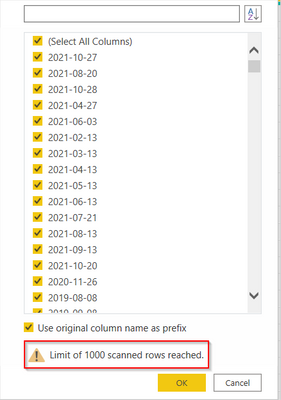
Thanky ou for your answer. I tred that, but as I have more than 1000 different dates, I'm afraid all columns won't be created:
Will all the columns be created even I could not select them because I was limited to the 1st 1000 rows?
Best,
Julien
Hi @Anonymous
Download sample PBIX file with the following example.
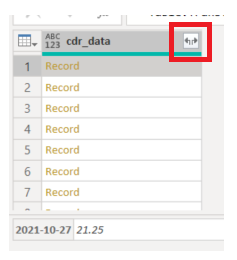
If you have a column of Records you should be able to expand these using the double headed arrow in the column header
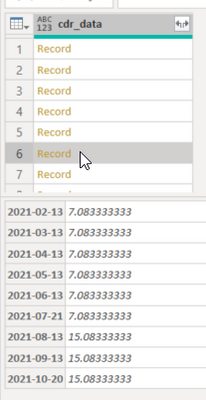
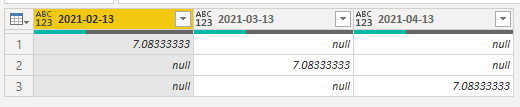
Which will give you something like this
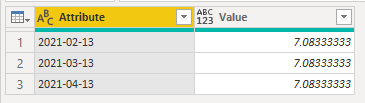
You can then unpivot the columns to give you this
Regards
Phil
Proud to be a Super User!
Share feedback directly with Fabric product managers, participate in targeted research studies and influence the Fabric roadmap.
Check out the February 2026 Power BI update to learn about new features.
| User | Count |
|---|---|
| 49 | |
| 40 | |
| 37 | |
| 14 | |
| 13 |
| User | Count |
|---|---|
| 85 | |
| 69 | |
| 37 | |
| 28 | |
| 27 |