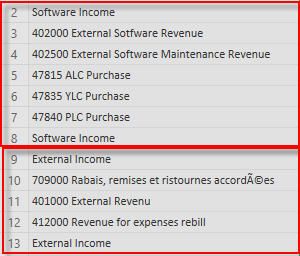
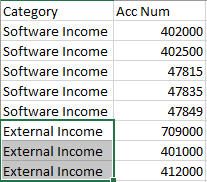
Hi @arcall,
Follow the steps below:
- Add a column to get the lines with only text in them (assuming based on your sample that all other lines starts with numbers)
if Value.Is(Value.FromText(Text.Start([Account],1)), type number) = true then null else [Account]
- Select the previous column and do a fill down
- Create validation column with similar formula than prior
if Value.Is(Value.FromText(Text.Start([Account],1)), type number) = true then [Category] else null
- This column as the null change with the category now filter out all the null and delete this column
- Make a split column by delimiter Space on the left most.
Check the complete M code below.
let
    Source = Table.FromRows(Json.Document(Binary.Decompress(Binary.FromText("bc4xDsIwDAXQq1iZGRxIVTgAA3PHqEOEbSQKjdRESo+PSwnqUCnT+7bzvTddlFzCxHAb7/HNpj944/CIiHCdM09jeEEXH7kGzTZIugxpjdqzbYBSGJ40pFDtpCYkRbiKQyAqLPQb2ivw/2BjLV6WUkx10aFdQA9JUlzNfpsr6ds/1X8A", BinaryEncoding.Base64), Compression.Deflate)), let _t = ((type text) meta [Serialized.Text = true]) in type table [Account = _t]),
    #"Changed Type" = Table.TransformColumnTypes(Source,{{"Account", type text}}),
    #"Added Custom" = Table.AddColumn(#"Changed Type", "Category", each if Value.Is(Value.FromText(Text.Start([Account],1)), type number) = true then null else [Account]),
    #"Filled Down" = Table.FillDown(#"Added Custom",{"Category"}),
    #"Added Custom1" = Table.AddColumn(#"Filled Down", "Valid", each if Value.Is(Value.FromText(Text.Start([Account],1)), type number) = true then [Category] else null),
    #"Filtered Rows" = Table.SelectRows(#"Added Custom1", each ([Valid] <> null)),
    #"Removed Columns" = Table.RemoveColumns(#"Filtered Rows",{"Valid"}),
    #"Split Column by Delimiter" = Table.SplitColumn(#"Removed Columns", "Account", Splitter.SplitTextByEachDelimiter({" "}, QuoteStyle.Csv, false), {"Account.1", "Account.2"}),
    #"Changed Type1" = Table.TransformColumnTypes(#"Split Column by Delimiter",{{"Account.1", Int64.Type}, {"Account.2", type text}})
in
    #"Changed Type1"
Regards,
MFelix
Regards
Miguel Félix
Did I answer your question? Mark my post as a solution! Proud to be a Super User!
Check out my blog: Power BI em Português