Join us at FabCon Atlanta from March 16 - 20, 2026, for the ultimate Fabric, Power BI, AI and SQL community-led event. Save $200 with code FABCOMM.
Register now!The Power BI Data Visualization World Championships is back! Get ahead of the game and start preparing now! Learn more
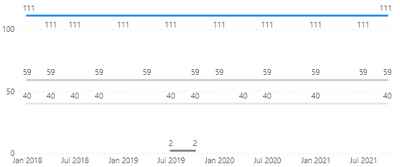
Hi guys, I have trouble when making cumulative charts, please see below figure:
As you can see, since there is no blue data after 2020 Q2, so the blue line stopped at Q2 and did not extend to the present.
Here is the formula I used to generate the line:
**bleep** COUNTS =
CALCULATE(
COUNT('ABC'[Attribute]),
FILTER(
ALLEXCEPT('ABC','ABC'[Attribute]),
ISONORAFTER('ABC'[Date/Time (Quarter)], MAX('ABC'[Date/Time (Quarter)]), DESC)
)
)
Can someone help me out on this? I have been struggling on this one for days, thanks!
Hi @Anonymous ,
Can you provide me with some dummy data?
I think you want to fill down measure, right?
Here's a similar posts:
Solved: Dax Measure Fill Down Value - Microsoft Power BI Community
Best Regards,
Stephen Tao
If this post helps, then please consider Accept it as the solution to help the other members find it more quickly.
@Anonymous , Join date of your table with a date of date table and then try measure like this with columns from date table on axis(like qtr year etc )
**bleep** COUNTS =
CALCULATE(
COUNT('ABC'[Attribute]),
FILTER( allselected('Date')
ISONORAFTER('Date'[Date], MAX('Date'[Date]), DESC)
), ALLEXCEPT('ABC','ABC'[Attribute])
)
or
**bleep** COUNTS =
CALCULATE(
COUNT('ABC'[Attribute]),
FILTER( allselected('Date')
ISONORAFTER('Date'[Date], MAX('Date'[Date]), DESC)
)
)
Hi @amitchandak , I just tried your first part of the code and it became like this:
The second doesn't work either😅
The Power BI Data Visualization World Championships is back! Get ahead of the game and start preparing now!
| User | Count |
|---|---|
| 38 | |
| 38 | |
| 36 | |
| 28 | |
| 28 |
| User | Count |
|---|---|
| 124 | |
| 89 | |
| 73 | |
| 66 | |
| 65 |