
This time we’re going bigger than ever. Fabric, Power BI, SQL, AI and more. We're covering it all. You won't want to miss it.
Learn moreJoin the FabCon + SQLCon recap series. Up next: Power BI, Real-Time Intelligence, IQ and AI, and Data Factory take center stage. All sessions are available on-demand after the live show. Register now
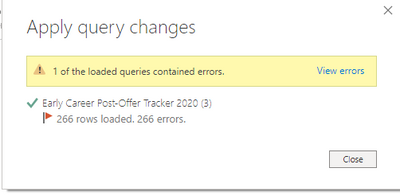
I have a report published to the power bi service. Whenever I try to download the report to refresh the data I get this message after the data has been refreshed.
When I click View errors. This comes up.
I've reset the data source settings and I still get this message. The permissions on the list hasn't changed either. The only thing that has changed is columns being added and rearranged on the sharepoint list. What can be the issue here?
Hi @dreaves1 ,
Could you tell me if your problem has been solved? If it is, kindly Accept it as the solution. More people will benefit from it. Or you are still confused about it, please provide me with more details about your table and your problem or share me with your pbix file from your Onedrive for Business.
Best Regards,
Eyelyn Qi
Hi @dreaves1 ,
As the official document said, it may caused by expired cached credentials.
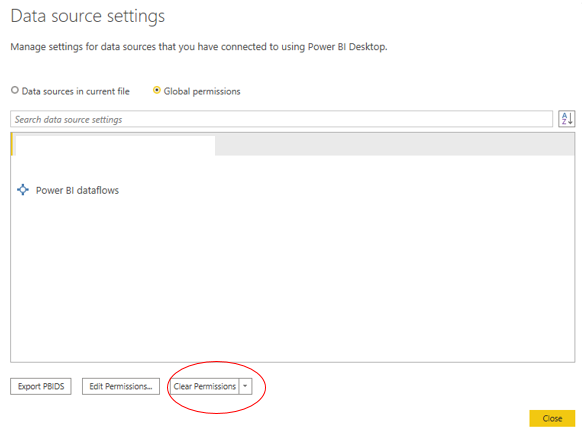
You could reset the data connection to re-enter credentials as belows:
Click the File tab —— Click Options and settings-Data source Settings on the menu —— Choose Clear Permissions.
Did I answer your question ? Please mark my reply as solution. Thank you very much.
If not, please upload some insensitive data samples and expected output.
Best Regards,
Eyelyn Qin
No Error for the first two steps.
Check out the April 2026 Power BI update to learn about new features.
If you have recently started exploring Fabric, we'd love to hear how it's going. Your feedback can help with product improvements.
A new Power BI DataViz World Championship is coming this June! Don't miss out on submitting your entry.
| User | Count |
|---|---|
| 40 | |
| 37 | |
| 31 | |
| 23 | |
| 15 |
| User | Count |
|---|---|
| 76 | |
| 59 | |
| 31 | |
| 31 | |
| 25 |