cancel
Showing results for 
Search instead for 
Did you mean: 

The Power BI Data Visualization World Championships is back! Get ahead of the game and start preparing now! Learn more

Reply
naivecalf
Helper III
Helper III

Expand rolling data

Hi,


I did rolling data by week, for qty_shipped, here is the fomular,

Accumulated Shipped = SUMX(
FILTER(
ALL(Shipped),
Shipped[Week_Shipped] >= 27 &&
Shipped[Week_Shipped]<= MAX(Shipped[Week_Shipped])),
Shipped[Amt_Shipped])
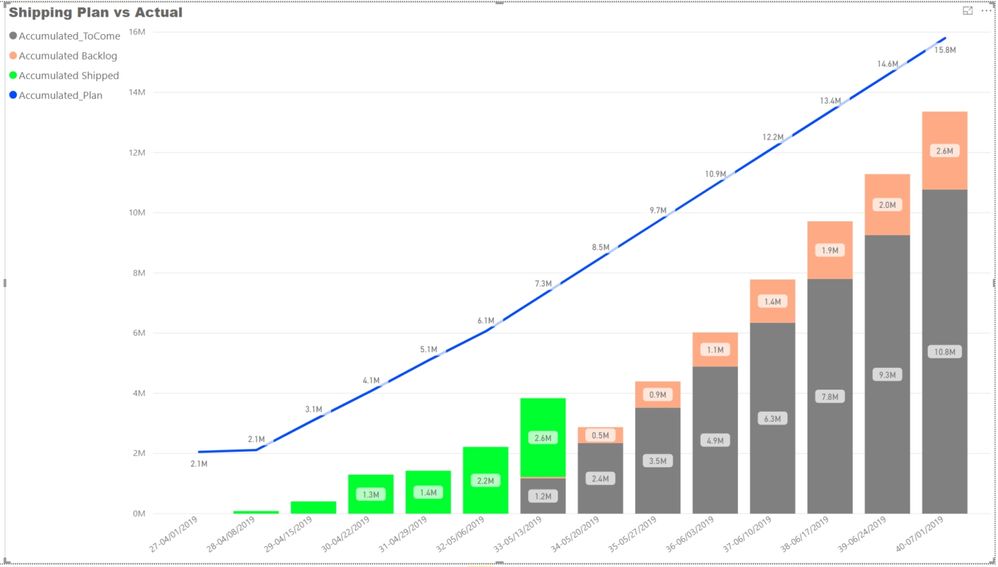
and here is the chart, please see green bar chart, how can I expand it to other date, in this sample, I need show 2.6M for weeks after and on 34.
thanks.
shipped rolling.jpg
1 ACCEPTED SOLUTION

@d_gosbell 


Thank you a lot, perfect!

I did it. 

Appreciate.


rolling data great.jpg

View solution in original post

5 REPLIES 5
d_gosbell
Super User
Super User

The condition stopping this data at week 33 is the following:


  Shipped[Week_Shipped]<= MAX(Shipped[Week_Shipped])),


So you either need to just remove that conditition or maybe use the same max date as your ToCome , Backlog or Plan measures.


@d_gosbell 


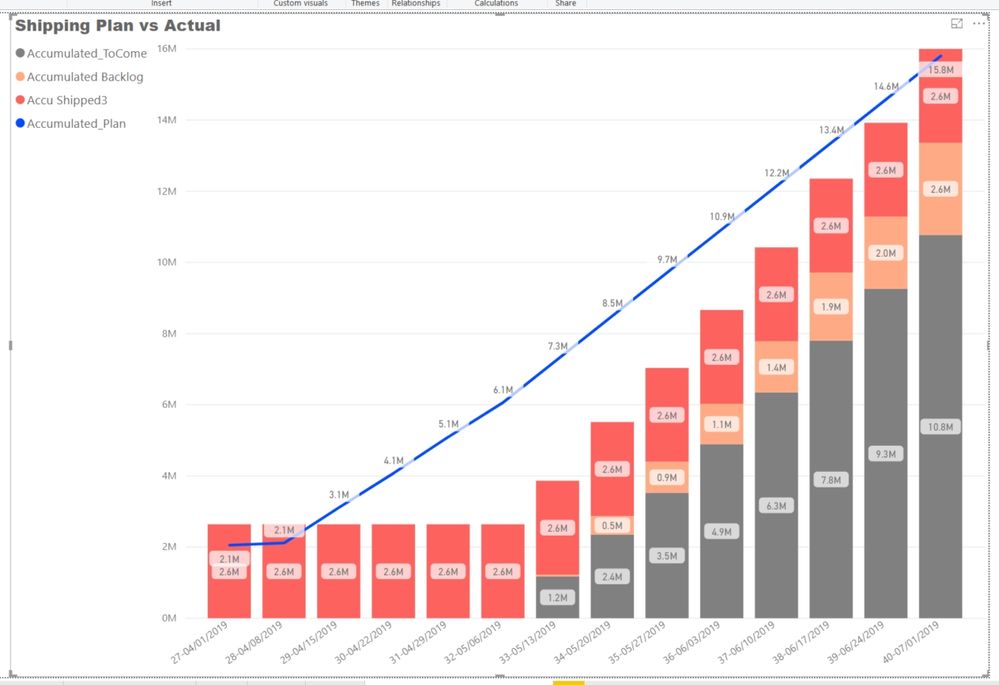
thank you. I tried to remove the condition, it expand to last week, but the total amount calculated a wrong number.

rolling data.jpg

Oh yes, I see what that is doing. I don't normally use date columns directly in the fact table for filtering. I usually create a separate date table and then hide the date columns in the fact table. The date table should then have all the dates in the range you want to report on (so maybe all the days in 2019).


Then you could build your calculations using the following pattern


Accumulated Shipped = CALCULATE(
SUM( Shipped[Amt_Shipped] ) ,
FILTER(
ALL(Date[Week]),
Date[Week] >= 27 &&
Date[Week]<= MAX(Date[Week]))
)
 

@d_gosbell 


Thank you a lot, perfect!

I did it. 

Appreciate.


rolling data great.jpg

then I tried another one,

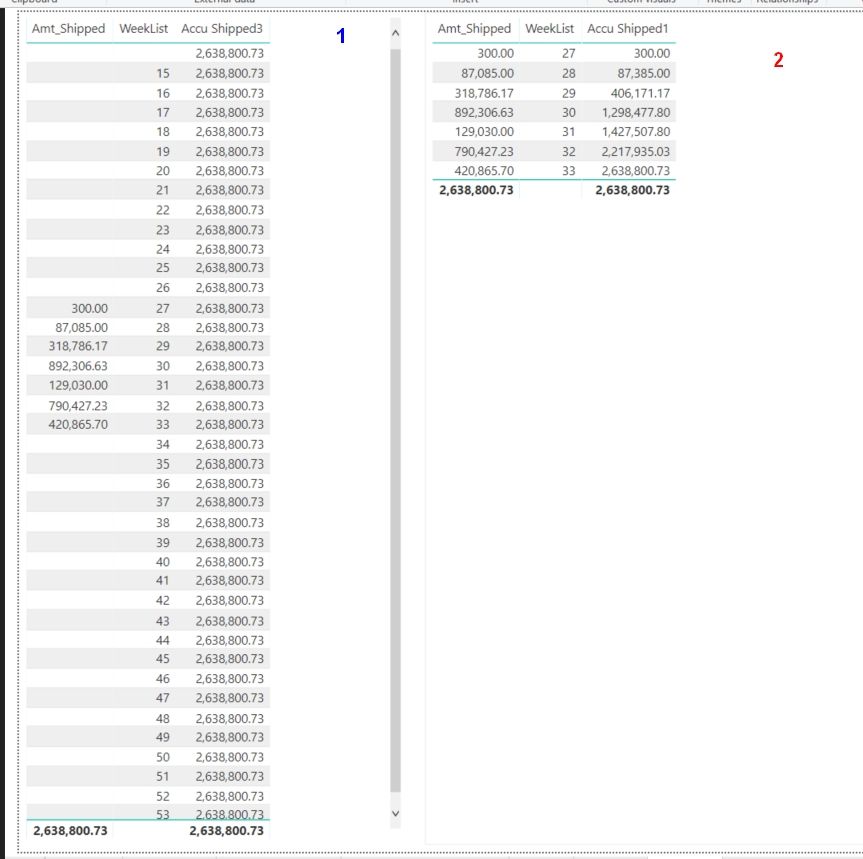
in the screenshot below,

list 2, calculation rolling is correct but can not expand more weeks.

list1, expand but rolling data is not right. 


Accu Shipped3 = SUMX(
FILTER(
ALL(Shipped),
Shipped[Week_Shipped] >= 27 &&
Shipped[Week_Shipped] <= 50),
Shipped[Amt_Shipped])
 

rolling data1.jpg

Helpful resources

Announcements
Power BI DataViz World Championships

Power BI Dataviz World Championships

The Power BI Data Visualization World Championships is back! Get ahead of the game and start preparing now!

December 2025 Power BI Update Carousel

Power BI Monthly Update - December 2025

Check out the December 2025 Power BI Holiday Recap!

FabCon Atlanta 2026 carousel

FabCon Atlanta 2026

Join us at FabCon Atlanta, March 16-20, for the ultimate Fabric, Power BI, AI and SQL community-led event. Save $200 with code FABCOMM.