cancel
Showing results for 
Search instead for 
Did you mean: 

The Power BI Data Visualization World Championships is back! Get ahead of the game and start preparing now! Learn more

Reply
Stemar_Aubert
Resolver I
Resolver I

Exclude items from RANKX evaluation and

Hello,


I am trying to rank the performance of my Districts based on their YoY Growth using RANKX().


Current formula, where Custom is a flag to exclude specific districts:

if(
            hasonevalue(Local[DISTRICT]),
            calculate(rankx(FILTER(all(Local),Local[Custom]=0),FPins[PINS YTD YoY Δ]),ALLEXCEPT(Local,Local[DISTRICT])),
"-")


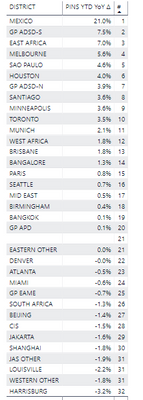
2019-10-22 09-09-28_Settings.png

However, my current formula doesn't work. It needs to exclude Districts with "OTHER" in their name. Also, the Ranking must stay valid when I filter the table visual. Let's say I only keep North America Districts via a filter, the ranking of the district must stay the same.


Any ideas ?


Thanks.

1 ACCEPTED SOLUTION
Mariusz
Community Champion
Community Champion

Hi @Stemar_Aubert 


Sorry, my bad, FILTER can only accept one-two arguments, try the below instead.

VAR _search = "OTHER"
VAR _tbl =
    CALCULATETABLE(
        FILTER(
            ALLSELECTED( Local[DISTRICT] ),
            SEARCH( _search, Local[DISTRICT], 1, 0 ) = 0
        ),
        Local[Custom] = 0
    )
RETURN
IF(
    SEARCH( _search, SELECTEDVALUE( Local[DISTRICT] ),  1, 0 ) = 0,
    RANKX( _tbl, [PINS YTD YoY Δ] ) 
)   


Best Regards,
Mariusz

If this post helps, then please consider Accepting it as the solution.

Please feel free to connect with me.
Mariusz Repczynski


View solution in original post

4 REPLIES 4
Mariusz
Community Champion
Community Champion

Hi @Stemar_Aubert 


Sure, try something like below.

VAR _search = "OTHER"
VAR _tbl =
    FILTER(
        ALLSELECTED( Local[DISTRICT] ),
        SEARCH( _search, Local[DISTRICT], 1, 0 ) = 0,
        Local[Custom] = 0
    ) 
RETURN
IF(
    SEARCH( _search, SELECTEDVALUE( Local[DISTRICT] ),  1, 0 ) = 0,
    RANKX( _tbl, [PINS YTD YoY Δ] ) 
)  


Best Regards,
Mariusz

If this post helps, then please consider Accepting it as the solution.

Please feel free to connect with me.
Mariusz Repczynski


Mariusz
Community Champion
Community Champion

Hi @Stemar_Aubert 


Sorry, my bad, FILTER can only accept one-two arguments, try the below instead.

VAR _search = "OTHER"
VAR _tbl =
    CALCULATETABLE(
        FILTER(
            ALLSELECTED( Local[DISTRICT] ),
            SEARCH( _search, Local[DISTRICT], 1, 0 ) = 0
        ),
        Local[Custom] = 0
    )
RETURN
IF(
    SEARCH( _search, SELECTEDVALUE( Local[DISTRICT] ),  1, 0 ) = 0,
    RANKX( _tbl, [PINS YTD YoY Δ] ) 
)   


Best Regards,
Mariusz

If this post helps, then please consider Accepting it as the solution.

Please feel free to connect with me.
Mariusz Repczynski


Thank you so much!


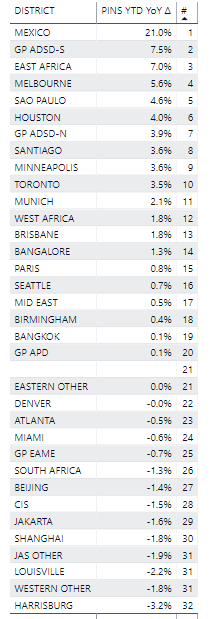
I have adjusted the formula by switching ALLSELECTED to ALL, because my tables must only show a specific region District.


The "OTHER" districts are removed and not included in the Ranking, which is perfect.


2019-10-22 09-09-28_Settings.png


There is a blank District, which might be removed using a filter excluding the blanks districts. 


Just a final question. If I want the Rank to be a specific value (like "-") when more than one district is displayed, where should I put the if(hasonevalue() statement ?


Thanks again!


Edit: Nevermind, I had a discrepant value in another table creating the blank. Solved it. 

Hi @Mariusz ,

thank you for helping. So what you do is create two variables, one that search valid districts, and one that ranks the PINS YTD YoY Δ based on a table of valid districts ?


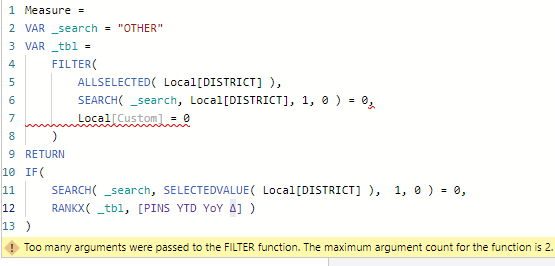
However, I have a slight issue, Filter refuses to accept the Local[Custom] = 0 argument. Is it needed since you have already the Search function looking for 0 ?2019-10-22 10-09-42_Start.png


Thanks,

Helpful resources

Announcements
Power BI DataViz World Championships

Power BI Dataviz World Championships

The Power BI Data Visualization World Championships is back! Get ahead of the game and start preparing now!

December 2025 Power BI Update Carousel

Power BI Monthly Update - December 2025

Check out the December 2025 Power BI Holiday Recap!

FabCon Atlanta 2026 carousel

FabCon Atlanta 2026

Join us at FabCon Atlanta, March 16-20, for the ultimate Fabric, Power BI, AI and SQL community-led event. Save $200 with code FABCOMM.