
cancel
Showing results for 
Search instead for 
Did you mean: 

The Power BI Data Visualization World Championships is back! Get ahead of the game and start preparing now! Learn more

Reply
fahadfarooqi
Frequent Visitor

Evaluation of data

I have a sample data table to understand a problem.


PLAYER NAMETEAMYEAR JOINEDMONTHYEARGROSS SCORENET SCORECategory
ABCXXX2012120164441649
ABCXXX2012120164441658
ABCXXX2012120164441668
ABCXXX2012120164441671
ABCXXX20121201644411031
ABCXXX20121201623467594
ABCXXX20121201623467625
ABCXXX20121201623467649
ABCXXX20121201623467658
ABCXXX20121201623467671
ABCXXX201212016234671031
ABCXXX201212016234671045
ABCXXX201212016721432658
ABCXXX201212016721432671
ABCXXX2012120167214321031
ABCXXX201212016972654625
ABCXXX201212016972654658
ABCXXX201212016972654668
ABCXXX201212016972654671
ABCXXX2012120169726541031
ABCXXX201212016321789658
ABCXXX201212016321789667
ABCXXX201212016321789668
ABCXXX201212016321789671
ABCXXX201212016321789672
ABCXXX2012120163217891031
ABCXXX2012120163217891032
ABCXXX2012120163217891072


I need to get the below table from the above one automatically.

TABLE 1
MONTHTOTAL NET SCORE
11+67+432+654+789
2SIMILARLY ALL DISTINCT VALUE
3SIMILARLY ALL DISTINCT VALUE


Not sure where I am missing. But I have a very long data table consisting of various years and months...


I am unsure how to write the DAX function to create the second table from the first one.

1 ACCEPTED SOLUTION
Anonymous
Not applicable

Hi @fahadfarooqi,


You can use SUMMARIZE, VALUES and CONCATENATEX functions to work through your issue:


Table = SUMMARIZE('Sample Data',[MONTH],"Value",CONCATENATEX(VALUES('Sample Data'[NET SCORE]),[NET SCORE],"+"))


2.PNG


Update: modify the formula to calculate the total value.


Table = SUMMARIZE('Sample',[MONTH],"Total",SUMX(VALUES('Sample'[NET SCORE]),[NET SCORE]))

8.PNG


Regards,

Xiaoxin Sheng

View solution in original post

5 REPLIES 5
Anonymous
Not applicable

Hi @fahadfarooqi,


You can use SUMMARIZE, VALUES and CONCATENATEX functions to work through your issue:


Table = SUMMARIZE('Sample Data',[MONTH],"Value",CONCATENATEX(VALUES('Sample Data'[NET SCORE]),[NET SCORE],"+"))


2.PNG


Update: modify the formula to calculate the total value.


Table = SUMMARIZE('Sample',[MONTH],"Total",SUMX(VALUES('Sample'[NET SCORE]),[NET SCORE]))

8.PNG


Regards,

Xiaoxin Sheng

Oxenskiold
Advocate I
Advocate I


Just for months regardless of years


ADDCOLUMNS (
    VALUES ( theTable[Month] ),
    "Total Net Score", CALCULATE ( SUMX ( DISTINCT ( theTable[Net Score] ), theTable[Net Score] ) )
)


OR if you want month/year ....


ADDCOLUMNS (
    SUMMARIZE ( theTable, TheTable[YEAR], theTable[Month] ),
    "Total Net Score", CALCULATE ( SUMX ( DISTINCT ( theTable[Net Score] ), theTable[Net Score] ) )
)


Anonymous
Not applicable

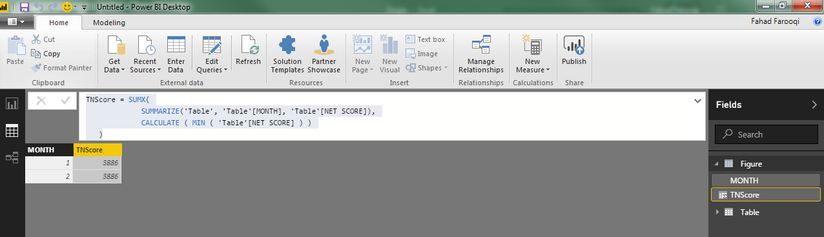
=SUMX(
             SUMMARIZE(MyTable, MyTable[Month], MyTable[Net Score]),
             CALCULATE ( MIN ( MyTable[Net Score] ) )
   )


I would try the above, ... understanding that MIN/MAX/AVG/WHATEVER shouldn't matter, there is only 1 value anyway...

Appreciate your response,

I have added same data for month 2 just to check if its working.


The expression is giving me sum of all distinct values for months consolidated.


It should have been 1+67+432+654+789 = 1943 for the first month.


Its giving me 3886 instead of 1943.


Capture.PNG

fahadfarooqi
Frequent Visitor

@v-chuncz-msft Have a look at this one.. I am trying to figure out DAX expression to get the table down below from the first one.

Helpful resources

Announcements
Power BI DataViz World Championships

Power BI Dataviz World Championships

The Power BI Data Visualization World Championships is back! Get ahead of the game and start preparing now!

December 2025 Power BI Update Carousel

Power BI Monthly Update - December 2025

Check out the December 2025 Power BI Holiday Recap!

FabCon Atlanta 2026 carousel

FabCon Atlanta 2026

Join us at FabCon Atlanta, March 16-20, for the ultimate Fabric, Power BI, AI and SQL community-led event. Save $200 with code FABCOMM.