cancel
Showing results for 
Search instead for 
Did you mean: 

Get Fabric Certified for FREE during Fabric Data Days. Don't miss your chance! Request now

Reply
Avivek
Post Partisan
Post Partisan

Error when the file is refreshed in the power bi service

I have a table surgeon sales in which I have 3 columns, order id, npi id and party id.


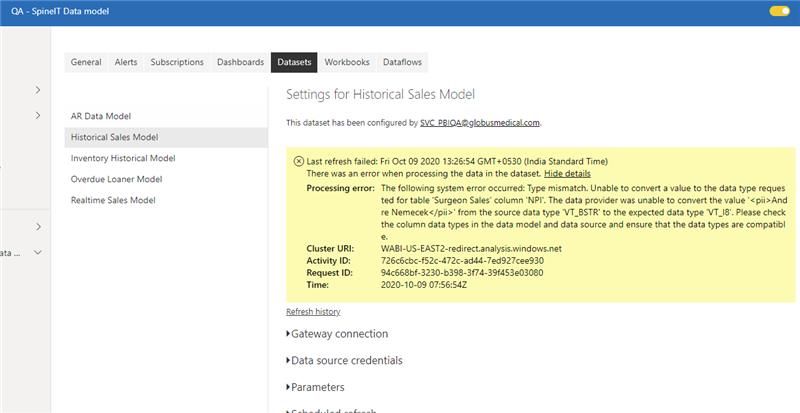
When I refresh the model in pbix file it works fine but when it is refreshed in service it shows the foll error

Avivek_0-1602579275297.jpeg


While trying to test the issue i tries to publish in another workspace I am getting the following error

Avivek_1-1602579401027.png

The source of my data is oracle sql, and the column npi id is basically numerical value but in the database we have some names in this column, hence that column shows as data type text. I need those columns also for my report, is there any other way by which we can move refresh this model and not get this error.

1 ACCEPTED SOLUTION
v-yingjl
Community Support
Community Support

Hi @Avivek ,

Please try to enter into Query Editor in Power BI Desktop, go to APPLIED STEPS, find the step named "Changed type" , delete this step.

Also, you can go to File -> Options and settings -> Options ->CURRENT FILE ->Data Load, don't tick the option "Detect column types and headers for unstructured sources", restart the Power BI Desktop to take effect of this change.

Detect Type 2.png

Then republish the report to power bi service and try to refresh it to check.


In addition, here are some simliar issues that you can refer which could help you:

  1. Type mismatch - Unable to convert a value to the data type requested 
  2. The following system error occurred: Type mismatch. 
  3. Refresh fail and get error : The following system error occurred: Type mismatch  


Best Regards,
Yingjie Li

If this post helps then please consider Accept it as the solution to help the other members find it more quickly.

View solution in original post

4 REPLIES 4
v-yingjl
Community Support
Community Support

Hi @Avivek ,

Please try to enter into Query Editor in Power BI Desktop, go to APPLIED STEPS, find the step named "Changed type" , delete this step.

Also, you can go to File -> Options and settings -> Options ->CURRENT FILE ->Data Load, don't tick the option "Detect column types and headers for unstructured sources", restart the Power BI Desktop to take effect of this change.

Detect Type 2.png

Then republish the report to power bi service and try to refresh it to check.


In addition, here are some simliar issues that you can refer which could help you:

  1. Type mismatch - Unable to convert a value to the data type requested 
  2. The following system error occurred: Type mismatch. 
  3. Refresh fail and get error : The following system error occurred: Type mismatch  


Best Regards,
Yingjie Li

If this post helps then please consider Accept it as the solution to help the other members find it more quickly.

manikumar34
Solution Sage
Solution Sage

@Avivek , 

Check with column data types on Power Bi desktop, if there is any mismatch make it porper.


And I can se the dta refresh is taking long time. Please Aggreagate the data and have less records to perform better. If you are using SQL, Oracle type DB then try to load incrementally. That will create Partition and load faster. 


Regards, 

Manikumar


If this helps, Appreciate your KUDOS!
Did I answer your question? Mark my post as a solution!


Proud to be a Super User!


amitchandak
Super User
Super User

@Avivek , check if the gateway working properly. But there is some issue with data type. Refesh the data in desktop and see if you get the error ?


for Troubleshoot gateway
https://docs.microsoft.com/en-us/power-bi/connect-data/service-gateway-onprem-tshoot
https://guyinacube.com/2016/09/21/troubleshooting-connectivity-tips/

Share with Power BI Enthusiasts: Full Power BI Video (20 Hours) YouTube
Microsoft Fabric Series 60+ Videos YouTube
Microsoft Fabric Hindi End to End YouTube

@amitchandak , the gateway is fine because the other models do not show error. Also suprisingly it shows no issues in the desktop file when refreshed.


Helpful resources

Announcements
November Power BI Update Carousel

Power BI Monthly Update - November 2025

Check out the November 2025 Power BI update to learn about new features.

Fabric Data Days Carousel

Fabric Data Days

Advance your Data & AI career with 50 days of live learning, contests, hands-on challenges, study groups & certifications and more!

FabCon Atlanta 2026 carousel

FabCon Atlanta 2026

Join us at FabCon Atlanta, March 16-20, for the ultimate Fabric, Power BI, AI and SQL community-led event. Save $200 with code FABCOMM.

Top Solution Authors
Top Kudoed Authors