cancel
Showing results for 
Search instead for 
Did you mean: 

The Power BI Data Visualization World Championships is back! Get ahead of the game and start preparing now! Learn more

Reply
jamesradams
Regular Visitor

Error refreshing data source when I add variable

I have a dataset in csv with 40 columns on. If I add two more columns in the middle the last tow columns are not recognised when I refresh the file.


How can I fix this? 


I see


Expression.Error Column "uplift_res" was not found.


It is definitely in the CSV.

6 REPLIES 6
jamesradams
Regular Visitor

In the end I just deleted the data connected and then connected it again. Seemed to work.


I don't know how to access the query code. I just click the menus. "get data - csv - file" etc.

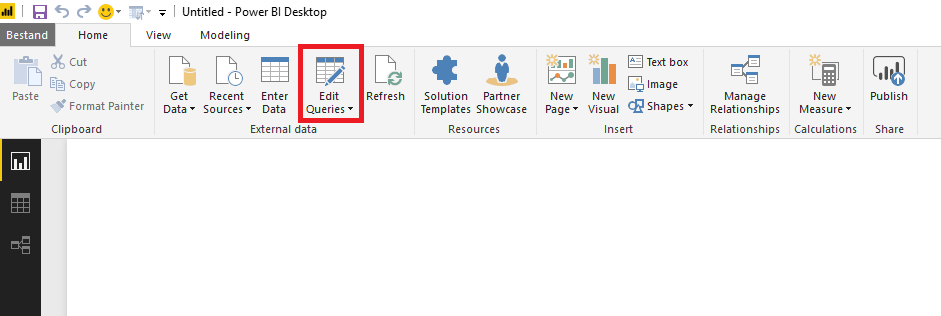
Here is your access to the query editor:


Query editor.png

Specializing in Power Query Formula Language (M)
MarcelBeug
Community Champion
Community Champion

You need to verify your query code and adapt it to the new layout of your csv file.


E.g. some steps may included column names (or number of columns) that need to be adjusted.

Specializing in Power Query Formula Language (M)

I don't understand what you mean by verify my query code. It's a simple CSV with some columns. I've added some columns to it and want them to read in. I don't recall any issues like this is Tableau. 

Anonymous
Not applicable

Hi @jamesradams,


@MarcelBeugis talking about your query code in Power BI Desktop.

The thing would be if you provide us with a picture of the column names of the csv and the query code.

Probably your query code includes hard coded column names.

Specializing in Power Query Formula Language (M)

Helpful resources

Announcements
Power BI DataViz World Championships

Power BI Dataviz World Championships

The Power BI Data Visualization World Championships is back! Get ahead of the game and start preparing now!

December 2025 Power BI Update Carousel

Power BI Monthly Update - December 2025

Check out the December 2025 Power BI Holiday Recap!

FabCon Atlanta 2026 carousel

FabCon Atlanta 2026

Join us at FabCon Atlanta, March 16-20, for the ultimate Fabric, Power BI, AI and SQL community-led event. Save $200 with code FABCOMM.