FabCon is coming to Atlanta
Join us at FabCon Atlanta from March 16 - 20, 2026, for the ultimate Fabric, Power BI, AI and SQL community-led event. Save $200 with code FABCOMM.
Register now!- Power BI forums
- Get Help with Power BI
- Desktop
- Service
- Report Server
- Power Query
- Mobile Apps
- Developer
- DAX Commands and Tips
- Custom Visuals Development Discussion
- Health and Life Sciences
- Power BI Spanish forums
- Translated Spanish Desktop
- Training and Consulting
- Instructor Led Training
- Dashboard in a Day for Women, by Women
- Galleries
- Data Stories Gallery
- Themes Gallery
- Contests Gallery
- QuickViz Gallery
- Quick Measures Gallery
- Visual Calculations Gallery
- Notebook Gallery
- Translytical Task Flow Gallery
- TMDL Gallery
- R Script Showcase
- Webinars and Video Gallery
- Ideas
- Custom Visuals Ideas (read-only)
- Issues
- Issues
- Events
- Upcoming Events
The Power BI Data Visualization World Championships is back! Get ahead of the game and start preparing now! Learn more
- Power BI forums
- Forums
- Get Help with Power BI
- Desktop
- Error on total with measures
- Subscribe to RSS Feed
- Mark Topic as New
- Mark Topic as Read
- Float this Topic for Current User
- Bookmark
- Subscribe
- Printer Friendly Page


- Mark as New
- Bookmark
- Subscribe
- Mute
- Subscribe to RSS Feed
- Permalink
- Report Inappropriate Content
Error on total with measures
Hi guys,
I'm trying to get the TOTAL Items Between any warehouse
Divided By the total number of warehouse which have a Rank
I'm not able to get the right measure :'(
here is my table

My formula is
Répartition = VAR QTETOTDEP = [Total quantités tous dépots]

              VAR TOTDEPOT  = [Total dépots]

              VAR RESULT = DIVIDE(QTETOTDEP,TOTDEPOT,BLANK())

              Return RESULT
My Model is

File example
Solved! Go to Solution.


- Mark as New
- Bookmark
- Subscribe
- Mute
- Subscribe to RSS Feed
- Permalink
- Report Inappropriate Content
You can use
Répartition =
VAR SummaryTable =
    ADDCOLUMNS (
        SUMMARIZE (
            'Tableau Dispatch',
            'Base Article'[CODE ARTICLE],
            'Tableau Dispatch'[CODE DEPOT]
        ),
        "@val",
            VAR QTETOT = [1-Total articles en stock]
            VAR QTETOTDEPOT =
                CALCULATE (
                    [1-Total articles en stock],
                    REMOVEFILTERS ( 'Tableau Dispatch'[CODE DEPOT] )
                )
            RETURN
                DIVIDE (
                    CALCULATE ( QTETOTDEPOT, ALL ( 'Tableau Dispatch'[CODE DEPOT] ) ),
                    [Total dépots],
                    BLANK ()
                )
    )
RETURN
    SUMX ( SummaryTable, [@val] )
- Mark as New
- Bookmark
- Subscribe
- Mute
- Subscribe to RSS Feed
- Permalink
- Report Inappropriate Content
you'd need to move the TRUNC into the measure so the last line becomes
SUMX ( SummaryTable, TRUNC( [@val] ) )- Mark as New
- Bookmark
- Subscribe
- Mute
- Subscribe to RSS Feed
- Permalink
- Report Inappropriate Content
You can use
Répartition =
VAR SummaryTable =
    ADDCOLUMNS (
        SUMMARIZE (
            'Tableau Dispatch',
            'Base Article'[CODE ARTICLE],
            'Tableau Dispatch'[CODE DEPOT]
        ),
        "@val",
            VAR QTETOT = [1-Total articles en stock]
            VAR QTETOTDEPOT =
                CALCULATE (
                    [1-Total articles en stock],
                    REMOVEFILTERS ( 'Tableau Dispatch'[CODE DEPOT] )
                )
            RETURN
                DIVIDE (
                    CALCULATE ( QTETOTDEPOT, ALL ( 'Tableau Dispatch'[CODE DEPOT] ) ),
                    [Total dépots],
                    BLANK ()
                )
    )
RETURN
    SUMX ( SummaryTable, [@val] )
- Mark as New
- Bookmark
- Subscribe
- Mute
- Subscribe to RSS Feed
- Permalink
- Report Inappropriate Content
You are God like,
i'll inspect your formula! to understand it!
- Mark as New
- Bookmark
- Subscribe
- Mute
- Subscribe to RSS Feed
- Permalink
- Report Inappropriate Content
Hello, Tank you!
Actually it send me an error ^^ On the Return part
🙂
May I ask you what are the mechanics behind?
- Mark as New
- Bookmark
- Subscribe
- Mute
- Subscribe to RSS Feed
- Permalink
- Report Inappropriate Content
Its effectively recreating the table visual. By doing a SUMX over the summary table it is doing the calculation line by line and then creating the total, rather than just doing the calculation for all rows at the same time.
- Mark as New
- Bookmark
- Subscribe
- Mute
- Subscribe to RSS Feed
- Permalink
- Report Inappropriate Content
Hi Johnt, I try to sum the Truncated values (integer part)
with
- Mark as New
- Bookmark
- Subscribe
- Mute
- Subscribe to RSS Feed
- Permalink
- Report Inappropriate Content
you'd need to move the TRUNC into the measure so the last line becomes
SUMX ( SummaryTable, TRUNC( [@val] ) )- Mark as New
- Bookmark
- Subscribe
- Mute
- Subscribe to RSS Feed
- Permalink
- Report Inappropriate Content
Last question then i'll have eveything i'll need to understand more of Dax context
I i'd like to compute The Total decimal part but show in rows the Decimal Values times the total number of warehouses?
To Get 4 as Total
but 2 in each Rows
because 0.67 *3 = 2
🙂

- Mark as New
- Bookmark
- Subscribe
- Mute
- Subscribe to RSS Feed
- Permalink
- Report Inappropriate Content
You'd need 3 more measures
Répartition Decimal Line Item =
VAR QTETOT = [1-Total articles en stock]
VAR QTETOTDEPOT =
    CALCULATE (
        [1-Total articles en stock],
        REMOVEFILTERS ( 'Tableau Dispatch'[CODE DEPOT] )
    )
VAR Total =
    DIVIDE (
        CALCULATE ( QTETOTDEPOT, ALL ( 'Tableau Dispatch'[CODE DEPOT] ) ),
        [Total dépots],
        BLANK ()
    )
VAR TotalAsInt = TRUNC( Total )
VAR NumDepots = COUNTROWS(ALLSELECTED( 'Tableau Dispatch'[CODE DEPOT]))
RETURN (Total - TotalAsInt ) * NumDepots

Répartition Decimal Total =
VAR SummaryTable =
    ADDCOLUMNS (
        SUMMARIZE (
            'Tableau Dispatch',
            'Base Article'[CODE ARTICLE],
            'Tableau Dispatch'[CODE DEPOT]
        ),
        "@val",
            VAR QTETOT = [1-Total articles en stock]
            VAR QTETOTDEPOT =
                CALCULATE (
                    [1-Total articles en stock],
                    REMOVEFILTERS ( 'Tableau Dispatch'[CODE DEPOT] )
                )
            VAR Total =
                DIVIDE (
                    CALCULATE ( QTETOTDEPOT, ALL ( 'Tableau Dispatch'[CODE DEPOT] ) ),
                    [Total dépots],
                    BLANK ()
                )
            VAR TotalAsInt = TRUNC( Total )
            RETURN Total - TotalAsInt
    )
RETURN
    SUMX ( SummaryTable, [@val] )

Répartition Decimal = IF ( ISINSCOPE('Base Article'[CODE ARTICLE]), [Répartition Decimal Line Item], [Répartition Decimal Total] )
the first 2 are just used in the final calculation, you only need to put the last one into the visual
- Mark as New
- Bookmark
- Subscribe
- Mute
- Subscribe to RSS Feed
- Permalink
- Report Inappropriate Content
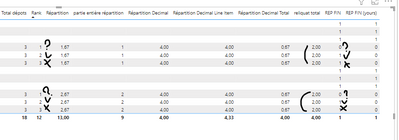
I have been able to manage it with this formula
reliquat total = VAR REL= [(1)Nombre décimal Répartition]

                  VAR TOTREL = CALCULATE([(1)Nombre décimal Répartition],REMOVEFILTERS('Tableau Dispatch'[CODE DEPOT]))

                  return if([Répartition]<>BLANK(),TOTREL,BLANK())
But even with this one I cannot verify
If([Reliquat total]<=[Rank],1,blank())
- Mark as New
- Bookmark
- Subscribe
- Mute
- Subscribe to RSS Feed
- Permalink
- Report Inappropriate Content
Hello,
this is impressive coding! thank you for providing me such information.
The visual send me and i'm not able to realize this test
IF([Repartition decimal]<=[Rank],1,0)

it does not give me one.
Maybe i have an error on my Rank measure?
- Mark as New
- Bookmark
- Subscribe
- Mute
- Subscribe to RSS Feed
- Permalink
- Report Inappropriate Content

Helpful resources

Power BI Monthly Update - November 2025
Check out the November 2025 Power BI update to learn about new features.

Fabric Data Days
Advance your Data & AI career with 50 days of live learning, contests, hands-on challenges, study groups & certifications and more!

FabCon Atlanta 2026
Join us at FabCon Atlanta, March 16-20, for the ultimate Fabric, Power BI, AI and SQL community-led event. Save $200 with code FABCOMM.


