Join us at FabCon Atlanta from March 16 - 20, 2026, for the ultimate Fabric, Power BI, AI and SQL community-led event. Save $200 with code FABCOMM.
Register now!The Power BI Data Visualization World Championships is back! It's time to submit your entry. Live now!
Hey everyone,
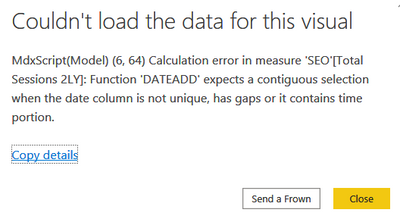
I have got a problem with one slicer:
I filter by device category taking data from GA. This only happens when I filter for 'tablet' sessions. Is there any way to fill the gaps? It works for 'mobile' and 'desktop'. I am using 'DATEADD' function to show the data for the previous years.
Solved! Go to Solution.
@Anonymous , Please use date Calendar for time intelligence
Time intelligence - https://community.powerbi.com/t5/Community-Blog/Decoding-Direct-Query-in-Power-BI-Part-1-Time-Intelligence-in/ba-p/922885
To get the best of the time intelligence function. Make sure you have a date calendar and it has been marked as the date in model view. Also, join it with the date column of your fact/s. Refer :
https://radacad.com/creating-calendar-table-in-power-bi-using-dax-functions
https://www.archerpoint.com/blog/Posts/creating-date-table-power-bi
https://www.sqlbi.com/articles/creating-a-simple-date-table-in-dax/
See if my webinar on Time Intelligence can help: https://community.powerbi.com/t5/Webinars-and-Video-Gallery/PowerBI-Time-Intelligence-Calendar-WTD-YTD-LYTD-Week-Over-Week/m-p/1051626#M184
Appreciate your Kudos.
@Anonymous , Please use date Calendar for time intelligence
Time intelligence - https://community.powerbi.com/t5/Community-Blog/Decoding-Direct-Query-in-Power-BI-Part-1-Time-Intelligence-in/ba-p/922885
To get the best of the time intelligence function. Make sure you have a date calendar and it has been marked as the date in model view. Also, join it with the date column of your fact/s. Refer :
https://radacad.com/creating-calendar-table-in-power-bi-using-dax-functions
https://www.archerpoint.com/blog/Posts/creating-date-table-power-bi
https://www.sqlbi.com/articles/creating-a-simple-date-table-in-dax/
See if my webinar on Time Intelligence can help: https://community.powerbi.com/t5/Webinars-and-Video-Gallery/PowerBI-Time-Intelligence-Calendar-WTD-YTD-LYTD-Week-Over-Week/m-p/1051626#M184
Appreciate your Kudos.
The Power BI Data Visualization World Championships is back! It's time to submit your entry.
Check out the January 2026 Power BI update to learn about new features.
| User | Count |
|---|---|
| 61 | |
| 48 | |
| 35 | |
| 25 | |
| 23 |
| User | Count |
|---|---|
| 142 | |
| 111 | |
| 65 | |
| 38 | |
| 33 |